Donnerberg Back Massager

Disclaimer – We received this item free for the purpose of this review/feature but all words and opinions are our own.

Christmas is a time to ask for that gift you would never buy for yourself, or to surprise someone with a present that they weren’t expecting but similarly love!  For me, the Donnerberg Back Massager falls into both categories as I’d seen them around but not ever thought of buying one. Likewise, it is something which I wouldn’t think of giving as a gift.

Read on to see why the Donnesberg Back Massager is perfect for both categories…

The Donnesberg Back Massager sits on the back of a chair so that the user sits with the massager behind them. It’s mains powers so there’s no need to charge it or change batteries and there are four settings; Shiatsu Massage, Massage Intensity (3 levels), Infrared head (2 levels) and Tapping/Percussion.  That might sound like a lot of functions but playing with the different functions is part of the fun!
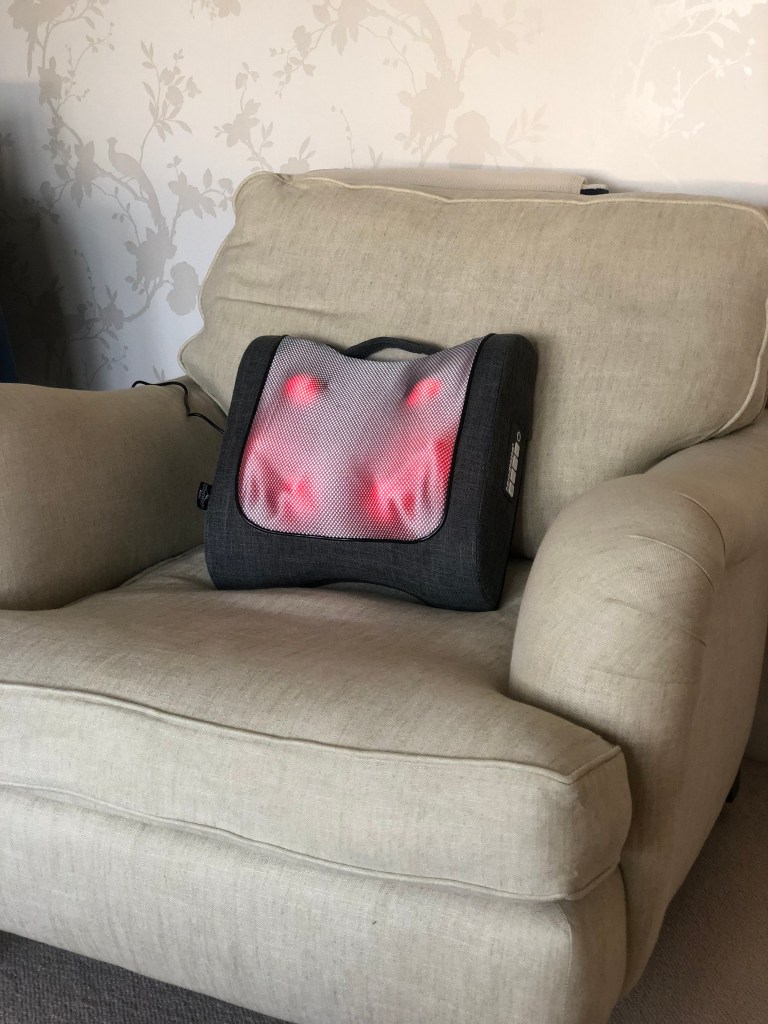
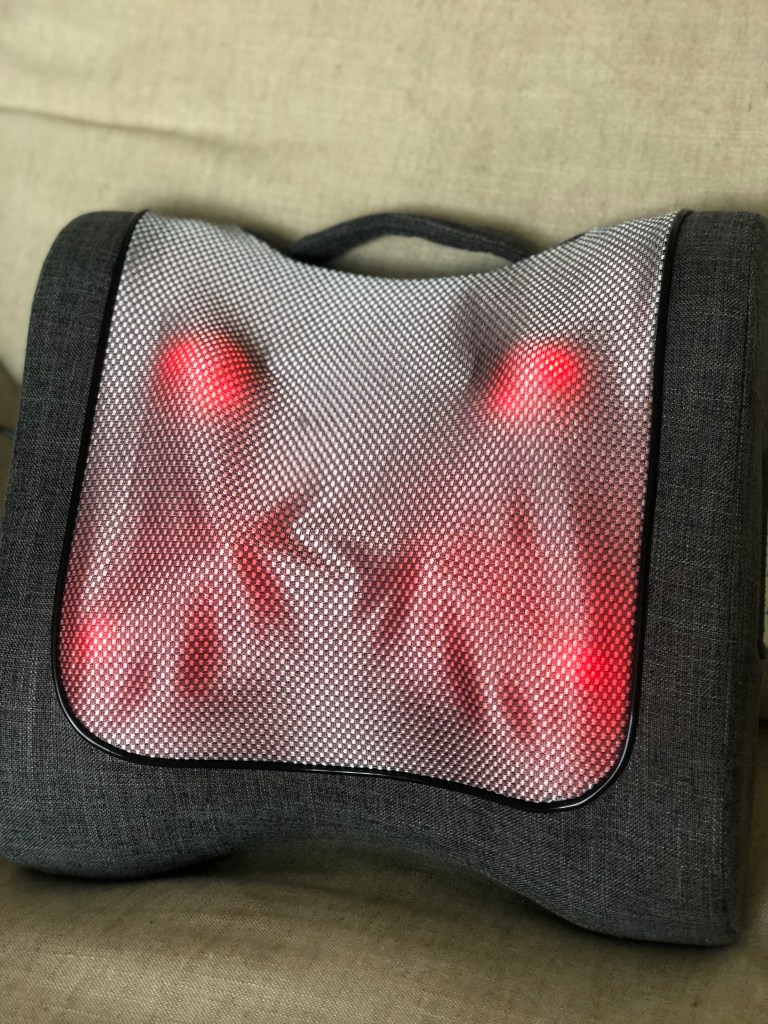
I started by plugging in the massager, which is easy with the UK plug that’s included. That’s all you need to do to get it working!  Starting with the Shiatsu Massage, the plates on the machine work extremely hard, giving a deep massage into the different areas of your lower back. There are 10 massage heads in all which work in different directions and patterns to give you a deeper, firmer massage in certain places as well as the infrared heat which helps you relax, but also aids healing.  The intensity can be increased with the function buttons, and the infrared heat can be increased too.

The second setting to try out is the Tapping/Percussion. This is a lighter, rainfall-like rhythm which helps relieve tension in the back muscles but with a different pattern. The Tapping/Percussion setting can be used with the infrared heat too, to give a deeper healing. Try using a combination of the tapping/percussion and Shiatsu massage settings to help with your specific ailments and eventually, you’ll work out a session that’s most beneficial to you!  There’s a timer on each of the settings too so you don’t spend too long in one place.

The first time I tried out the Donnerberg Percussion Massager I did all the settings and all the intensities going on for more than 20 minutes. This turned out to be a mistake because the next day my muscles were sore and I had bruises! Instead, it’s better to find a medium intensity for your back and work up to the higher intensities over time.  You don’t notice how strong the massager is at the time of working it, and it’s usual to find that it’s a bit of a weird sensation at first, until you get used to how deep it can be.

Over a week, the massage became more relaxing as your muscles get used to the sensation and start to relax over time.  I haven’t needed to increase the intensity to the maximum level yet but as times goes on there is that option.  Interestingly, there are other areas you can use the Donnerberg Massager on. Whilst watching TV, I put it on the floor and rested my feet on it. It’s a very weird feeling at first but once your feet start to relax, and your calf muscles start to melt away, it’s very nice having the vibrations trace through your feet and legs!  After a run, this was especially useful as it distracted from the pain but then as the day went on, all the blood rushed to my calves and feet to bring the oxygen.

The Donnerberg Massager can be used on other areas of the body too. Placing your thighs or calves directly onto the massager face and putting it on a low intensity also helps with relaxing muscles and getting rid of aches and pains.  The massager has a low noise output too, so you can still watch TV with it running in the background.

The only downside I can see is from having the cable to the mains adaptor. The lead is a few metres long so you can move it around whichever room you’re in but it means you can’t use it outside in the summer easily, and might not be able to use it in every room in the house. Still, it’s great to use whilst sitting up and you can probably use it whilst lying in bed too.

The Donnerberg Percussion Massager is a fabulous toy for anyone who has everything, or if your loved one needs to relax!  It’s perfect however for anyone who runs, works out with weights or has a busy life where they need muscle relaxation but probably don’t have the time for a massage. Sit with the Donnerberg massager whilst watching TV and soon the aches and pains will melt away, no matter how active you’ve been!

Available online for £130.00 at: https://www.amazon.co.uk/Donnerberg-Percussion-Massager-Shoulders-Feet-RM099/dp/B07MM1GBR3?maas=maas_adg_24031058CD9482C941442D86EFC447DF_afap_abs&ref_=aa_maas&tag=maas

RooDog Avatar Electric Mountain Bike

Disclaimer: We were loaned this bike for the purpose of the review and all thoughts and opinions are our own.

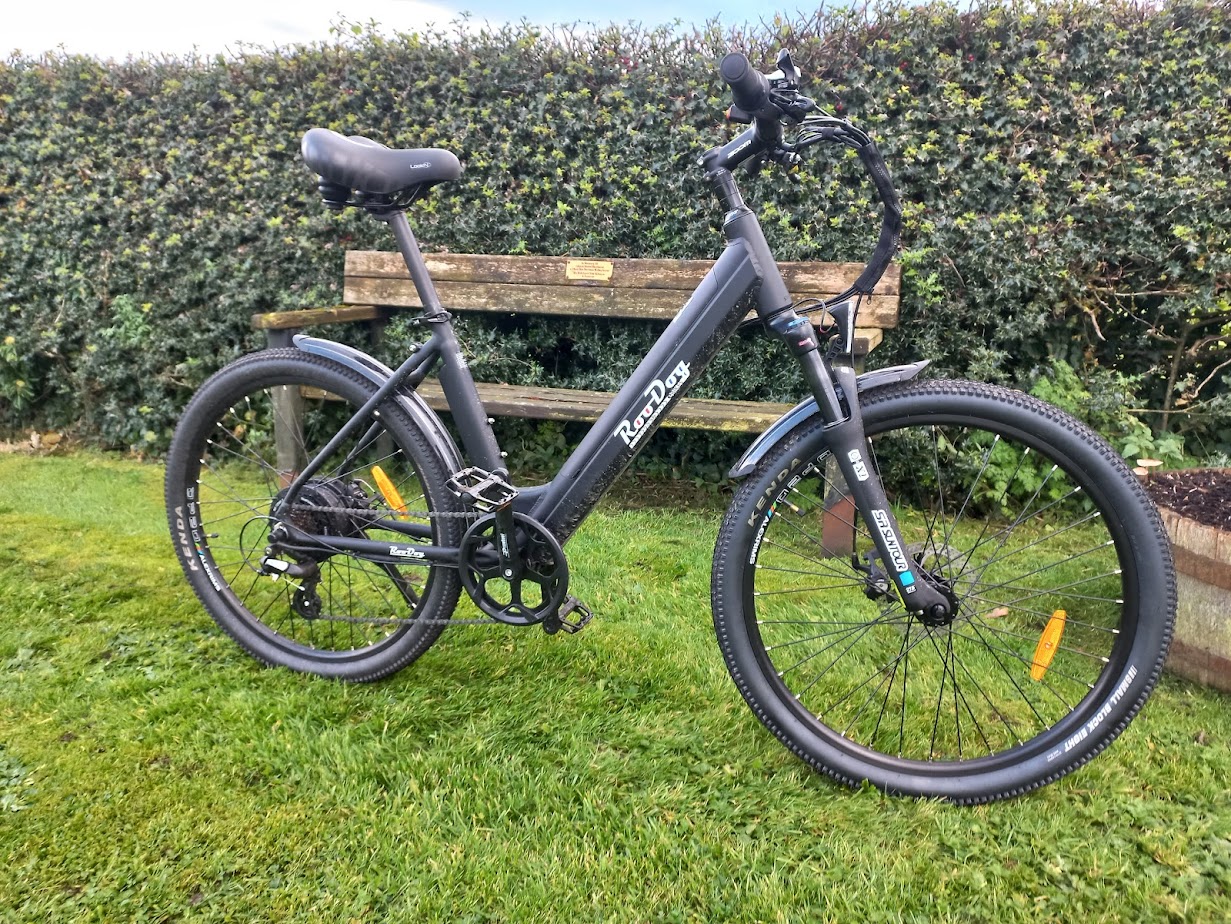
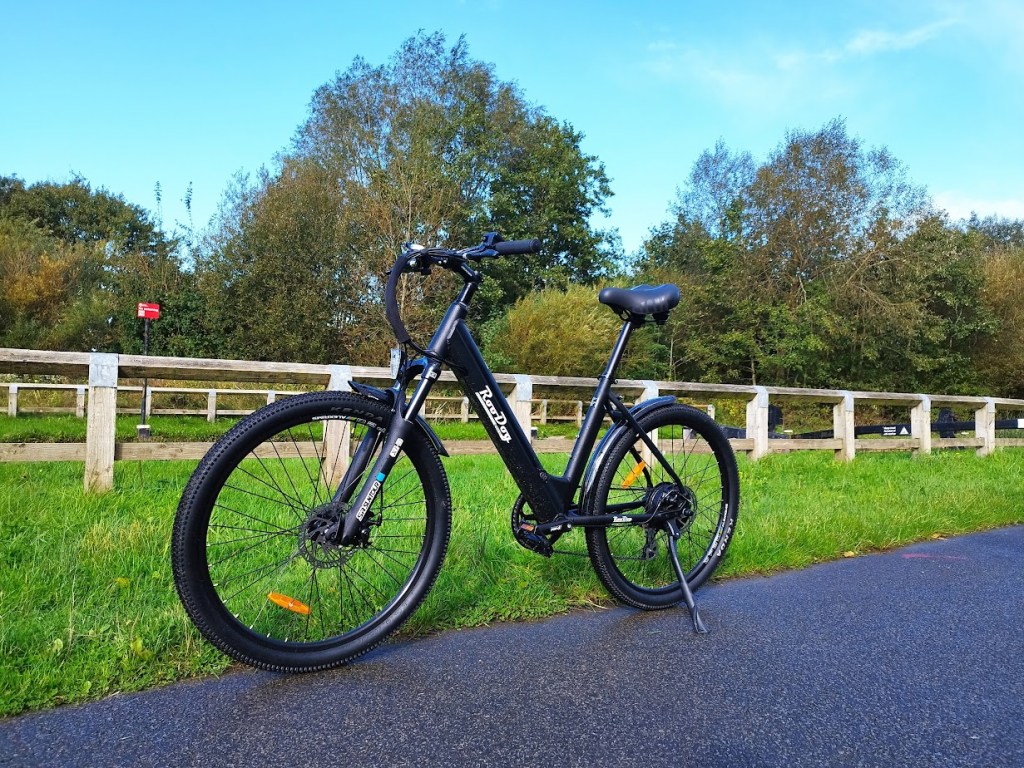
I’ve been considering buying an electric bike for a while, my husband is a keen cyclist and when we go out on our bikes I tend to lag behind, so an electric bike sounded the best option as it will enable me to keep up with him on the hills and go that little bit further. I was therefore really pleased when RooDog offered me the chance to try their new Avatar Step through mountain bike.

The first thing I have to say is it is fantastic having a step through bike – being 6‘ tall means up until now I have always had men’s cycles with a crossbar and whilst it has never really bothered me it is so much easier not having to lift my leg over a crossbar when I get on and off!

With burly tyres and suspension, it’s designed for on and off-road riding and is incredibly smooth to ride. It also has a twist grip throttle which is really useful, especially when at junctions, giving a quick boost to get me going when I need a bit more power. Despite having an electric motor it is incredibly quiet which is definitely a positive for me, a constant roar would drive me mad when out in the countryside. The gears on my existing bike are quite clunky so I was really impressed with the Shimano 7 speed Megarange gears which give incredibly slick gear changes and are very easy to use. Although there are only 7 gears, with the motor driving me on, this was more than enough to get me up the hills!  

The geometry of the Avatar gives a more upright riding position and the frame allows for plenty of adjustment, ample for my 6’ height. I’m at the very top of the height recommendation and it was perfect for me, the seat was high enough and the reach to the handlebars is comfortable for my long arms. I liked the level of adjustment available and after a few tweaks found it very comfortable to ride, the position is well balanced and didn’t put too much weight on either my rear end or wrists. The bike comes with a standard saddle, but RooDog helpfully provided a larger ladies gel saddle, which is an option with all their bikes. This was really easy to swap and I find it much more comfortable to sit on.

On the road, the most impressive trait of the Avatar is the way it powers up hills – we live in a very hilly area – so much so that many pro cyclists train around here – and it really comes into its own when faced with a hill. Hills that I generally walk up are no longer a problem, I can now ride up easily on power level 3 speed and now it’s my husband who is lagging behind me! I found I could get up some of the steepest hills at 10mph whereas before I would puff and pant my way up at around 4mph and invariably need to get off at some point and walk the rest of the way up.

The Avatar has a decent range – up to 30 miles per full charge (on the highest speed setting of which there are 5). I haven’t been using it on full power but to give an idea of range I dipped down to two bars of battery (out of five) after 32 miles of using mainly speed 2 and 3 on hilly terrains.

My first outing was a fairly flat ride so I could get used to the bike and we did 23.42 miles, with 679ft of ascent. Further rides saw 31.82 miles with 1,860 ft and 18.69 miles with 979ft and I’m confident that I can do longer rides and still have enough power left to get me home.

The suspension gives a really smooth ride both on the road and on tracks, on rough surfaces it cushions the lumps and bumps and the bike feels stable and balanced and I feel in control both on fast descents and tight, twisty corners. It is here that the disc brakes come into their own giving really powerful braking that does not fade in wet conditions.

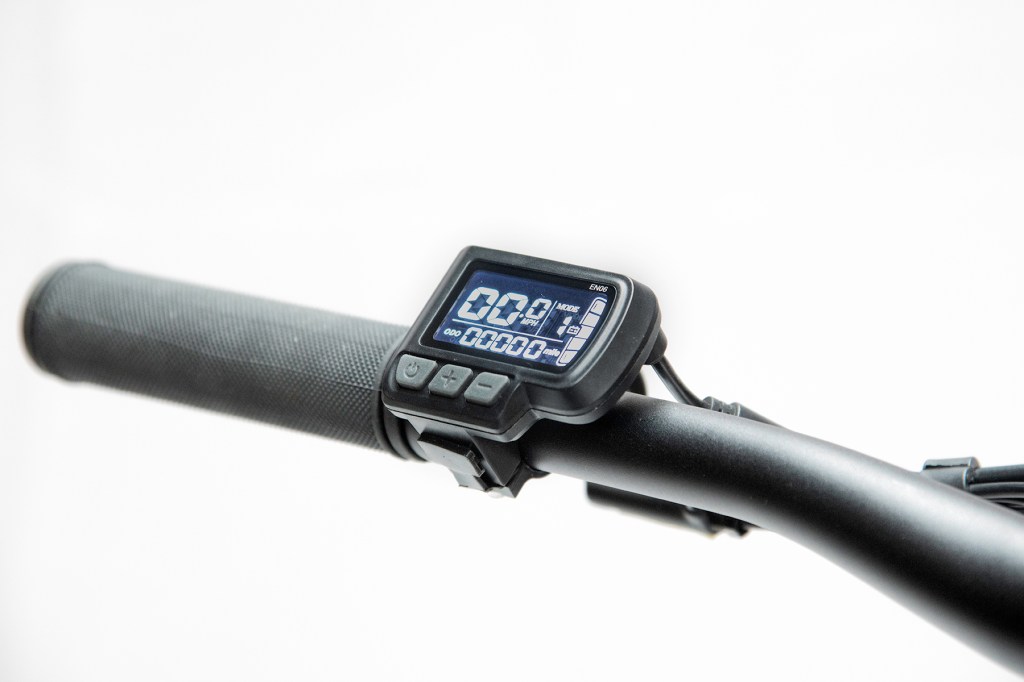
The digital control is smart, sitting nicely on the left handlebar, the LCD-PAS System has a clear digital display with battery indicator, lights, tripometer and the all important speed indicator.

For me, the point of an electric bike is to get assistance when out cycling as I do still want to get some exercise! Whilst you can just turn up the power and ride without any effort I generally have it set on a low power to flatten the hills and give me a “push” away from the junctions. Obviously the less you rely on the motor, the longer the battery will last.

With a 250W rear wheel hub motor, suspension forks and a 10Ah battery, the Avatar isn’t a lightweight bike weighing 22.5kg. Without using the motor, it would be quite a heavy bike but as long as the power is turned on, the extra weight isn’t an issue. We own a motorhome and have a rear mounted bike rack, the weight of the bike is well within the specification but it is always worth checking beforehand. The battery is removable which is really helpful as it makes the bike much lighter when I am lifting it up onto the bike carrier.

Charging is pretty simple, after a ride I just plug in the charger and it takes around 4 to 6 hours to charge from flat. I charge it in the garage but since the battery is removable it can be charged in the house and when we’re away I can easily charge it in the motorhome.

As with all electric assist bikes, the motor cuts out at 15.5mph and the throttle at 4mph so the Avatar isn’t going to turn me into a fast rider but it certainly gives me an edge when we head off into the hills and that’s what I’m looking for in an electric bike. For £1,750 you’re getting a pretty good deal, it has a good motor and fairly sizeable battery so if you want an e-bike that looks decent, and will help you some of the way, this is the bike for you.

All parts are covered by a 2 year warranty, including the battery (provided cared for in conjunction with battery care instructions), motor casing & hub motor and bike frame.

RooDog are a small family business and have been trading for 10 years, like all small businesses they are passionate about what they do and whenever I have spoken or emailed Scott and Tina I have found them incredibly knowledgeable and very easy to deal with. They recently celebrated their 10th anniversary and you can find out more about it by reading their blog post 2023 – Celebrating Our 10th Year in Business – Roodog Electric Bikes

After using the Avatar for the last couple of weeks I am now convinced that an e-bike is a very worthwhile investment, it gives me the extra boost I need to get up the hills and I can still enjoy the scenery without lagging behind. I’m really happy with the Avatar electric mountain bike but if you don’t fancy that style of bike then RooDog have 9 other electric bikes to choose from, so whether you want a folding bike, city bike or even a polka dot one you will find a RooDog to suit.  

Creative Outlier Free Pro Headphones

Disclaimer: We received this product free of charge for the purpose of this review and all thoughts and opinions are our own.

Christmas is fast approaching and I’ve been having a think what to buy my husband. He’s quite active and enjoys cycling, swimming and walking so the Outlier Free Pro headphones from Creative are perfect for him.

The bone conduction headphones with Bluetooth 5.3 are also waterproof, meaning they are great in the rain and can also be used when swimming. Being able to listen to one of his playlists or podcasts is bound to make his morning swim a lot more interesting. With an IP rating of IPX8, you just need to make sure the microphone is sealed with the included plug and you can swim in freshwater up to a depth of 1.5m for up to 40 minutes. They’re not suitable for salt water so don’t pack them if you’re off to the beach! Obviously, you don’t take your phone swimming, so the headphones have 8GB storage for you to store MP3 files to listen to whilst in the pool. Understandably the sound quality isn’t as good when you are in the water but it’s pretty good and much better than having no music at all!

The headphones are also great for cycling, it’s quite scary the number of cyclists you see wearing headphones or earbuds, they simply can’t hear approaching cars and it’s an accident waiting to happen. The advantage of these headphones is they sit on the bone at the front of your ear and as the noise is transferred through the bone into your inner ear you are able to listen to music but also hear what’s going on around you.   

The headphones have the following features

– Bluetooth 5.3

– IPX8 Waterproof

– 8GB Memory Storage

– Up to 10 hours playtime

– Multipoint Connectivity

Weighing in at just 32g they sit comfortably on my head, I’ve used them for several hours at a time and find them much more comfortable than standard headphones or earbuds.

Allow 2 hours for a full charge via a USB-A Magnetic Clip-on Charging Cable which should give 10 hours of playback. The sound quality is really good, it’s not quite the same as a traditional pair of headphones but fantastic for being able to listen to my playlists and podcasts whilst staying aware of my surroundings. I know my husband is going to enjoy being able to listen to music and answer calls whilst on his cycle commute and I’ll be happy knowing he is still aware and able to hear the traffic around him.

These headphones are perfect for those with active lifestyles, offering a whole new way to tune into your favourite music whilst exercising on land or in the water.    

RRP £119.99 

Tower 1.6l Soup Maker with Sauté Function

Disclaimer – We received this item free for the purpose of this review/feature but all words and opinions are our own.

You may think you already have all the kitchen products you already need, but have you ever tried a soup maker?  I sometimes make soup at home, standing over a saucepan endlessly stirring in order to make a vegetable soup or maybe a stock and I didn’t think anything of how long it takes until Tower sent me their 1.6 litre Soup Maker, complete with sauté function…

 The appliance is a bit bigger than a kettle, and looks stylish in chrome and black. Having never used a soup maker before, I had a look at the instructions (Tower always have really good instructions for their products) and realised it was really easy to make a soup in a maker like this, and far less time consuming.

The Tower 1.6l Soup Maker has 5 functions; Smooth and Chunky (for making soups), Sauté (for cooking bacon and other small pieces of meat before adding them to the soup) and then Juice and Blend.  The Juice and Blend functions are primarily for making smoothies, so not only is this a soup maker for the winter but also a smoothie maker in the summer! To make any of the types of soup or smoothie, you just add the ingredients then press the function and the machine does the right amount of blending or mixing for you, and knows how long to heat the soup for in order to create it at the perfect temperature.

Inside the soup maker, there is a blending blade for creating the smooth soups and mixing up the smoothies. There’s a level on the outside to tell you the minimum amount of liquid to add to the jug and a maximum so that you don’t overfill it.  There’s only a few ‘rules’ about making anything in the soup maker; like you can’t add ice to it (presumably because it will blunt the blade quickly) and you need to cook all the meats before you add them to the soup, but that’s easy with the sauté function.  Everything else can go in and either be blended or cooked as chunks.

So after reading the instructions I was keen to try out this soup making.  I added a mixture of vegetables (courgette, carrot, swede and onion) as chunks to the jug of the soup maker and added a litre of stock made up from a pre-packaged stock cube.  You can add other things at this time like any butter you want or herbs etc but I was keeping it as a simple vegetable soup.  Press the Smooth function on the top of the soup maker and it automatically knows to blend all the ingredients and that it needs heating for 21 minutes.

Whilst I walked out of the kitchen to do some work, the soup maker did its thing. I could hear intermittent blending and heating, and there was tons of steam coming from it (so make sure it’s not anywhere near something that could get damaged or hurt!) which helped warm up my kitchen on a dull day!  When the 21 minutes was up, the alarm sounded and the timer finished so I knew my soup was done. That was it. I didn’t need to do anything else to it except just serve it, which I did with a dollop of fresh yoghurt.

The soup is super hot when you pour it out but it’s beautifully blended and on the Smooth setting there are no lumps. It’s much easier to use than standing over a hot saucepan and allowed me to get on with other things. The Chunky setting allows you to make soup with chunky pieces – just make sure you sauté the chicken or bacon first using the Sauté function or in a frying pan.

I also used the Soup Maker as a smoothie maker using the Juice function.  There’s a recipe in the instructions on how to create your own smoothie from scratch but I used some frozen fruits from the supermarket, yoghurt and milk. Adding them all to the jug, you just choose the Juice function and leave it to work its magic. The programme is only 2 minutes long and made a lovely fruit smoothie. You can’t add ice to the smoothie so I left the frozen fruit out for a while to let it thaw. Look at the yummy results!

The duel use of the soup maker with being a juicer and smoothie maker as well makes this an excellent gift, especially for those who aren’t great at recipes like students or anyone pressed for time. The soups make a lovely change to salads and in winter time are a welcome hot comfort for lunch instead of a sandwich.

Available online from £69.99 at:

https://www.towerhousewares.co.uk/soup-makers/16l-soup-maker-saute-function

Retreev SMART Tags

Disclaimer – We received this item free for the purpose of this review/feature but all words and opinions are our own.

I have thankfully never lost luggage on a flight. I’ve had most of my luggage damaged and even ended up with an empty holdall because the airline company ripped a hole in the side and everything fell out, but so far, not lost anything.  It’s one of my fears though; going on holiday and not being able to relax because I have nothing to wear but also that my belongings aren’t personal any longer and could be anywhere in the world. Maybe, never to be seen again?

There are a lot of items on the market for tracking down your luggage, but most of then are very expensive and difficult to set up. The Retreev SMART Tag is a credit card sized tag which you affix to your luggage in case your bags get lost. On the back there is a QR code and it has a chip inside too for any of the airlines who can read them.  If your bag is lost, anyone can scan he QR code or chip to register it as lost and you receive a message via text and email to say it’s been found.  Retreev SMART Tag is recognised by 3000 airports and 400 airlines and is available in multiple languages.

To set it up, tap or scan the card which you are going to attach to your luggage. Complete all your contact details online and activate your tag. There’s no subscription fee, your card is covered for life.  If your bag is found, the finder either taps the card or scans the QR code to bring up the ‘found’ form. They fill in the details of where your bag is and how to retrieve it and you as the owner receive a text and email with the finder’s details. There’s no need for them to know your personal information and the tag doesn’t display anything to show that the bag belongs to you.

We were sent a Union Jack and a Lion tag, but there are many to find online at the www.retreev.com website. They have solid metal tags to them too so that it’s difficult to break them off of your luggage and the plastic cards are made of 100% recyclable packaging. Not only are there no subscription fees, but they have a lifetime guarantee and there’s no batteries to have to replace!

Setting up the cards was easy. I just scanned the QR code and filled in a simple form with my name, email and mobile number. The form is set up to be accessible from anywhere in the world so it doesn’t matter where you call home.  Retreev send you a login and you activate the card on a dashboard. That’s it! Adding the second tag was easy because you just scan the QR code again and open your account to activate it.

So far I’ve not had any lost luggage to be able to test how it works, but from what I can see it’s a really good idea and keeps your identity safe too. Here’s hoping I won’t ever need to use it but if I do lose any luggage, I’ll be much happier knowing I have the Retreev SMART Tags on them!

Available online from £14.99 at: 

Edifier W320TN Earbuds

Disclaimer: We received this product free of charge for the purpose of this review and all thoughts and opinions are our own.

Christmas is coming and it’s time to start thinking what to buy my teenage son. He spends a couple of hours each day on the bus going to and from college and often listens to music so a new pair of earbuds like the Edifier W320TN earbuds will be the perfect gift for him this year.

Rather than the usual white, these earbuds are in an attractive gloss grey colour, although they’re also available in ivory. Supplied in a smart gift box they come packaged with the usual instruction manual and a USB-C charging cable. They connect effortlessly using the latest Bluetooth 5.3 and are Hi-Res certified.

Many earbuds are supplied with a range of different size silicone ear pieces to ensure a good fit, instead Edifier have designed these to fit without the fiddly silicone sleeves and I don’t know how they’ve done it but it’s almost as if they were custom made. They’re lightweight too so I could wear these for hours without any issues and the battery life wouldn’t stop me either, the earbuds are good for up to 5.5 hours playback and then there is another 22 hours charge in the case!

The earbuds also have an AI Multimodal Adaptive System which combines multiple sounds and algorithms to ensure that users have the strongest noise cancellation, the best sound quality and the clearest calls.

You can just connect them to your phone and start listening to music but it’s well worth installing the Edifier app where lots of settings can be altered. As well as adjusting the equaliser settings and turning on the Hi-Res audio pretty much everything else can be changed, including the touch sensitive controls which are activated by pinching the bottom of the earbud’s stem enabling you to answer and hang up calls, control music playback, switch modes etc.

One feature I especially like is the “wearing detection” feature that turns off the music if you take out an earbud and re-starts when you put it back in – meaning you can have a quick chat and then go back to your music where you left off. I’m also impressed with the active noise cancellation – perfect for those noisy bus journeys and they’re IP 54 rated so won’t get damaged whilst waiting for the bus in the rain!

RRP £99.99 from Amazon

Marshall Minor iii Wireless Headphones

Disclaimer – We received this item free for the purpose of this review/feature but all words and opinions are our own.

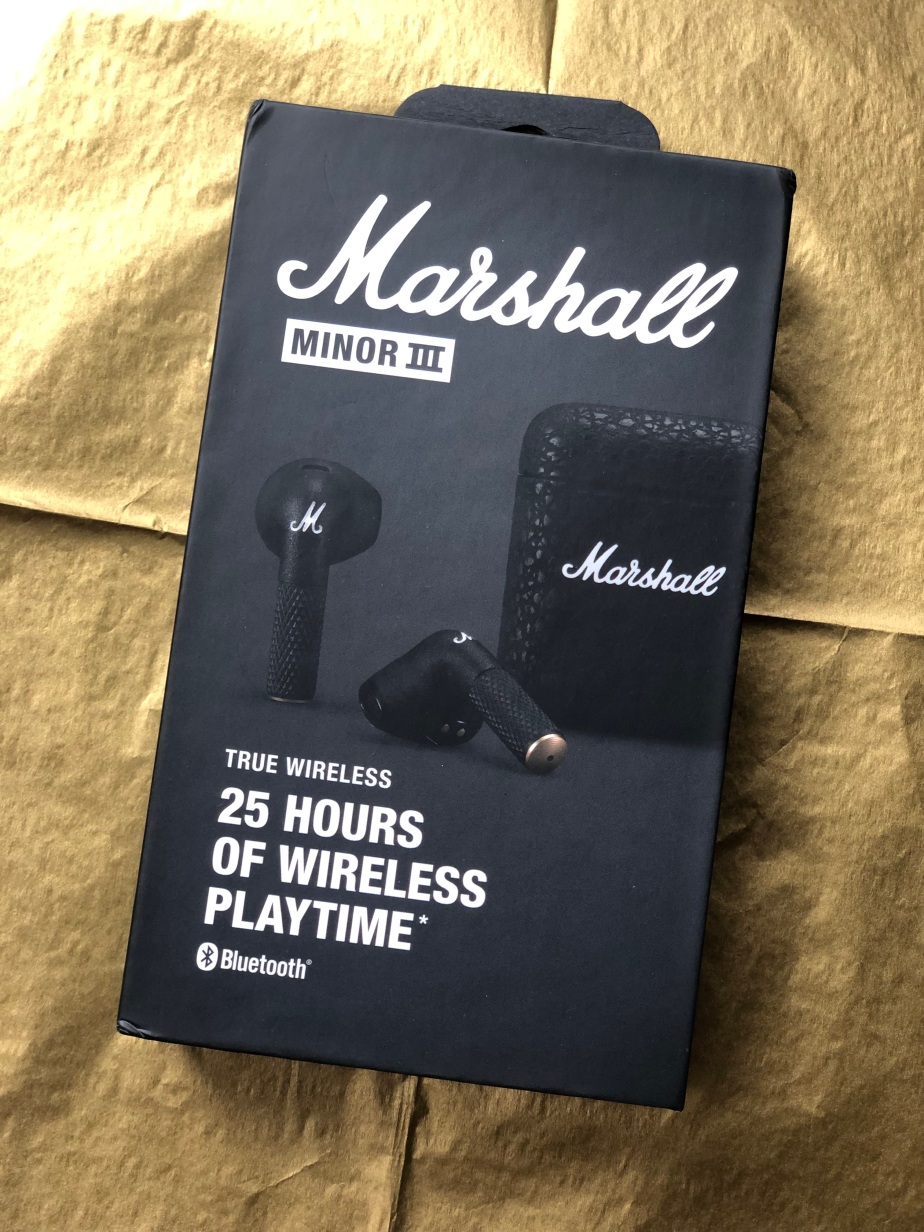
Marshall are at it again with their state-of-the art, high end speakers and headphones, this time with the Minor iii wireless, Bluetooth earbuds.

With 25 hours of wireless playtime, these are the classy headphones you would expect from Marshall and I was VERY excited to be testing them. I don’t usually use wireless earbuds but having tested the Marshall speaker a few months ago, I knew what the quality would be like for these headphones and how I would likely learn to use them. 

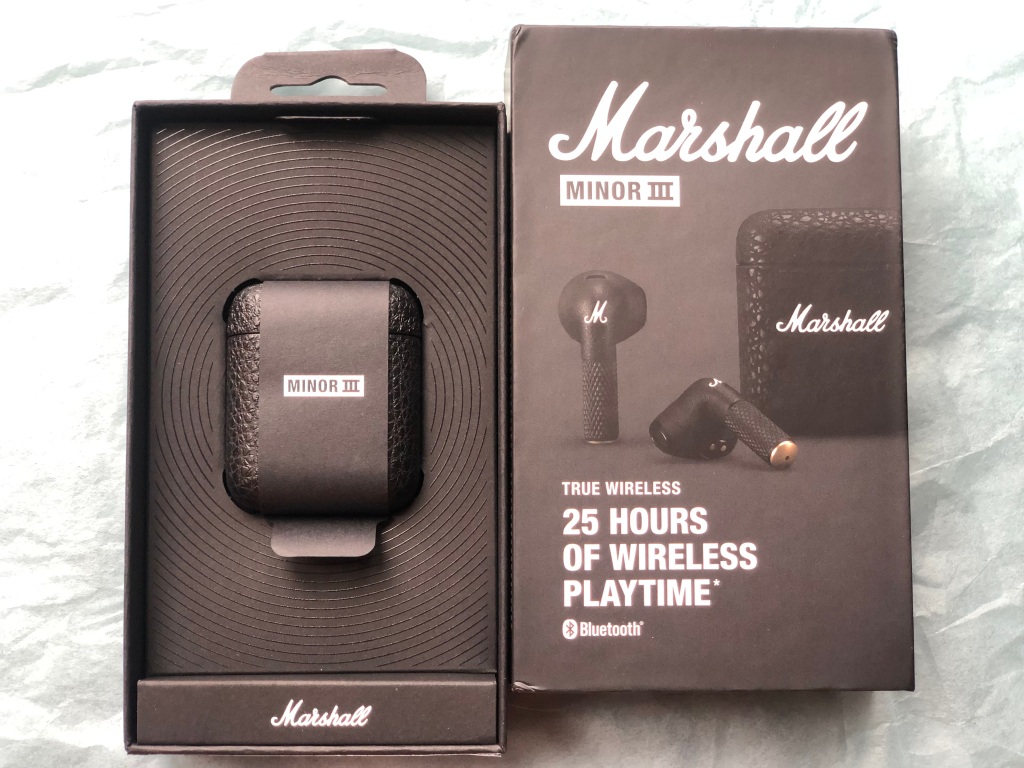
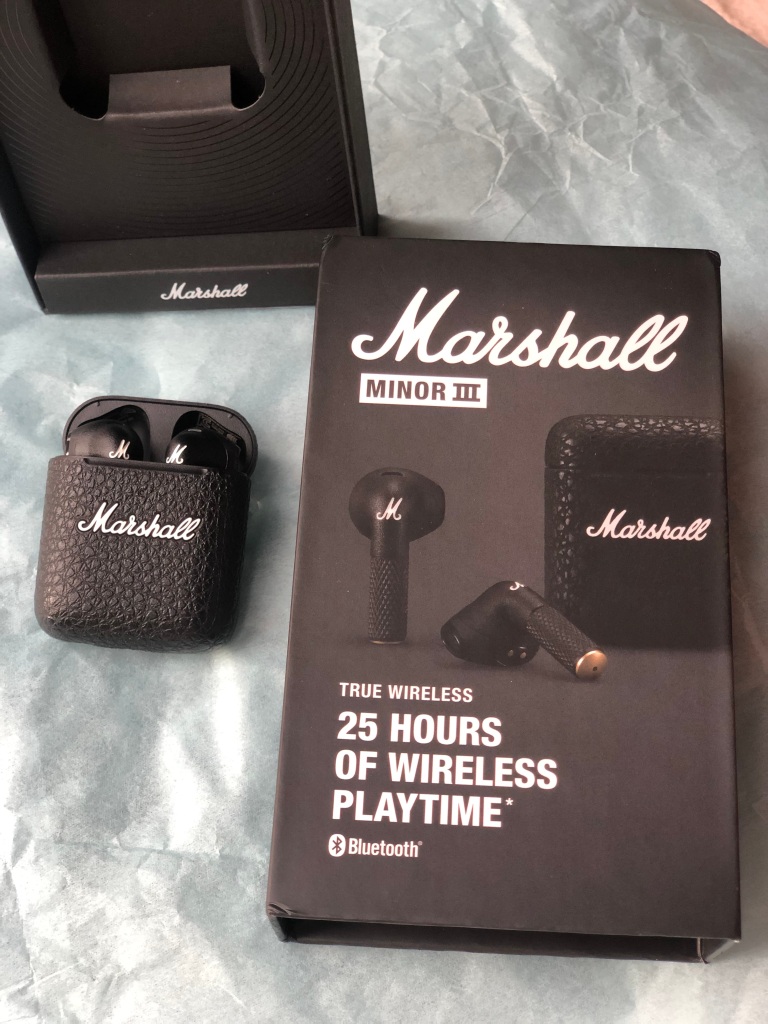
The first aspect you notice for the headphones are how sturdy they are and how famously Marshall they look. With the snakeskin-esque charging case and raised ‘Marshall’ white lettering, it’s instantly recognisable as the iconic brand.  The case opens and closes with robustness, revealing the headphones inside. The charging case is powered with a USB C charging lead which comes with the set. You don’t need anything else to begin using them and thankfully, there was a little bit of charge in the headphones when I took them out the box to set them up!

Inside the box packaging there is a Quick Start Guide which gives you an easy reference of how to set them up. There’s no downloading of any apps or software and no need to use any website. Instead, connect them to your device (in this case it was my Apple MacBook Pro) by turning on the Bluetooth and opening the Apple Settings. To make the headphones discoverable, you just press and hold the button underneath the case, with the headphones still in it.  There’s a tiny LED light on the front of the case just above the Marshall logo. When it flashes blue, you know that the headphones are pairing with your device.  That’s all you need to do for them to work and link to your device!

The headphones snap into the charging case magnetically so you don’t have to make sure the connections are in the right place for charging.  Lifting them out, there’s R/L on them and that’s pretty much all you need. As soon as I take them out of the casing, Music (the jukebox app on my Apple laptop) opens and recognised that I have switched on the headphones. It’s only when I put the second headphone in my ear that I can use the touch controls to start playing music directly from the laptop. One tap to play or pause, or receive or end a call… two taps to skip forward or reject a call… three taps to skip backwards. Now, I found this quite difficult to master for several reasons. When you tap, you are assuming where the stem of the earbud is (and the same tapping applies on both earbuds so you can use either hand) and therefore miss quite often. So when I wanted to tap twice, I would often miss and therefore only hit the stem once, thereby only pausing the music and not skip forward.  I would suggest practicing with music before you use the Minor iiis for calls – otherwise you run the risk of accepting a call with just one tap rather than rejecting with two taps!

The quality of the Marshall Minor iii headphones is excellent, as you would expect. I was able to pick up the background static on older songs originally recorded onto LPs. The balance between both headphones is also true to the original recordings and there’s a formidable bass there too. From another person’s perspective, when you have the headphones in you can hardly hear the sound. These headphones are great for commuting or for when you don’t want someone else to know what you’re listening to!  I also liked that they don’t vibrate when they’re in your ears. That’s important to protect your ears, and your balance and shows a high quality of workmanship on headphones that don’t have loose working parts. Rattling will get annoying very quickly, and end up damaging the structure of your ears.

The only gripe I have with them is that you can’t change the volume through just the headphones. You have to go back to the device to change how loud they are which makes it slightly annoying when you are either out and about and have to fix your phone, or when you need to keep going back to a laptop and changing the volume. It’s the same with other settings like the balance of sound, bass or treble. There is no control for them either on the headphones or on a device so you take these headphones as they come.

The price of £119.99 is very reasonable for the quality of these headphones. They’re not extortionately expensive and can be used for either music or phone calls so they’re versatile, and both for work and home.  The ease of setting them up makes them all the more appealing compared to cheaper brands, and I love that they’re so sturdy and in the charging case they can be put in any pocket, handbag or hand luggage. Strong enough casing and manufacturing that they won’t get squashed easily, although I wouldn’t try it, they are probably stamp proof too!

The Marshall Minor iii is the next generation of high quality headphones, with superb sound, easy usability and flexibility for a long time to come. 

Available from £119.99 at: https://www.marshallheadphones.com/gb/en/minor-iii.html

Malena USB Light from Paulmann

Disclaimer – We received this item free for the purpose of this review/feature but all words and opinions are our own.

Treat yourself or your teen to one of the Paulmann Malena lights from their interior lighting range this Christmas.  Their selection of luminaires add a style to your room which is not like anything you can buy from a certain Swedish home store, giving a unique flair that’s timeless too.

We were sent the Malena USB wall mounted light from Paulmann to review. Available in black and this matt white, it goes with any décor. Measuring 35 centimetres high and 22 centimetres wide, the light comes with fittings to attach it to the wall, but even without attachment, the light can sit on a side table quite easily thanks to the tray shelf underneath.  There’s a USB C port too, which allows you to cleverly charge your phone on the tray shelf, but you can easily charge anything else there or use the shelf for medicines, water etc. 

The unit plugs into the wall with a 1.2 metre cable rather than being wired in, and it should be noted that the plug is a European style so you will need a converter plug as well – never, ever plug this type of electrical plug into a UK socket.  The light doesn’t come with a bulb either, but you can buy these on the Paulmann website when you purchase the light. The Malena isn’t dimmable either, it’s an on/off switch to put the light on.

The brackets are included for installation but the instructions are not that easy to follow. This is an item for a European market so there are no language instructions at all, they’re all in illustrations. You will need to have a screwdriver and simple tools available if you are going to fix it to the wall. Without fixing it, it does sit against a wall but it’s not secure and the back of light unit looks unsightly if you turn it.

We were sent a GU10 Warm White 3.5 watt light bulb from Paulmann that fixes into the Malena light easily with a twist. Once plugged in, all you have to do is press the switch on the body of the light, and swivel the head to position it where you want. It’s ideal for reading or as a direct light in the middle of the night, right next to the bed.

The Malena is a great space saving device, with ample uses and the USB C is an added extra to its usefulness. This is a great gift to a family member who loves reading in bed, or who needs a permanent reading chair light that’s easy to access and perhaps wants to charge a phone at the same time. I personally think it’s great for a guest bedroom where you want to save space but make sure guests feel comfortable and not have to keep looking for somewhere to charge their phone or a light that won’t disturb anyone in the house. In fact, the Malena light is a great practical gift for anyone.

Available from £94.95 at: https://uk.paulmann.com/p/wall-luminaire-malena-usb-c-gu10-230v-max.-5w-matt-white/71098

IMO Q2 Pro Mobile Phone

Disclaimer – We received this item free for the purpose of this review/feature but all words and opinions are our own.

There is so much choice on the markets for phones nowadays, and with choice comes complicated tech words, specifications and all sorts of apps which just adds to the confusion. 

The IMO Q2 Pro Smartphone is an Android model, with all the features you’d want on a modern phone but without the pricetag, or the complications.  For as little as £34.99 and available at High Street shops, it saves so much money compared to the bigger players on the phone market without the worry of breaking it or losing it.

As for the specifications, it has what you would want to keep a phone safe. There’s facial recognition to unlock it, so you don’t have to worry about passwords or pin codes.  The phone is a standard 16GB of memory which is enough to hold the random photos we all take as well as video but also has an extra Micro SD slot so that you can add 32GB of memory if you need to. I personally find it easier to have a remote hard disk that backs up all your photos and videos so that there isn’t the worry but depending on what you need the phone for, you might prefer just using the memory on the phone.

Speaking of photos, there’s a 5MP rear camera and 2MP front camera (for taking selfies) which isn’t the most powerful phone camera on the market but it is a good quality to be able to take photos to upload to social media.  As with all apps too, you can add filters to whichever social media you are uploading to, even if the photo isn’t perfect when you take it. 

One of the universal problems with smartphones is the life of the battery when on full charge. The IMO Q2 Pro Smartphone has a battery life of approximately 15 days when on standby and not being used.  I found that I didn’t have to charge it for several days with light use and taking some photos, which is much better than most smartphones.  The speed when connecting to the internet was excellent too. The IMO Q2 Pro Smartphone is 4G, which is the standard frequency in the UK. The new 5G is rolling out now but doesn’t cover the majority of the country yet and if you have a phone that is only 5G, it won’t convert to 4G when there’s no 5G frequency. The most common frequency is 4G still. 

The phone also connects to Wifi and Bluetooth for downloading information or if you want to connect another device (such as a speaker) to play any of the MP3s stored on the phone.

Usability wise, it’s very easy to navigate with just 3 simple buttons and a simple Android 11 userface. It only measures just over 12 centimetres long and 6 centimetres wide so it can fit in your pocket or a handbag, or even in the glove compartment of the car.  It’s great for taking on holiday and using with a spare SIM card in case it gets lost or you don’t want to use your expensive phone on adventure days out.

Lastly, this phone is great as a first phone for children that isn’t complicated or expensive if it gets lost or broken or for older people who aren’t familiar with smartphones. It’s easy to use so it doesn’t need much explanation. The long battery life means you can charge it less frequently and it’s still usable.

Available from £34.99 for the phone at: https://www.argos.co.uk/product/1131992?clickSR=slp:term:imo%20q2%20pro:1:3:1

Call plans and SIM card are extra.

Vortx 6L Colour Air Fryer by Tower

Disclaimer – We received this item free for the purpose of this review/feature but all words and opinions are our own.

I have wanted to try an air fryer for ages, having heard a lot about them and seen on Instagram what they can do.  Why would I want an air fryer though when I have a perfectly good electric fan assisted oven?  Without trying one, I wasn’t going to find out if this would be an easier and perhaps cheaper way of cooking, so when the Tower 6 Litre Vortx Air Fryer arrived, I wasted no time checking it out!

The website gives a lot of information about air fryers in general and how they work, but I was pleased to see that the Vortx technology in this Tower air fryer is even better at circulating the air and heating it up, making it quicker than an oven by up to 30%. This variety is also 6 litres, which is a generous size to be able to cook a family meal or large volume baking, thereby saving energy as well as time.

As air fryers work by cooking the food with air at high temperatures which is circulated quickly around the food, there is no need for any fat as you have to do with electric or gas ovens. The air convection mechanism uses a lot less energy too, and this Vortx Air Fryer uses 70% less energy for cooking than oven, which with the price of energy is also a bonus. 

The machine itself is pretty big; bigger than a bread maker or about as big as a mixer. However, compared to a built-in oven, it’s much smaller and obviously mobile, so taking it away to university would be ideal. I like the fact that it stays on the worktop like a microwave would so all the panels and buttons are at eye level and the drawer can be opened with one hand if needed. It’s not so heavy that you need two hand, and I also like that you don’t need oven gloves to take the drawer out. Much safer with little children around and anyone with a disability and unable to bend down or lift out heavy grills will find this much easier. In fact, the Tower Vortx Air Fryer is designed in a way in which elderly or anyone with a disability can adapt how they use it to be able to lift the drawer and carry food.

The front panel is touch controlled, which lights up when you switch it on with the control panel button, but don’t forget to switch it on at the wall first! It’s easy to set the temperature from 80 Centigrade up to 200 Centigrade. You can also choose some of the pre-sets for easier cooking such as fries, steak and cake.

Once I had worked out the controls panel, it was time to start testing the Vortx Air Fryer! I started with some simple oven chips. As you don’t need any oil, I just piled a layer into the basket and used the pre-set controls for cooking them.  After the 15 minutes cooking time, the Vortx Air Fryer emits a sound and you take the drawer out, emptying the fries onto a plate. There’s very little clearing up to do because there’s no oil involved, and the chips are crisp on the outside and still fluffy on the inside!

Once I had mastered fries, it was onto cooking more of a meal! I cooked a piece of beef, being careful to work out the cooking time with regards to the weight.  Like any new appliance, it takes a while to get used to the cooking times and how evenly it cooks so I checked on the meat a few times by opening the drawer.  The beef was nicely cooked on the outside, along with the layer of mustard I had smothered on top to give it some extra flavour!  You can see in the photo how it looked as soon as I took it out of the air fryer and put it on a plate – medium rare, and that was in 20 minutes of cooking.

The Tower Vortx 6l Air Fryer can also be used for cooking vegetables, baking, roasting and even dehydrating such as these pieces of apple which I put on at 80 Centigrade (the lowest temperature possible) for 20 minutes. Most of the moisture was taken out, without any burning and just the flavour of the apple left behind. This will be lovely as part of a salad later in the week and puts to use the windfall apples from the garden this time of year!

Healthier than a microwave and more versatile than an oven, the Tower Vortx Air Fryer is brilliant for going to university and not having to worry about ovens and hot grills.

Available from £79.99 in 6 colours at: 

https://www.towerhousewares.co.uk/air-fryers/vortx-6l-colour-air-fryer-midnight-blue-t17127mnb

Edifier G5BT CAT Headphones

Disclaimer: We received this product free of charge for the purpose of this review and all thoughts and opinions are our own.

I’ve come to expect great sound from Edifier and the G5BT gaming headphones from their Hecate brand do not let me down. Listening to music is a pleasure, with deep bass and a full immersive sound from the 43mm Hi-Res titanium drivers. The headphones are really well built and comfortable to wear, the ear cups are softly padded with memory foam as is the adjustable headband to give all day comfort. They also include a cute set of cat ears – an extra feature that you’re going to love – but don’t worry if cat ears aren’t your thing they are attached with magnets so can easily be removed!

Being targeted squarely at gamers, there is a dedicated gaming mode that adjusts the sound profile and gives a low latency connection. If you’re using a 3.5mm jack connection and your device is compatible, then you’ll also benefit from the certified Hi-Res sound.

It isn’t just about the sounds that you can hear, it is important that your friends can hear you. The headphones come with a boom mounted microphone that can be hidden away when not needed and a great dual mic noise cancelling system.

The final gaming touch is a full RGB system with 8 different lighting options which light up not only the earcups but the magnetically attachable ears too, personally I’m not a fan of the lighting but then again I’m not a teenage gamer! If like me you prefer not to use it, it is easy to turn off and best of all, the headphones remember the setting when you next turn them on.

The battery life is excellent, a 2 hour charge can give 20 hours of use – and up to 36 hours without the lighting but if connected with the 3.5mm jack then they’ll work fine without any charge at all. Connection is either by Bluetooth 5.0 or a 3.5mm jack allowing connection to a wide range of devices. I’ve been using bluetooth and have not had a single problem. Controls are pretty simple with easy to find buttons on the back of each ear cup covering all the normal features such as volume, track skip, answer a call etc.

The headphones come with a charging cable, 3.5mm jack cable and a hard carry case which is great for keeping the headphones in when travelling.

With great sound-quality and comfortable to wear these would make the perfect gift for any gamer young or old.

RRP  £129.99 available from Amazon

Edifier TWS1 Pro 2 Earbuds

Disclaimer – We received this item free for the purpose of this review/feature but all words and opinions are our own.

Edifier have a huge range of headphone and earbuds available for all budgets, so this Christmas you’re bound to find a pair that are a suitable gift, or perfect for yourself!

The Edifier TWS1 Pro 2 Earbuds are among the cheaper headphones (RRP £69.99) but still have all the features you’re looking for.  The in-ear buds are Bluetooth and able to pair with phones, laptops or gaming computers.  They’re especially good for gaming (or watching TV) because of the low latency connection between sound source and ears.

That’s not the only feature the Edifier TWS1 Pro 2 Earbuds have.  Students will love these for studying or listening to lectures because they have active noise cancellation and environmental noise cancellation. If you’re not used to headphones which cancel out surrounding noise, then it comes a quite a shock when you can’t hear the traffic outside or the TV in another room. The sturdy earbuds are dust and splash proof, so work excellently in the gym or out for a run.

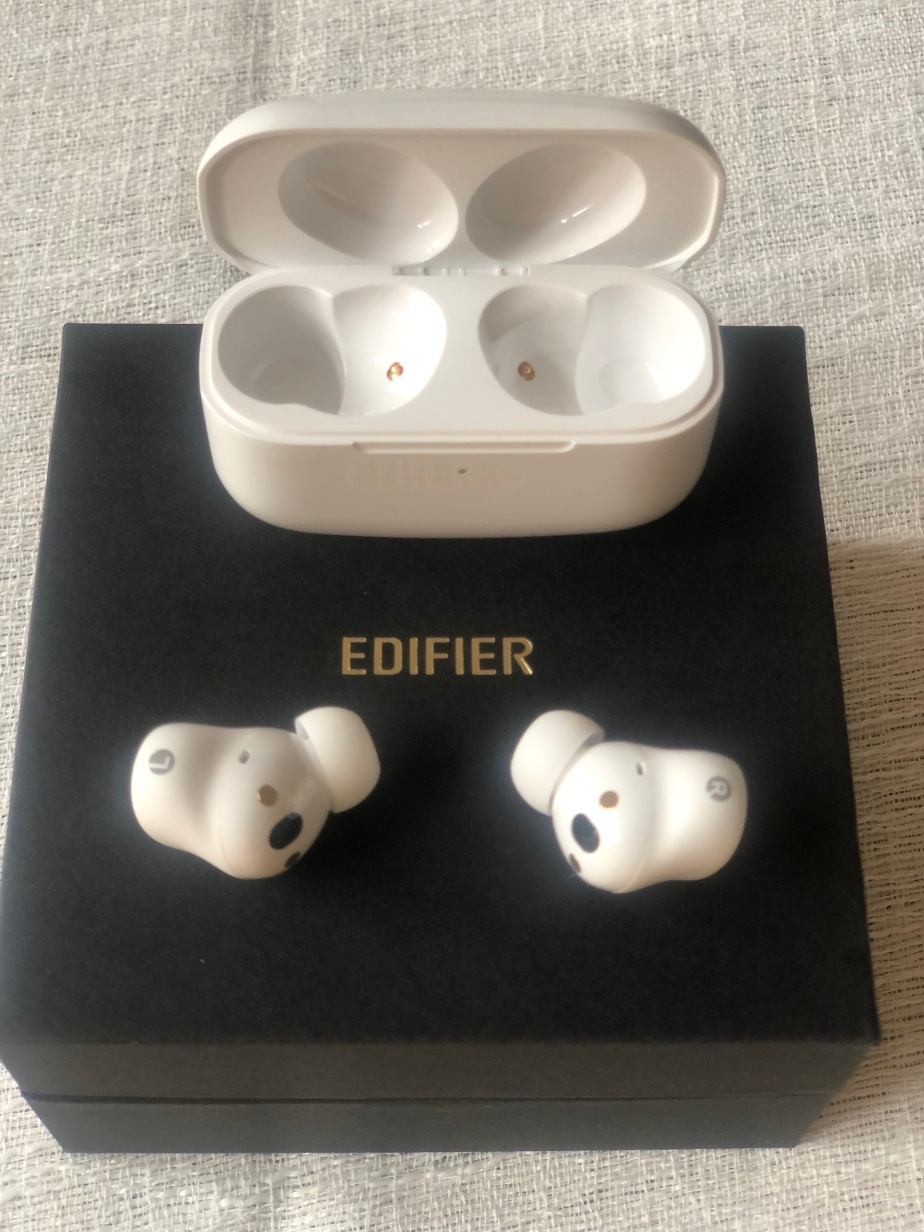
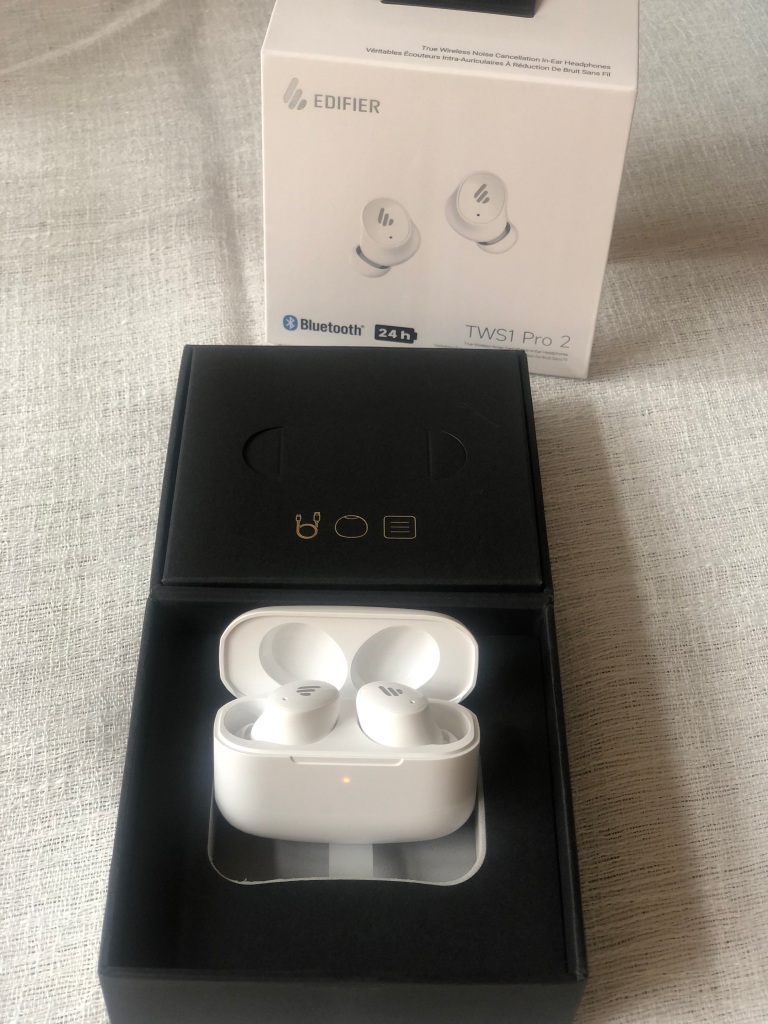
The earbuds come in a presentation box (as seen in the photo) where the charging cable, instructions and different sized spare earpieces are stored. The actual Edifier earbuds are in their own carry case which is where the charging happens. Each earbud ‘click’s into place by magnets in the case and you charge them using the USB cable provided.  10 minutes of charging gives an hour of play on the headphones, and a full charge gives 24 hours of play with the ANC (Active Noise Cancellation) switched off, or 16 hours with ANC turned on. Long enough for a long haul flight or train journey from one end of the country to the other!

Connecting the headphones is easy. There’s a QR code on the back of the packaging or in the Instructions that allows you to download the Connect App to your device, or on my laptop they just connected when taken out the carry case and my laptop Bluetooth mode was switched to “Discover Mode”. The earbuds have a really useful feature whereby they can tell if you are taking them out, they automatically pause what they’re playing, the start again when you put them back in your ears. 

Buying the Edifier TWS1 Pro 2 Earbuds won’t break the bank and you don’t need any extras with them such as a case or spare sets of ear pieces. The different size ear pieces make it easy to adapt them to any size ear whether for children or adults. The carry case fits nicely into a pocket so the only problem I would see with these earbuds is if you lose one!

The sound quality is excellent, so it’s surprising that they cost as little as they do, plus they’re on sale at the moment on Amazon for £49.99. As with all Edifier headphones, they’re not just a one trick pony whereby they deliver sound, but they have extra features that make them more comfortable, less frustrating and easily adaptable.

Available online for £69.99 (£49.99 at Amazon on sale): 

Audio Pro A10 MKII Wireless Multiroom Speaker

We received the speaker as a review sample but all words and opinions are our own.

Music is important to me, I enjoy sitting down in an evening and listening to a playlist through the stereo in our living room. Most of the time though, I’m listening to music whilst doing other things, working in the office or cooking and eating in the kitchen. In these rooms I’m limited to how to listen, I can wear headphones or just listen to music through the speaker on my phone but it just isn’t the same as listening on a proper sound system. This is where a wireless speaker comes in. The Audio Pro A10 MKII is a high quality speaker that connects to my network and allows me to stream music from anywhere in the house. It is part of the Audio Pro Multiroom system so can be combined and grouped with extra devices to play music across the house. It supports AirPlay2 and Google Cast along with Audio Pro Multiroom.

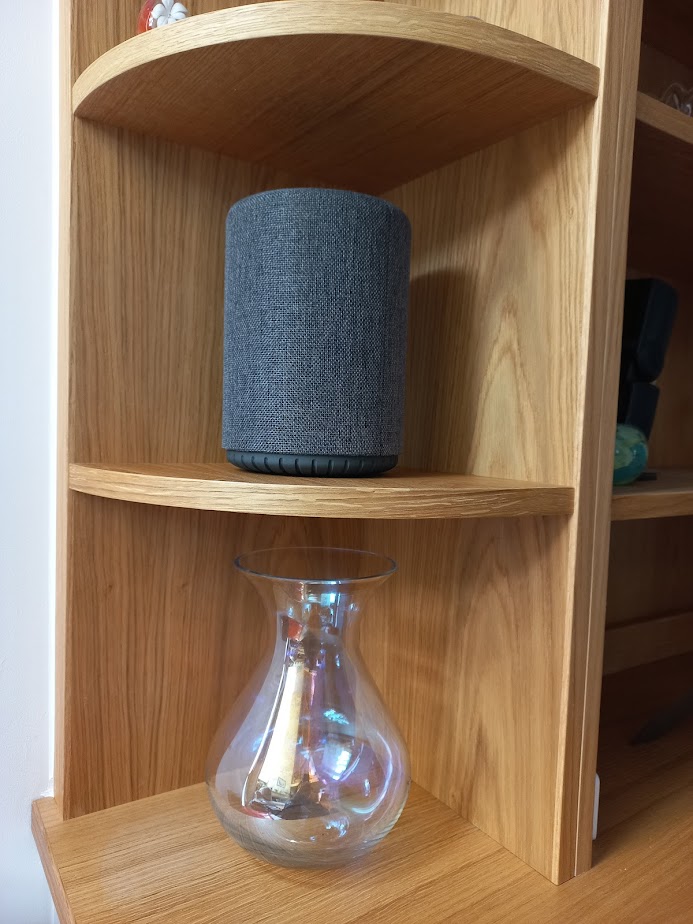
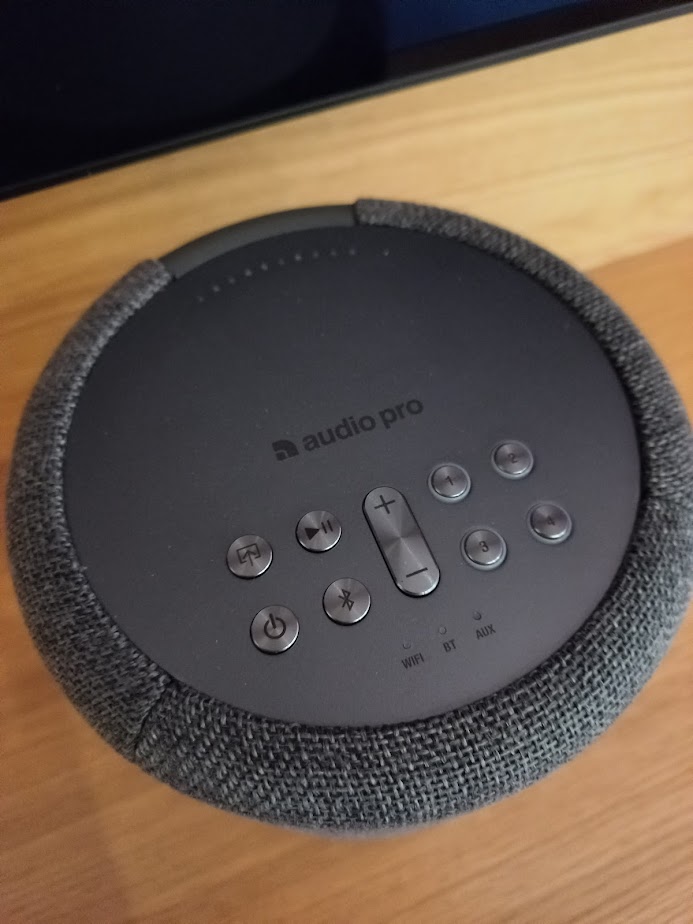
With a sophisticated dark grey cloth finish and metal controls (also available in light grey) the Scandinavian design fits discreetly in any room of the house and standing 193mm high and 140mm across it isn’t too large to get in the way. It feels high quality and weighs 1.5kg.

Setup of the speaker is easy with an app though although once it’s connected the speaker can be used on its own. There are three ways to connect, a direct connection over wifi is the main one but it’s easy to connect a phone using Bluetooth 5.0 or other music sources through a 3.5mm jack. On the rear of the speaker is a threaded socket allowing the speaker to be wall  or ceiling mounted.

I mainly use Spotify for my music and once setup the speaker simply appears in the list of devices. For radio I’m a BBC fan so use their iPlayer app so I can use casting to send the radio onto the speaker. For all its good looks the sound quality is obviously the most important feature of any speaker and the A10 does not disappoint. It easily fills a room with music without a hint of distortion and though you’re never going to shake the foundations with a small speaker it is certainly good enough for me and I’d be happy listening to this anytime.

I mostly use my phone to control the music but there are a number of buttons on the top panel allowing you to play/pause, change the source or volume and four presets. I liked how these work, just start playing a Spotify playlist then hold the button. The playlist can be recalled at any time with just a press of the button. The only obvious missing feature is a skip button but it isn’t a major omission.

Using the app gives access to a few more features including a sleep timer, alarm clock and adjustment of the bass and treble. 

Overall, I love the Audio Pro A10 MKII speaker, it is easy to link to my phone and has wonderful sound quality and would be a great addition to any home.

RRP £220 available from Audio Pro

EcoFlow River 2 Portable Power Station

Disclaimer: we received this product free of charge for the purpose of this review and all thoughts and opinions are our own.

We just can’t get away from tech these days, whether it’s a trip to the beach or camping in the Lake District. It seems we can’t do without our gadgets. 

We can all pretty much manage for a day without a charger but if we’re away for longer, then we’re going to need power. Now, a small battery pack will charge a phone but what about bigger devices that require a mains supply?

The River 2 from EcoFlow is a really compact portable power station, the smallest in the EcoFlow range, with a 256Wh capacity and 300W output. The size of a shoe box, it only weighs 3.5kg so is really easy to include when packing for a weekend away or trip in the car.

It is well built, with a flat top so it is easy to pack when travelling. The handle is mounted on the rear of the device which helpfully leaves room for any cables coming out of the back.

Included in the box are two charging leads, a mains charging lead (no adapter required) which takes only an hour to fully recharge the battery, and a car adapter that plugs into the solar connector on the back. Optionally it can be changed through the USB-C connector or for a truly portable option a solar panel can be connected too.

We enjoy going away in our motorhome and much prefer the more remote sites, often with no mains hookup. The sites are peaceful and quiet, but we do sometimes miss a main supply. We do a lot of cycling when we’re away and depending on how far we have ridden my e-bike will need charging, but up until now I have had no way to charge the bike with only a 12v supply. The battery on my bike is 250Ah so using the fully charged River 2 to charge the bike means I can do more cycling when we are on sites with no mains power. I’ve used it to charge my bike a couple of times and founds it only changed up to 90%, I’m not sure why but to be honest 90% is certainly good enough and means I can get another couple of days cycling in when we are away.

A while ago we bought an electric cool box which is great for keeping food and drinks cool when going out with the family. The only problem is whilst I can plug it in when driving, once we’re there we just have to hope it stays cool, with the EcoFlow River 2 I can now leave it plugged in (when set on low (20w) you get 7 hours of use) meaning the drinks are still cold when we get back to the car after a day out.

The EcoFlow River 2 can also be used as a UPS, it has a 30ms switchover so most devices will not notice a power cut and whilst it might not run a PC for too long, it will at least give you time to save your work before shutting down.

I’m going on Scout camp in a few weeks and the EcoFlow River 2 is definitely coming with me, lighting is usually a mixture of small headtorches and large gas lamps but it will be much easier to use a 240v LED flood light. If it works well, I might look at getting the optional solar panel for a daytime recharge whilst we are on camp.

It’s a great device once you know its limits. You’ll not be able to run anything that draws more power such as a cooking device, heater or kettle but for all your tech and low powered devices it’s great. There is a good selection of outputs too, in addition to the 240v socket there are 2 USB-A, 1 USB-C and a 12v “cigarette lighter” too.

I’m really impressed with the EcoFlow River 2, although it is the smallest model in the range, it has a real quality feel and doesn’t lack features. It is controllable with the mobile app using bluetooth or wifi, can be charged in 4 different ways and by using Lithium Iron Phosphate technology, the battery can be discharged 3000 times and should provide years of use.

RRP £269 available here

Audio Pro T3+ Peter Eugén Bluetooth Speaker

Disclaimer – We received this item free for the purpose of this review/feature but all words and opinions are our own.

Gear yourself up for the Christmas gift buying season by familiarising yourself with the latest gadgets out there. You won’t be disappointed by all that Bluetooth speakers can do nowadays, and I bet there’s at least someone in your life who could benefit from one!

Audio Pro are the Swedish speaker company who have been in operation for over 40 years. Their website shows the full range of different speakers they have on offer including multiroom speakers, Tv speakers, speakers which connect with smart apps and Bluetooth speakers like the Audio Pro T3+ which we have been reviewing.

In conjunction with self-taught artist and designer Peter Eugén, Audio Pro have created the Addon T3+ Bluetooth speaker.  The collaboration is made even more special by the fact that the Addon T3+ is a special edition created by Peter who is best known for his rock music portraits and recent watercolours.  So with these two artistic worlds meeting to make cutting edge technology, what can you expect?

The Audio Pro T3+ Bluetooth speaker has 1 woofer and 2 tweeters in a sand coloured frame with brass accessories.  The buttons on the top are for on/standby, Bluetooth pairing, BT/AUX source selection and volume.  At the back, there’s a USB charging port, power connection and AUX, with cables provided in the box. You’ll spot in the photos that this limited edition also has a “Peter Eugén” edition plate too, so you know you’re the owner of a select few!

Although the T3+ can connect with AUX to any appliance, this is after all a Bluetooth 4.0 speaker so that’s how I initially set it up. There’s instructions both in the box and online but if you’re like me and want to play with the gadgets first, you’ll find it easy to get started. Simply turn the speaker on, click the Pair button and your laptop, phone or anything Bluetooth compatible will be able to find it.  Pair up and it’s as easy as that – just start playing the music.

The Audio Pro T3+ supports various sound systems including Apple, MP3, WMA and FLAC. It also supports whatever you play on your device so I went onto YouTube and played a movie soundtrack through the speaker with ease.  The battery lasts for up to 12 hours on full volume if fully charged, and 30 hours on half volume. Speaking of the volume, I was pleasantly surprised at how loud this speaker could go, far greater than any of my devices but also louder than what I could attain with other Bluetooth speakers.

The quality of the sound is very good, given that it only has one woofer. The balance is excellent with no dead spots around the speaker where there isn’t a balance.  For the price of this speaker, I would say the quality of the sound is superb and the ese of use makes it excellent value for money.

The colour of the casing might put off some of the teenagers who are undoubtedly the target audience for the price range.  However, for the grown ups, who appreciate the design and who Peter Eugén is, the speaker makes a big impact and can be used for anything including taking outdoors or as a speaker in the office during the day. The ease of carrying it around and setting up are the main plus points.

I look forward to seeing what else the innovative Audio Pro come up with next in their speaker range but in the meantime, I’ll keep playing The Stones on my T3+.

Available from £180 at: https://www.audiopro.com/en/product/addon-t3/#black

Creative Outlier Free Pro Headphones

Disclaimer: We received this product free of charge for the purpose of this review and all thoughts and opinions are our own.

I’m a great fan of the noise cancellation technology that you get with earbuds and headphones but there is one massive, and potentially dangerous, problem – you can’t hear what is going on around you. Whilst it isn’t a problem if you’re sitting in your living room or on public transport listening to music, wearing them out and about can be a problem. 

I am a cyclist and a real issue on cycle paths is riding up behind pedestrians who are listening to music and completely unaware of your arrival, not even hearing your bell. Even worse is the cyclist who wears noise cancelling headphones – they’re just asking for trouble!

Bone conduction headphones are one option – they’re not new but this is the first time I have had the opportunity to try a pair and I was keen to see what they are like, especially when I discovered the Outlier Free Pro headphones from Creative Labs are waterproof and had the potential to make my twice weekly morning swim just that little bit more interesting.

The headphones have the following features

– Bluetooth 5.3

– IPX8 Waterproof

– 8GB Memory Storage

– Up to 10 hours playtime

– Multipoint Connectivity

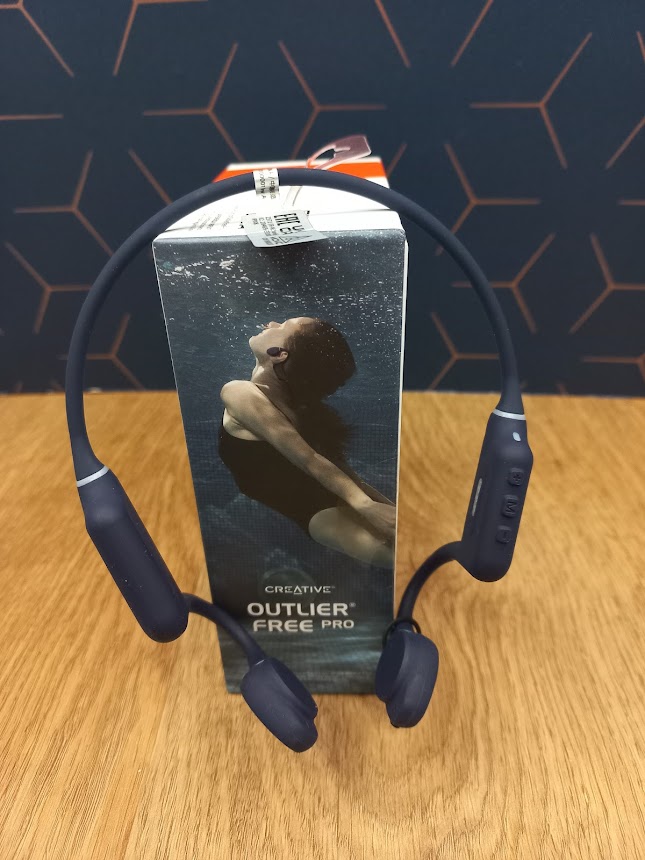
Rather than sitting in or over your ear, these headphones sit on the bone at the front of your ear and the noise is transferred through the bone into your inner ear, leaving you able to hear other sounds at the same time. 

Weighing in at just 32g and with adjustable transducers they sit comfortably on my head, I have worn them for several hours at a time and not had a problem with discomfort. A full charge takes 2 hours using a USB-A Magnetic Clip-on Charging Cable and should give 10 hours of playback. I haven’t managed to get quite that long, but I do tend to have the volume turned up which will affect battery performance. Sound quality is really good, not quite the same as a traditional pair of headphones but certainly good enough for my ears! When out and about I tend to listen to podcasts and the radio rather than music and for this they are perfect. It’s great to be able to listen to the radio whilst on my cycle commute and still hear the traffic!

These headphones are waterproof, and with an IP rating of IPX8, are suitable for swimming (as long as the microphone is sealed with the included plug) in freshwater up to a depth of 1.5m for up to 40 minutes. Unfortunately they’re not suitable for salt water, so no swimming in the sea when wearing them. Now you probably don’t want to take your phone with you whilst swimming, so they have 8GB storage for you to store MP3 files to listen to whilst in the pool. It seemed really odd keeping my headphones on when I got in the pool but after a couple of minutes I got used to them and it made my 30 minute swim a lot more stimulating as I kept pace with the music. It is worth noting that the headphones should only be used for 40 minutes at a time which is fine for me but perhaps not for more serious swimmers.  The sound isn’t high quality when you are in the water but it’s certainly a lot better than not having any music to listen to.

Another advantage of them being waterproof is I can wear them when I’m out on my bike knowing it won’t damage the headphones.

I’m really impressed with these headphones, they have exceeded my expectations and whilst I’ll keep my standard headphones for music listening these open up a whole new way to listen whilst out and about. 

RRP £159.99 but currently on offer at £89.99 on the Creative website here

Edifier NeoBuds Pro Headphones

Disclaimer – We received this item free for the purpose of this review/feature but all words and opinions are our own.

During the summer, when we are more likely to be working out or going for a run, or perhaps you’re on the beach and need to carry very little with you in hand luggage, ear phones can be a life saver.  Nowadays, earphones are state-of-the art and not only come in this ‘ear bud’ form, but are Bluetooth. Connecting to your phone or laptop wirelessly, they don’t have wires so you can hide your phone in a pocket and carry on with your day.  

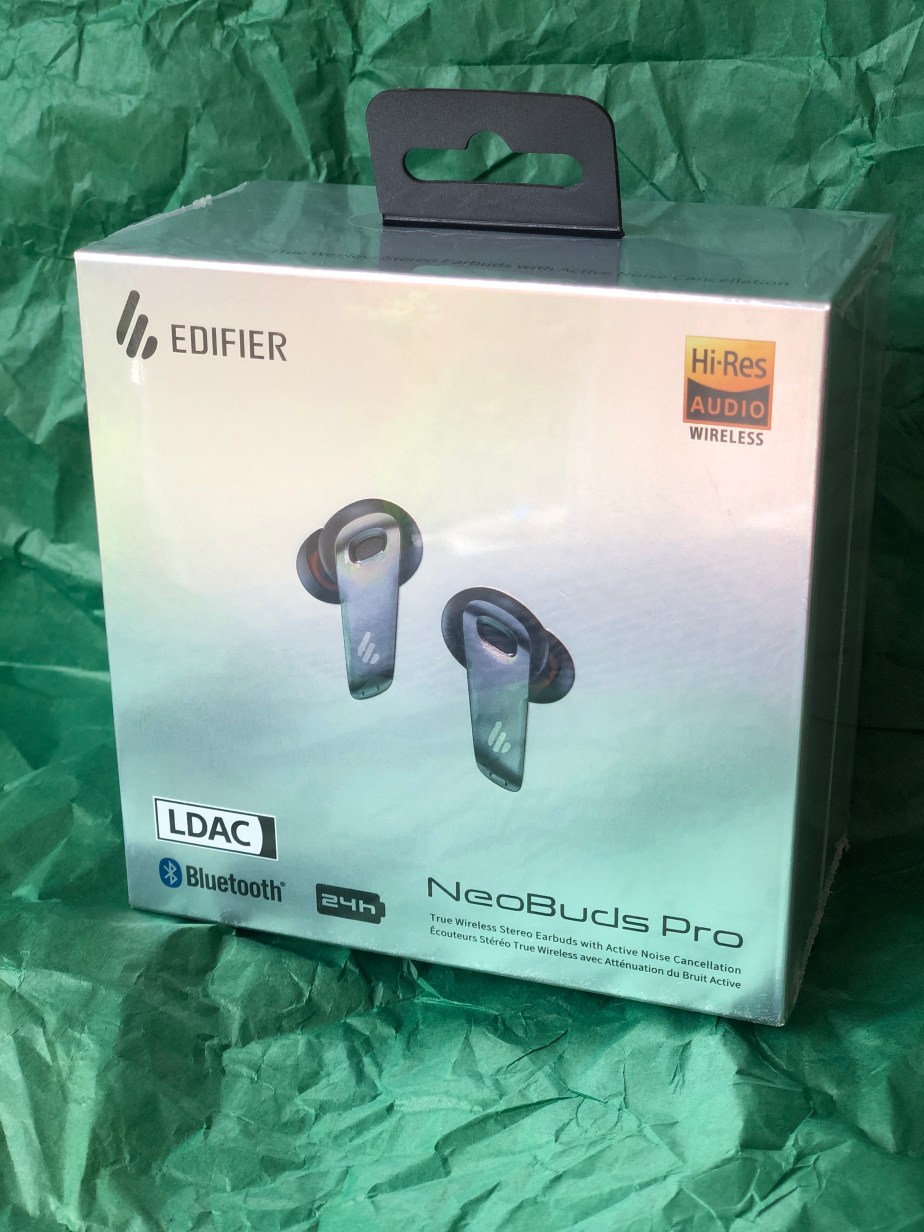
The Edifier NeoBuds Pro come in a charging case so you don’t lose them easily. Their full charge time is 24 hours, so enough for a holiday or long journey but just 10 minutes of charge gives you an hour listening time.  The ear-tips are also anti bacterial, so you can share them if you wish, or even if you drop them on the car floor, they’ll still be safe to put back in. The box contains the NeoBuds and case, spare sets of ear tips, charging cable and case and written instructions.

The NeoBuds uses LDAC technology which is an auditory technology which allows high quality streaming over Bluetooth. Before purchasing these Edifier NeoBuds, make sure your phone or laptop supports this technology.  LDAC is considered to be the premier audio coding available at the moment, so the NeoBuds are making use of the best technology available, and it shows in the quality of the audio!  There’s Ambient Sound technology too, so you can still hear certain sounds around you when the music is playing – great for when you’re in town and weaving in and out of traffic.

The Edifier NeoBuds Pro also have crossover technology for balanced sound thanks to the Knowles Balanced Armature drive. No matter what audio you’re listening to, the NeoBuds balance out the sound making it a better listening experience all round. You can also use the NeoBuds for phone calls, thanks to the three microphone noise cancellation technology. It also has low latency with game mode, so you can hear exactly what’s happening on screen as it happens and without a time delay.

The Edifier NeoBuds Pro contain all the technology, and more that you need for everyday use of headphones.  There’s no problem with how they perform and the sound quality is excellent. It took me a while to figure out how they fit into my ears and get used to the sensation as I don’t normally have ear buds but it doesn’t take long. I was impressed with how high quality the sound is because it automatically balances out the levels with each song.  Audio books are richer too; you can hear the bass of the reader’s voice much easier and phone calls are as clear as you’d expect them to be and I didn’t experience any drop-off in calls with Bluetooth.

The Edifier NeoBuds Pro are practical, easy to use and easy to store. They’re so versatile across all the different sound appliances that you don’t need another pair, and they store away in their case so you don’t have to worry about carrying heavy overhead headphones that might break.  Not just for summer, the NeoBuds Pro are for all year and all uses!

https://www.edifier.com/global/p/true-wireless-earbuds/neobuds-pro

Available on Amazon for £119.99 at: https://www.amazon.co.uk/Edifier-NeoBuds-Wireless-Cancellation-Universal-Black/dp/B0B12BGZPT/ref=sr_1_4?crid=31RSN41FGB2OE&keywords=edifier+neobuds+pro&qid=1688822928&sprefix=neobuds+pro%2Caps%2C75&sr=8-4

iWALK PowerSquid Portable Charger

Disclaimer: We received this product free of charge for the purpose of this review and all thoughts and opinions are our own.

It’s holiday time and we’re off exploring the beautiful countryside in Somerset. We’ve got everything packed, including all our tech – it’s surprising just how many items need charging. A quick look shows two phones, two smart watches, earbuds, a camera, the GPS for my bike and a couple of rechargeable bike lights. That’s a lot of charging cables and there are only two USB sockets in the motorhome.

To make things easier, I’m trying out a USB power bank from iWALK. The PowerSquid has a capacity of 9000mAh and offers quick charging to compatible devices. Its name comes from the fact that it has three built-in charging cables that are permanently attached, looking like the legs of a squid. With micro USB, USB-C and Lightning, many devices are covered but for complete coverage there is of course a standard USB socket too. Charging is via USB-C and a USB-C cable is included.

Mine is white but black and pink models are also available, it weighs 200g and feels really well made. A small LED display gives the percentage charge and also shows if fast charging is being used.

With multiple outputs the PowerSquid is able to charge a number of devices at the same time and it can also take on a charge at the same time, this was perfect in the motorhome where USB sockets are limited. It is also capable of offering fast charge to compatible devices with 5v, 9v or 12v offered on the USB-C and USB-A connector. It can charge a Samsung S22 up to 50% in 30 minutes and was able to charge my phone around one and a half times on a full charge so it will be great for weekends away. The cables all clip neatly into the casing so no more tangled cables in your bag.

It is compatible with iPhone 14/14 Pro Max/iPhone 13 Pro Max/13 Pro/13, Samsung Google Pixel & Apple HomePod devices.

I am really happy with this power bank, it is going to be indispensable when travelling both in the UK and abroad. My teenage sons have already been eying it up so that’s their birthday presents sorted too!  

RRP £34.99 available from Amazon here

Edifier MP230 Portable Bluetooth Speaker

Disclaimer – We received this item free for the purpose of this review/feature but all words and opinions are our own.

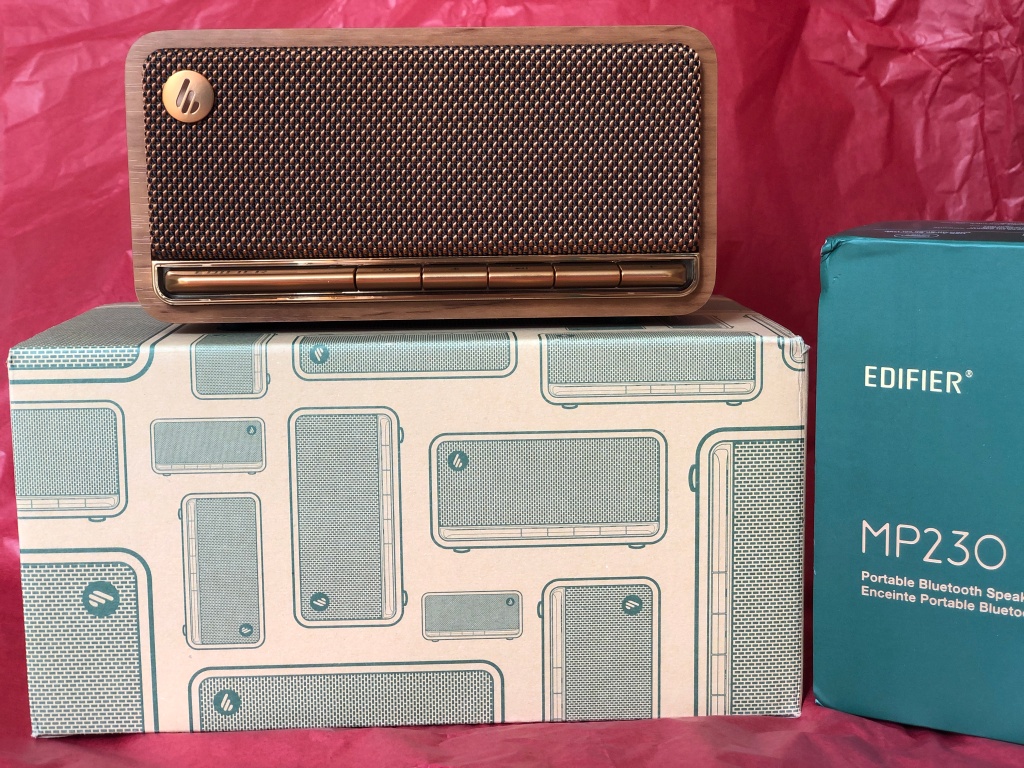
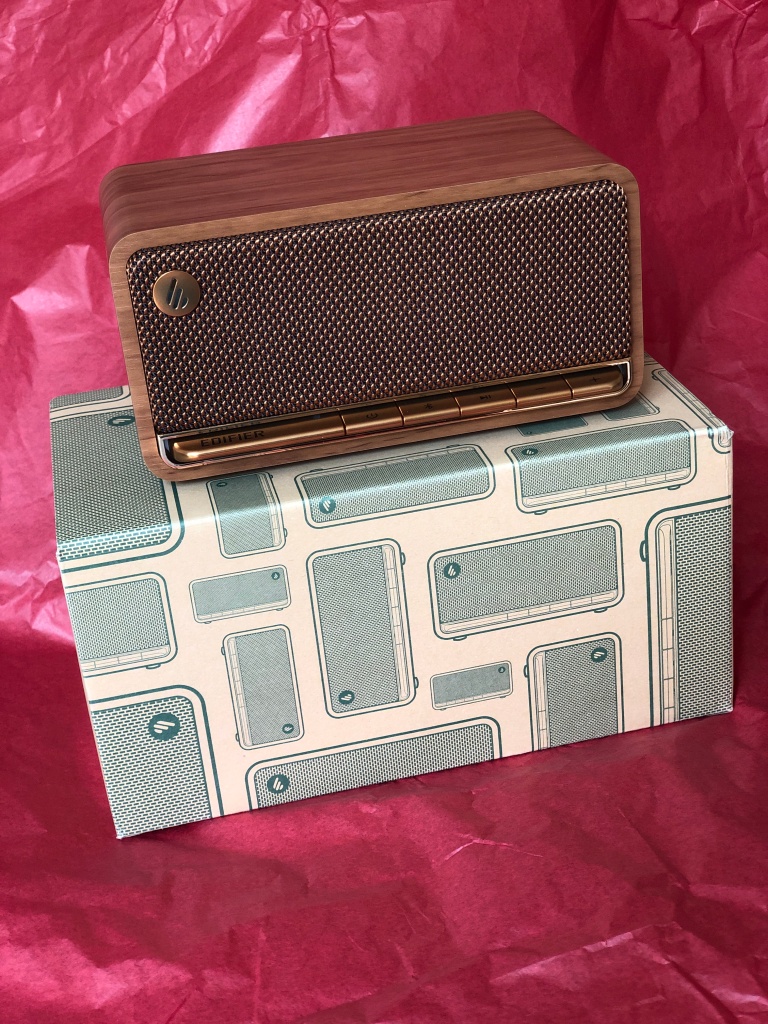
This retro style portable speaker from Edifier is probably the easiest I’ve ever set up a speaker. With crystal-clear sound, it’s a brilliant addition to your household or as a gift to someone you love.

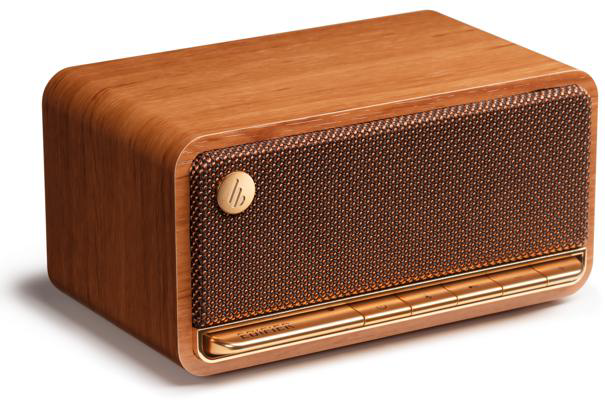
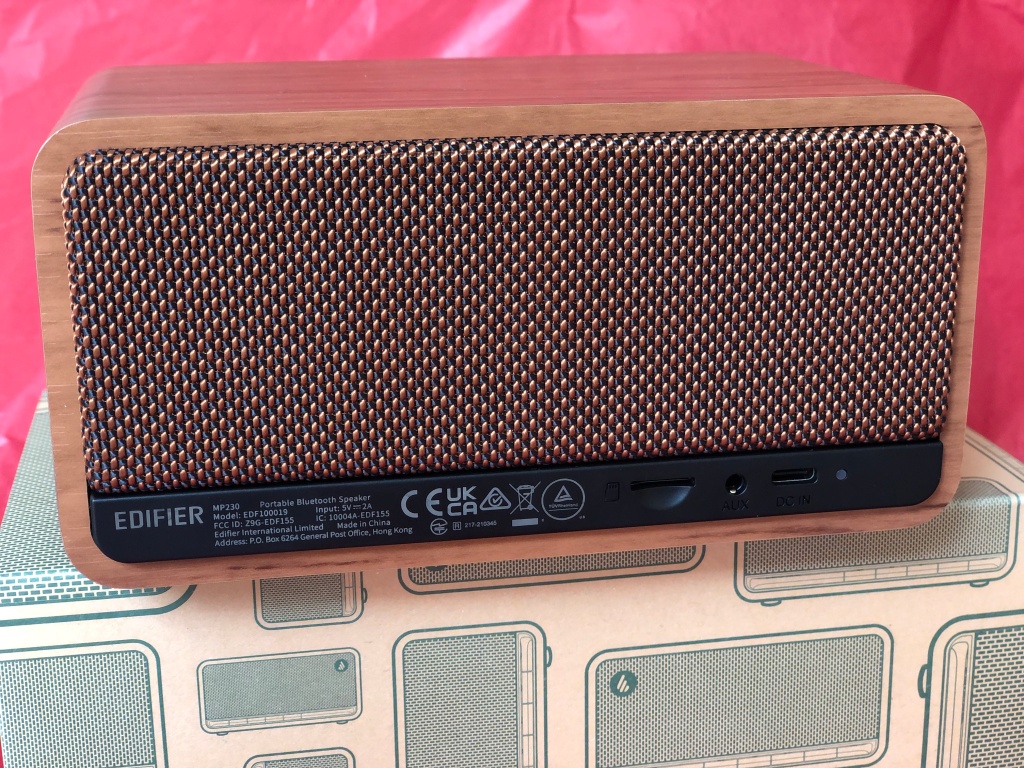
The Edifier MP230 Portable Bluetooth Speaker has a battery charge of up to 10 hours with a wooden casing and grill cover to give it a retro 50s/60s portable look. The operating keys on the front are piano-style for on/off, Bluetooth, play/pause and two volume buttons.  Speaking of Bluetooth, it was incredibly easy to set up. All I had to do was turn on the speak with the button on the front, use the Bluetooth settings on my laptop, which found it immediately and press Connect. As soon as I played a track on my laptop, it came through the Edifier speaker; no need for any instructions or clicking buttons, adding settings etc, it was easy as pie!

The quality of the sound through the speaker is excellent. There are two 48mm driver units, which create stereo sound and an output power of 20W RMS. Along with Bluetooth, the input modes are AUX, USB-C port and even a TF Card. The size of the speaker also lends itself to being taken on car trips, or even packed in luggage. Measuring 16.4cm × 8.43cm × 10.8cm it can even fit in hand luggage, and weighs just 0.85kilorams (that’s just 1.9lbs!)

The Edifier MP230 Speaker can be charged with the USB port and doesn’t take long for a full charge, so can be connected to a laptop or a wall charging point. As it’s so portable, it can be taken with you anywhere, or left on the shelf in a room. The size would suggest it could go outside easily, which would be great for picnics but I don’t think the wood casing nor the grill would survive getting even slightly damp, and definitely not one for the beach!  Set up in a baby’s nursery to play white noise or as background whilst in the garden, the Edifier MP230 would be really useful.

I can’t help but think it would be a great present too. The stylish look to it appeals to anyone who likes design or for grandparents who want something that fits in with their pre-IKEA furniture and is small enough to be discreet on a book shelf. Teenagers will love this though, as it doesn’t take up much room and you don’t even need to be in the room for it to connect to Bluetooth. It’s a brilliant addition to any household as well as being a perfect stereo sound for you online music!

Available from £99.99

MoGo 2-Pro Portable Projector from XGIMI

Disclaimer – We received this item free for the purpose of this review/feature but all words and opinions are our own.

Disclaimer – The MoGo 2 Pro was sent as a review sample for the purpose of this review/feature but all words and opinions are our own.

What’s a great Father’s Day gift Dad isn’t expecting? Or what kind of gift could you get him that he doesn’t know he wants yet but when he tries it, will wonder why he hasn’t bought one for himself before!

The MoGo 2 Pro Portable Project from XGIMI has so many feature that I can hardly write them all, but for an overview of what it does, it’s a portable projector and speaker all in one!

With a 120 inch screen, the projector can be used for movies, online content (for example, You Tube) or gaming.  It’s compatible with power banks too so you can even take it outside or use it whilst camping. I told you Dad didn’t know he needed it!

As for the technicals, the MoGo 2 Pro Portable Projector supports HDR 10 with a resolution of 1920 x 1080 pixels.  With an auto focus of ISA 2.0 and an aspect of 1:2:1 it also has Intelligent Screen Alignment and Intelligent Obstacle Avoidance. 

The system contains 16GB of storage and 2GB of RAM with a system of Android TV™ 11.0.  There’s an impressive 3 different ports (USB type-C, USB type-A and HDMI 2.0) and an AU 3.5mm output port.  Bluetooth 5.0 is also included and it works on a Wifi 5 Duel band of 2.4/5GHz.

The whole kit includes a power cable as well as a remote control. It only weighs 1.1kilograms (2.42lbs) which makes it even more portable and I liked the cube shape which also makes it easy to pack if you’re going away. The possibilities are endless with this projector so having never owned one before, I was excited to get it set up and see how it works!

There are instructions included with the projector, but as you take it out of the box you realise it’s actually pretty simple to set up and the screen takes you through it. Start by connecting the power with the power pack provided, then press the on button. The MoGo 2 Pro starts playing music as it asks you how you want to set up, starting with the wifi network and password, then going through the different type of screen adjustments. The pages take you through each option before you get to the Apps page. There’s even an explanation of how the screen adjustment works on the projector too. 

The last page of set up already has a TEX app and you can download other Adroid (Google) apps.  There’s no need to hook it up to a computer or network, it’s simply connected to the internet, you log into your Google account (which includes You Tube) and you can view any of your saved videos, or go and search for more.

 The whole time I was setting up the projector, it was adjusting to the distance from the wall so that it stayed in focus, as well as the horizontal.  It didn’t matter how far the projector was from the wall, it adjusted the size of the screen, knew when it was out of focus and kept adjusting so that it was completely clear.  As I was thinking of all the movies and programmes I could now watch on the big screen thanks to this projector, it was really exciting to think how it could change how anyone watches TV, especially as I don’t have a projector already. It was like having my own personal cinema!

The picture remained sharp the whole time my movie played, as well as the audio being pitch perfect throughout.  If you have a really good internet connection too it helps, and there was no buffering or loss of sound throughout. I also like how you can play it against any wall, curtain or makeshift movie screen no matter where you are, and the sound of the fan is very quiet so doesn’t detract from the soundtrack.  The remote control is super easy to use as well and makes life much easier rather than trying to fiddle with buttons on the machine.

The MoGo 2 Pro Projector changes the way you watch TV and videos, especially if you’ve never had a projector before, and is much easier to use than a TV! Perfect picture, perfect sound and so, so easy to set up that anyone can use it and the whole family can enjoy it. Even Dad… 

Video to show the MoGo 2 Pro features: https://uk.xgimi.com/pages/mogo-2-pro?gclid=Cj0KCQjwjryjBhD0ARIsAMLvnF-jlS0VT-o2VOsZ79C22jjQYth6bDMBpZPVGylBW6VL4VNmLr_PpoQaAoy_EALw_wcB

Link to MoGo 2 Pro online:

https://uk.xgimi.com/pages/mogo-2-pro?gclid=Cj0KCQjwjryjBhD0ARIsAMLvnF-jlS0VT-o2VOsZ79C22jjQYth6bDMBpZPVGylBW6VL4VNmLr_PpoQaAoy_EALw_wcB

Available from £529 upwards: https://www.amazon.co.uk/XGIMI-Portable-Projector-Automatic-Alignment/dp/B09MD5YM1P?maas=maas_adg_AA8418F13B9FA3969B7CB325343050E3_afap_abs&ref_=aa_maas

Modibodi Basics Period Pants

Disclaimer – We received this item free for the purpose of this review/feature but all words and opinions are our own.

Period products have come a long way in just a few short years, not just because of the environmental impact of throwing away disposable pads and plastic but because the materials which can be used for more innovative products has greatly improved as well.

The company Modibodi.co.uk have created a range of products for everyone, from pregnancy pants, incontinence clothing and period knickers.  We were sent a sample of the Basic Mid-Rise Brief Period Pants (in pink!) to try as part of their bigger range.

The briefs come in 6 different colours including black and various shades of skin-colour plus sizes from UK 8 (extra small) up to UK 24 (5XL).  These pants are different to what you buy in the clothes shops for one particular reason – you don’t need to use pads or tampons when you are on your period because there is built-in technology to prevent you from needing them. You can of course, still wear them but just use the Modibodi Period Pants for insurance!

These Modibodi period pants have a moderate to heavy absorption, which is good to know if you find that other brands aren’t good at keeping up with your needs. There are other varieties which are light to moderate absorption available too, also in a range of colours.  At present, there’s an online deal on of 5 pairs of briefs for under £80 in a mix-and-match offer. One pair costs £15.50 without postage so it’s worth buying 5 pairs or more so that you have the choice of colours. Bearing in mind how much you’ll save on tampons and pads over the next few years, it’s an economic save in the long run too.

As for using them, I loved the colour of these Modibodi mid-rise briefs, and was very pleased to see where the absorptance technology was. Other brands don’t re-enforce in the right areas so you’re still prone to leaks, or the threat of a leak because you’re not sure how well they fit.  These lasted as long as any pads would, and in conjunction with a tampon worked really well especially as I was wearing an evening dress and didn’t want to be uncomfortable.  When it comes to washing, I try and soak them as soon as possible as well as put them in a cool wash as soon as I could – 20 Centigrade would be ideal but 30C works just as well.  The pink colour comes up well in the wash and they do keep their shape and absorbency over time. 

I would take advantage of the 5 for Under £80 deal online, with different colours and different types of brief so that these last a long time and can also be used in a variety of ways with different outfits. They work brilliantly and give you peace of mind as well as help to save the planet and a lot of fuss with remembering what to bring with you when you go out! The Modibodi online site also has period bikinis for holidays and new products coming out all the time.

£15.50

Edifier W820NB Plus Headphones

Disclaimer: We received this product free of charge for the purpose of this review and all thoughts and opinions are our own.

I have been using a pair of headphones from Edifier for a few weeks now and I’m really happy with their performance.

The Edifier W820NB Plus headphones are a pair of lightweight (221g) bluetooth headphones with USB-C charging and connection. Made completely of plastic they are available in a range of 5 colours (Blue, Grey, Green, Ivory and Black) and are lightweight and very comfortable to wear. I have worn them for several hours at a time without any discomfort or sweaty ears! The headband and ear cups are soft and the headphones are adjustable so will fit pretty much any size head. The build quality is good and whilst lightweight, they have a quality feel to them.

Most of my listening is done whilst working in the garden so noise cancellation is important to me, I was mowing the grass the other evening and was really impressed with how well they coped, my podcasts were easy to listen to and whilst I could still hear the petrol mower it wasn’t a problem at all. If you want to know the figures, Edifier’s website claims “upgraded noise cancellation with ANC depth of up to -43dB”.

I’m no audiophile but I can tell you that the sound quality through the 40mm drivers was very good, I couldn’t fault it. The frequency range is listed as 20Hz – 40kHz which is way more than my ears would hear! If you choose to install the accompanying app then you can select some different equaliser settings, but it isn’t something I would make use of so just left the settings at default. The headphones are Hi-Res Audio & Hi-Res Audio Wireless certified for those who have a Hi-Res device and a special game mode can be selected with a couple of presses of a button which offers a latency as low as 0.08s.

Controlling the headphones is done with the usual combination of single and double taps of the various controls. I’m never good at remembering all the different options but the basic controls are easy to use although the buttons could be a little bigger and more spaced out for me.

Answering a phone call is a single tap of the main button as is ending the call and noise cancellation can be turned off with a single tap too.

So far I haven’t had to charge the headphones, Edifier suggest they have a battery life of between 33 and 49 hours depending on how much the noise cancellation is used and a 10 minute charge should give 7 hours of use. More than enough capacity for me.

£79.99 available from Amazon

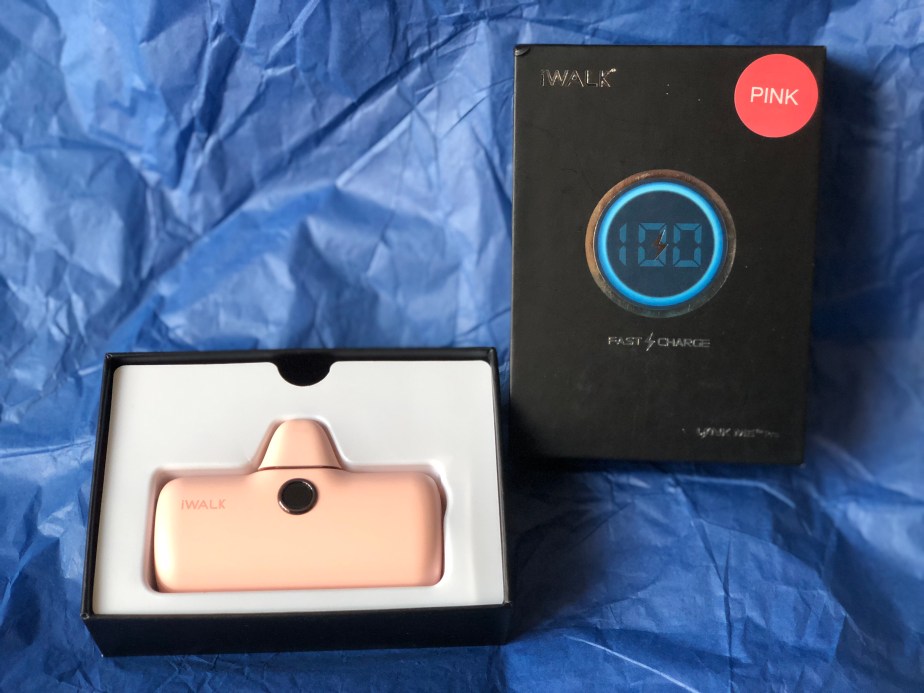
iWALK Magnetic Wireless Power Bank for iPhone 12/13/14

Disclaimer – We received this item free for the purpose of this review/feature but all words and opinions are our own.

Available for Apple iPhones 12 and up, without a case.

Adding extra battery life to your iPhone is a must if you can’t be near a charging socket anywhere. Festival season in particular is a difficult time for charging phones, so any extra help for your iPhone battery is needed!

The iWALK Magnetic Wireless Power Bank is specifically designed for iPhones 12 and up, which have magnetic casings which allow wireless battery charging.  The iWALK Magnetic Wireless Power Bank is designed to attach itself via its magnet to the back of your iPhone and add to the battery life. The front of the battery pack shows the percentage charge remaining, so you know how much you have available to charge your phone, and a finger ring at the back to make holding the phone easier and for the removal of the battery pack.

Each full charge of the iWALK Magnetic Wireless Power Bank gives approximately 1 full charge of your iPhone, but this can vary depending on the health of your battery and which model iPhone you have. I found that it gave roughly 1 full charge for my iPhone 12, which in addition to the 24 hours+ charge I have when I plug the phone into the wall, it gave me an extra day that I wouldn’t normally have!

To use the iWALK Magnetic Wireless Power Bank, you need to remove any extra cases on top of the iPhone then attach to the back by the built-in magnets.  The battery pack with automatically start charging when you press the power button, which is located on the side. The LED display will show you the amount of charge on the battery pack and the front of the phone shows that it’s being charged.  You can remove the battery pack easily and charge it up again using the provided USB cable, which doesn’t take long. You can use the LED display on the front again to see when it’s been fully charged.

It’s slimline, less than 1 inch thick and fits onto the back of your iPhone easily. The finger ring makes removing the battery easier but also works as a handle when using the phone, and as a rest for propping the phone up to read from it or to video hands-free.

As Apple iPhones move towards having magnetic cases, more chargers like the iWALK Magnetic Wireless Power Bank will become available and be handy for charging all appliances, not just iPhones.  I also love that it’s available in 5 different colours too (black, white, white, red and mint green) to match your phone casing! It also has an intelligent temperature control so that it doesn’t overheat whilst charging or whilst you’re using it, which is also a safety feature.

The iWALK Magnetic Wireless Power Bank is not just a handy charging gizmo for your iPhone, but an investment for all of your future Apple products which will need magnetic charging sooner than you think.

iWALK Portable Charger for iPhone

Disclaimer – We received this item free for the purpose of this review/feature but all words and opinions are our own.

Any iPhone user will know that their phone battery doesn’t last long at the best of times, but the more you use it and the older the phone, the quicker the battery runs out. That’s not great if you’re on holiday, out at a festival or running around after the kids and you can’t put your phone on charge. iWALK have the solution in a very handy, small and portable battery pack which plugs into your phone and charges, even whilst you’re still using it!

The iWALK Portable Charger Power Bank comes in a range of colours (we were sent the colour pink to review) and is accompanied by a USB cable so that you can charge it from any computer or socket with a USB attachment.  The Portable Charger is diminutive in size at approximately 3 inches long and just over 2 inches high, it can fit into pockets, handbags and purses or even be kept attached to your phone.  The USB cable is approximately 1 metre long so you can attach to your other devices, or if in travel, to the nearest USB socket. The charging plug is protected with an attached cover, so you can just snap it back and charge straight away, then put the power bank away again without damaging the charger.

The iWALK Portable Charger Power Bank delivers a full battery charge quickly (it depends on your phone battery and how much charge you already have as to how long it takes to fully charge) and can also be used on other Apple appliances which have Lightening plugs such as iPads and Apple Watch.  I found that the iWALK Portable Charger Power Bank took a little over an hour to charge my phone fully, but that was when I already had about 18% charge to it.  There’s a handy LED display on the front giving you an idea of how much charge the Power Bank has left. 

The biggest plus of having the iWALK Portable Charger Power Bank to hand is that it’s so compact and easy to carry around, lightweight and fast too. I didn’t notice it when I went out for the day and knew I would use up all the battery on my phone, and with the charger plugged in, I was still able to use my iPhone as normal. The different colours available will match your phone case colour.

Please note, the iWALK Portable Charger Power Bank is only available for iPhones 6 – 14, including most X models.

I’m more than happy with this iWALK Portable Charger Power Bank which is a company I’d never seen before, but they have a range of products available for iphones, some of which we are reviewing later!

Available in various colours from £31.99:

Edifier W820NB Active Noise Cancelling Bluetooth Stereo Headphones

Disclaimer – We received this item free for the purpose of this review/feature but all words and opinions are our own.

Being a bit behind with the times, I don’t own any Bluetooth headphones. I’m still on the wired earphones which came with my iPod, even though I know I could use wireless headphones on any of my gadgets! Edifier sent us the W820NB Noise Cancelling Bluetooth Headphones from their extensive range for us to try this week, and so far, I’m impressed!

The first thing you notice about the headphones is the noise cancelling. I put them on around the house and the ambient noise from the road outside and the planes overhead was eliminated – they really are noise reducing, even without anything playing on them!

The controls on the headphone are on/off switch, volume up/down and a Bluetooth button. With such simple controls, it was very easy to set them up to sync with my laptop, so much so that I didn’t actually need to read the instructions.  All I had to do was turn on the headphones and press the Bluetooth button until the light flashed. My laptop found the headphones within a few seconds of being set to ‘discoverable’ so it didn’t take much effort at all.  I was able to play anything from my music online, streaming or YouTube onto them.

The sound quality is excellent. With the headphones also being noise reducing, it was a surprise to hear how good they were with stereo sound and I couldn’t fault them.  I had to use a combination of the laptop sound as well as the headphone volume buttons to get the volume as high as I wanted it, but that’s only a matter of practice.  The range was also excellent with there being no disconnection on the Bluetooth wherever I was in the house which made a difference.  The headphones are nice and lightweight as well so can be taken on holiday (they’re perfect for flights or working out) and have a titanium diaphragm for longevity.

To skip to the next song or ahead in a podcast for instance, you hit the volume button up/down and hold, the Power button is for pausing.  The headphones can also be used for taking calls by Bluetooth although I haven’t tested this yet. Using the Multi-function button (with the Bluetooth symbol next to it) you can change between noise cancelling, gaming mode and use it for Bluetooth pairing.

My only gripe with the headphones are that they don’t come with a bag or pouch of some kind so that you can transport them easily or put them in an overhead locker on a flight.  There is a cable which comes with them for charging, but you won’t need to charge them very much as there’s a 49 hour playtime on each charge. The cable is a USB connection so will charge from most sockets if not your computer.

The more I play with these Edifier headphones the more I like them, and am surprised by how good they are. I have found several times when I can walk around the house with them connected via Bluetooth and still listen to my laptop, tune into a radio station or eventually be on a call and not lose any of the quality I’m used to with more expensive, wired headphones.  

https://www.edifier.com/product-w820nb.html

Currently on sale at Amazon for £69.99: https://www.amazon.co.uk/Edifier-W820NB-Hybrid-Cancelling-Headphones-Black/dp/B09FF244QP/ref=sr_1_3?crid=2T9TA5A4TJKYB&keywords=w820nb&qid=1681726589&sprefix=w820nb%2Caps%2C68&sr=8-3&th=1