Disclaimer – We have received this item for free or on a loan basis for the purpose of this review/feature but all words and opinions are our own.
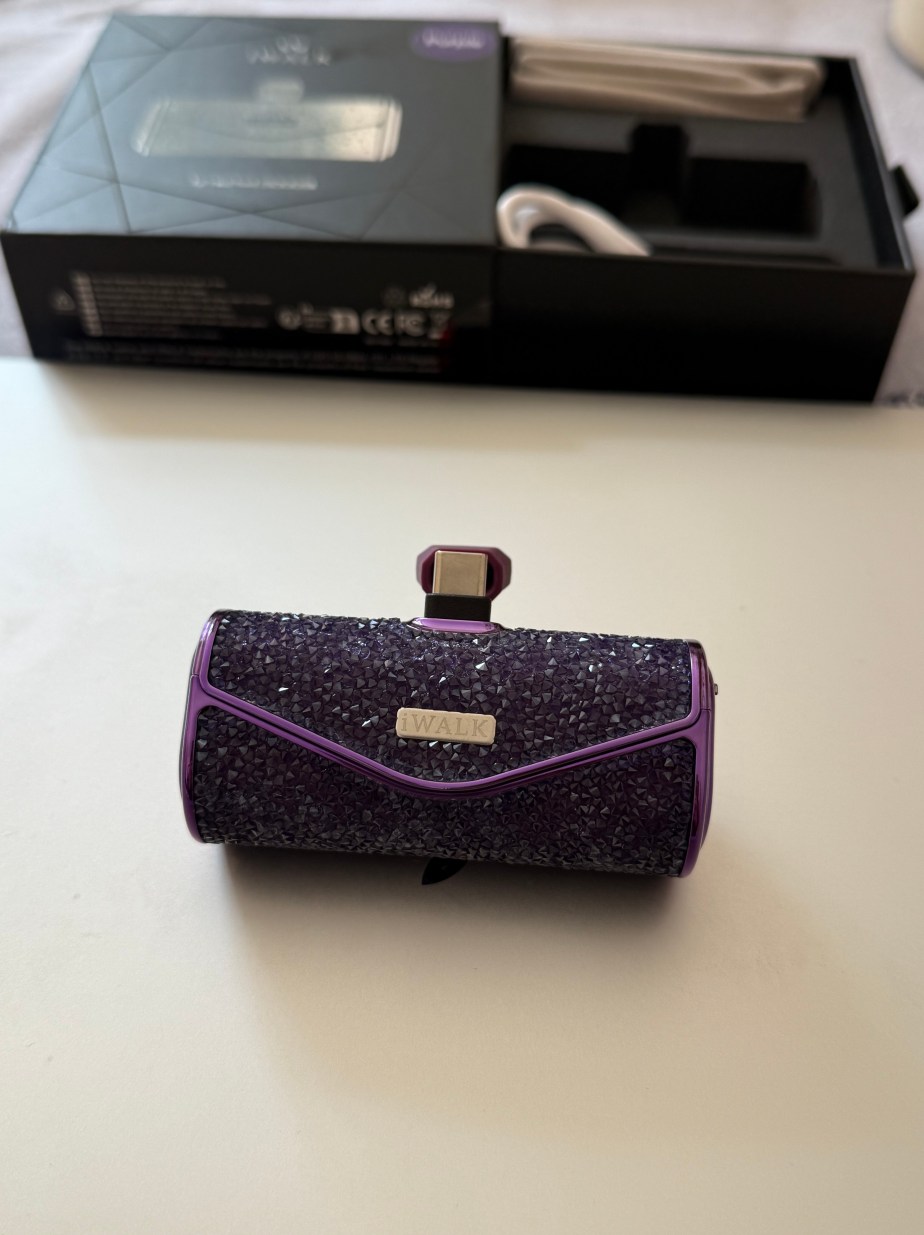
As far as Christmas gifts go, anything that is useful is good with me. The iWalk Sparkly Portable Charger is a USB-C charger with the added appeal of being sparkly, and in the case of the model sent to me to review, it’s purple too!
Suitable for newer iPhones as well as lots of other models and gadgets, the iWalk is easy to charge and easy to use. Inside the box, the charger has a cable which hooks up to your PC via a USB-C so that you can charge it whilst you’re working. It holds 500mAh of charge, which is about 2.5 battery life charges for my iPhone 16 if you start with the iWalk fully charged. It’s also able to be used with the iPhone 15 and SAMSUNG S24/23+, Google Pixel 3, AirPods, iPads and some other phone and tablet models too.
With its sparkly purple colouring, it looks like a piece of make-up rather than a boring techie object and can fit in even the smallest of handbags. I particularly like having it because you can put it in your bag and forget about it, plus you can plug it into your phone and still be using your phone (or tablet!) at the same time. Not many charging banks are easy to use like that, but the iWalk is designed to be used on the go. It even comes with its own pouch for keeping in your luggage or handbag!
This is a great gift for a teenager or a stocking filler for your loved one. It’s a bit more expensive than some chargers, but it makes up for it by being quicker on charging (42% in 30 minutes for an iPhone 16) and the super handy size that can fit anywhere!
Disclaimer – We have received this item for free or on a loan basis for the purpose of this review/feature but all words and opinions are our own.
These days, headphones are not only getting smaller, but these essentials of everyday life are being produced in better and better quality. The Technics AZ40M2 earbuds are headphones with Multipoint (meaning the headphones can be switched between use on different devices such as your laptop, phone etc) and Bluetooth with noise cancelling thanks to the earbud design.
The drivers are 6mm for ultimate comfort. The carry case is exceptionally small too, which makes them ideal for commuting or at the gym, and the short charging cord (USB-C) means the headphones can be charged at your desk, or whilst you’re travelling. The red light pulses on and off when the box is charging, green when the headphones are fully charged. There are 3 additional ear bud sizes available with the packaging, which, by the way is completely plastic free. The earbuds have about 5.5 hours of play on full charge if you’re using noise cancelling, or 18 hours without. You can charge just one headphone at a time if you still want to listen to music though, which I thought was a really good tip! 15 minutes of quick charge will give you 60 minutes of listening. I haven’t yet been able to check though, how long it takes to fully charge them from completely dead, but I’m told it’s around 3 hours.
The headphones come in 3 different colours; silver, black and these ones are rose gold, which matches most brands of phones too. You can have noise cancelling as a complete block-out, or Attention Mode to focus on speech. Natural Ambient Mode allows you to select how much background sound to hear. The touch controls on the earbuds include one tap for play, two taps on the left for volume down, two taps on the right for skip a track and so on… there’s a menu in the ‘Let’s get Started’ guide which comes in the box.
The instructions also explain how to pair the earbuds with your phone using Bluetooth. Just put the earphones in your ears, press the control pad for 5-8 seconds and you’ll hear music playing. Your device with Bluetooth will be able to pick up that the earbuds are available. It literally took 3 seconds! I would recommend downloading the Technics app for your phone though, as it gives more flexibility in the different controls you have, especially if you don’t want to learn what the tapping sequences do when wearing them.
The sound quality is excellent and very sharp. I didn’t find that the Bluetooth dropped out at all, and I used the app for the controls at first so that I didn’t have to keep looking for the paper instructions. I like my music quite loud, and I like to be able to adjust the bass etc. It doesn’t take long to learn the app and the headphones adjust quickly.
These are brilliant headphones for a stocking filler or a Christmas gift to yourself!
Disclaimer – We have received this item for free or on a loan basis for the purpose of this review/feature but all words and opinions are our own.
Keep your devices connected and up-to-date with the Krafted Connex in your pocket.
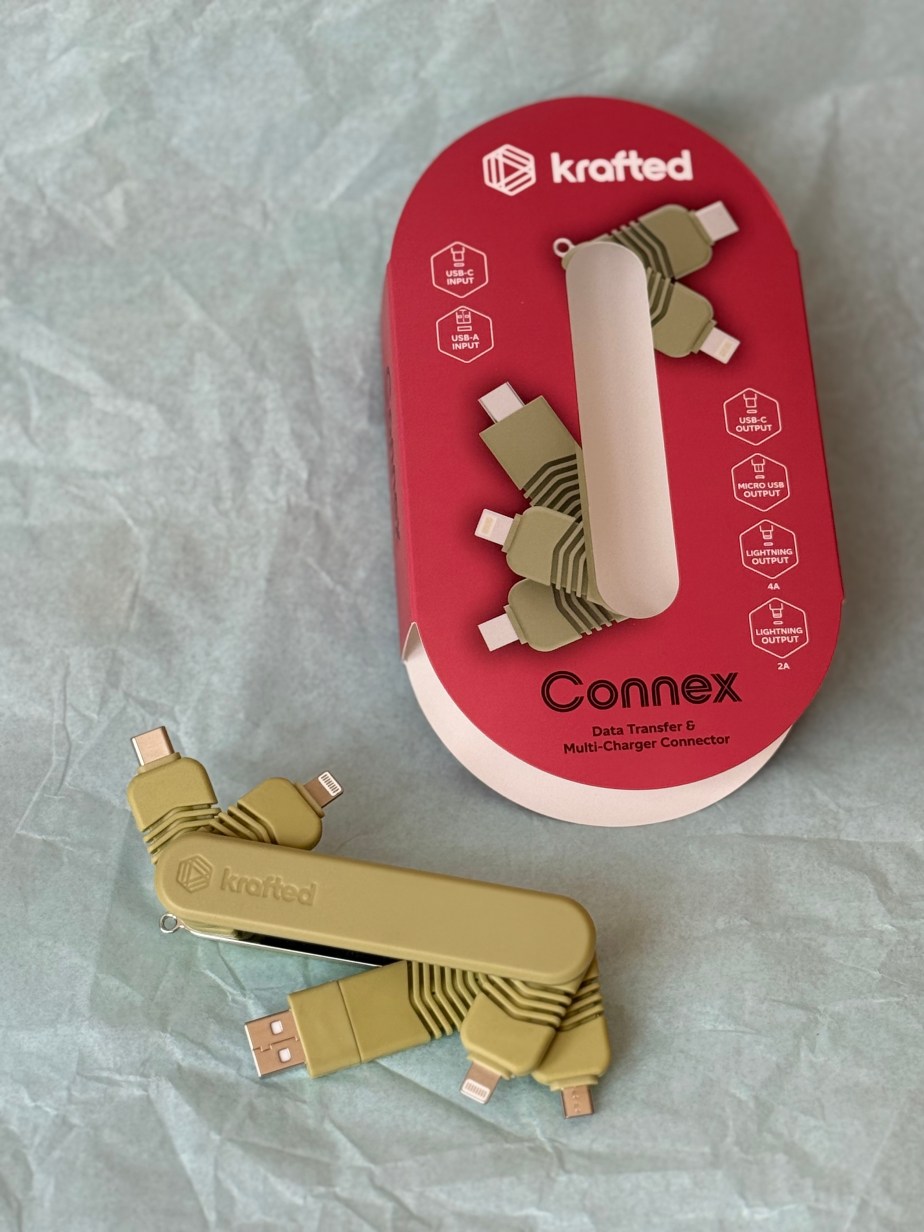
The handy Connex gadget has 5 connectors in one product which can allow for high speed data transfer between phones, laptops and other devices as well as charge from one to another. Like a Swiss Army knife, the Krafted Connex folds up into the size of a packet of chewing gum to be able to be packed, in a pocket or thrown at the bottom of a bag. It also comes in two colours; jade (like the one in the photo) and charcoal.
The Krafted Connex has a USB-C plug at one end, which comes with a USB-C to USB-A adaptor already attached. This is important because when it comes to charging or data transfer, the Connex needs to be plugged in to each device at opposite ends. So I had to remove the USB-A first, then attach my speaker to the USB-C plug on the other end in order to charge it.
All the connections are:
INPUT:
USB-C Connector
USB-A Connector (as an adaptor)
OUTPUT:
Lightening Connector x2
USBC-Connector
Micro USB Connector
There’s actually 8 different combinations of connections you can make with the gadget, and because it’s made of Flex Silicone rubber, it can twist in all sorts of ways to get the connection you need. It folds up nicely so that you can store it away and the keyring on it ensures you’ll always have it handy.
This is great as a Secret Santa or for the stocking of a teenager or someone travels a lot. You could also use them as gifts for clients who are always out and about – nearly everyone would find a use for them!
Disclaimer – We have received this item for free or on a loan basis for the purpose of this review/feature but all words and opinions are our own.
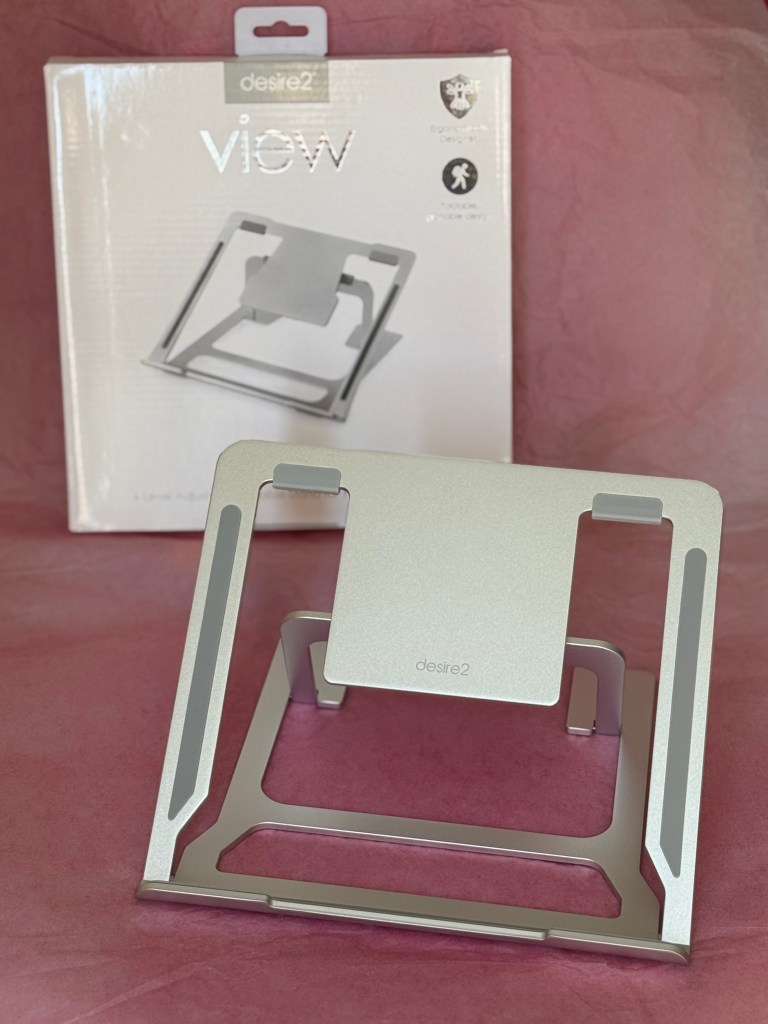
Tech accessories are everywhere nowadays, but few are actually useful! Desire2 sent us this set of lightweight aluminium stands for laptops, smartphones and tablets. As I never got around to getting any of them during lockdown, it was a bit of a treat to be able to set them up and use my tech properly!
Each of the stands pack completely flat. They’re metal, but very light to carry so you can pack them to travel or even in a laptop bag. Each one has rubber footings to make them more secure and non-slip on a surface. The laptop stand can hold a computer measuring from 10-15.6 inches with 6 different level adjustments depending on what height you’re looking for. The higher levels allow you to prop up a laptop (such as a MacBook) with a camera at the top so that you’re eye-level during a call. Otherwise, the lower levels allow you to watch a video or type at a more comfortable angle.
The smartphone stand can be used for either phones or tablets, depending on their size and how you want to view them. With a rubber foot to hold your device up from the table surface, it won’t mark a touchscreen as there are no metal corners. You can adjust the angle of the view as well as the back support to give a higher lift. You can feel that even though the stand is lightweight, it’s incredibly anchored and doesn’t move, especially with the grips on the base. The last stand is the smaller ‘Anywhere’ model which is designed for taking anywhere. This stand is so small that it can be flattened to about 1 centimetre flat and even fits in a pocket, but it’s useful for both phones and tablets.
Each of the stands are designed for easy charging access, especially as most smartphones charge from the bottom nowadays. The smaller stands are both really stable, and the laptop stand would be too but for the lever at the back that doesn’t sit as firmly in the support as I would have liked. It collapses if you pick it up from the wrong arm as there’s no pivot in the lever and changing levels means you have to pick it up and hold the weight of the laptop to fix it into place. It works perfectly if it’s stationary but it would be more sturdy if the back support snapped into place. It still folds flat though and is still very strong.
These are great as Secret Santa items or for setting up a home office for a teenager needing accessories for their new laptop. I have so many uses for them because I always have my phone and laptop around and need some way of propping them up whilst I’m doing a million other things, so I’m very glad to have them at hand now!
Disclaimer – We have received this item for free or on a loan basis for the purpose of this review/feature but all words and opinions are our own.
Lavender has long been used for medicinal purposes, not just to aid sleep but it has healing properties that help the immune system, anxiety, stress and depression. Lavender Lux are a Czech company who grow the lavender in the Lavender Valley in the Czech Republic and turn them into beautiful products to benefit health as well as happiness. We were sent the Anti Blemish Roll On and the Bio Hemp Balm with Lavender (along with some lovely lavender tea bags too!)
The Anti-Blemish Roll On can be used on acne prone skin or on areas which need some TLC. Simply shake the bottle, roll on and the lavender’s anti-inflammatory and anti bacterial properties sooth the skin and help reduce the bacteria that cause acne. It ca be used several times a day, and the scent of the lavender can also help with anxiety and sleep. Only a small amount is needed, it massages into the skin easily. This is a lovely alternative to a perfume too, especially if you aren’t getting dressed up to go out but need something convenient.
The Bio Hemp Balm is used on cracked or dry skin, eczema and minor skin legions. The combination of hemp and lavender nourish the skin, especially lips which can become chapped and sore. The lavender fragrance really comes through when you use it and the 30ml size is enough to take on holiday or leave in your handbag for minor cuts, grazes or dry areas. I love this for when my skin is dry during the day and for my lips at night before I go to bed. It’s hydrating and medicinal at the same time.
The lavender tea bags come in slightly different flavours (they’re written in Czech though so I can’t tell you which flavours they are!) and they give an indication of the type of other lovely products available online at Lavender Lux.
Disclaimer – We received this item free for the purpose of this review/feature but all words and opinions are our own.
Most people are off to some kind of outdoor event this summer whether it be a concert, festival, picnic or even camping so if you’re taking your phone, you’d be prudent to take some extra battery charge for your phone too. The iWalk Portable Phone Charger for iPhone (Android also available) holds 4800mAh of charge for your phone, and all in this tiny little charge bank you can take anywhere!
Available in white, pink or black, the iWalk Portable Phone Charger takes around 90 minutes to charge but gives more than 100% of charge to an iPhone. So if your phone is down to 0%, the iWalk Charger will charge it up to 100% with a little charge left over to charge again, or hand to another friend to charge instead! (This is from me testing the charger, not official statistics from the manufacturer.) This particular iWalk is USB-C so fits newer iPhones and nowadays there are multiple other devices which aren’t phones but still have USB-C connections which can also charge from the iWalk. It’s handy to have around so I keep it in my handbag so that I can charge my phone if it goes low.
As the iWalk Portable Charger is so small (it measures approximately 3 inches long or 7.5 centimetres) it is roughly the width of your phone so you can still either type or talk on our phone as it’s charging at the same time. The compact size also makes it easy to pack away or even put in your hand luggage so that you never run out of charge. It is charged with a USB-C cable which comes with the packaging and as it doesn’t take long to charge, you can add it to your laptop as you work or even use an adapter and plug it into the wall. The two items together are so compact you can take them anywhere and the extra charge they provide will be invaluable if you lose charge.
The iWalk Portable Phone Charger also differs to other chargers because there’s a handy display on the front. When you press the button on the side, the front display shows you how much charge the device holds as a percentage. As it charges, the number goes up until it’s 100%, which doesn’t take as long as you think. The charger is lightweight but also really robust so you can keep it charging whilst moving around, even if you’re doing sports or on bumpy transport.
I really like having the iWalk Portable Charger on hand and knowing that it will reliably keep charge and then transfer it to my phone whenever I need it, and it’s especially handy as it charges as you use your phone. Not all the portable chargers can do that. Makes a great gift for a teen or for someone going travelling too.
Disclaimer – We received this item free for the purpose of this review/feature but all words and opinions are our own.
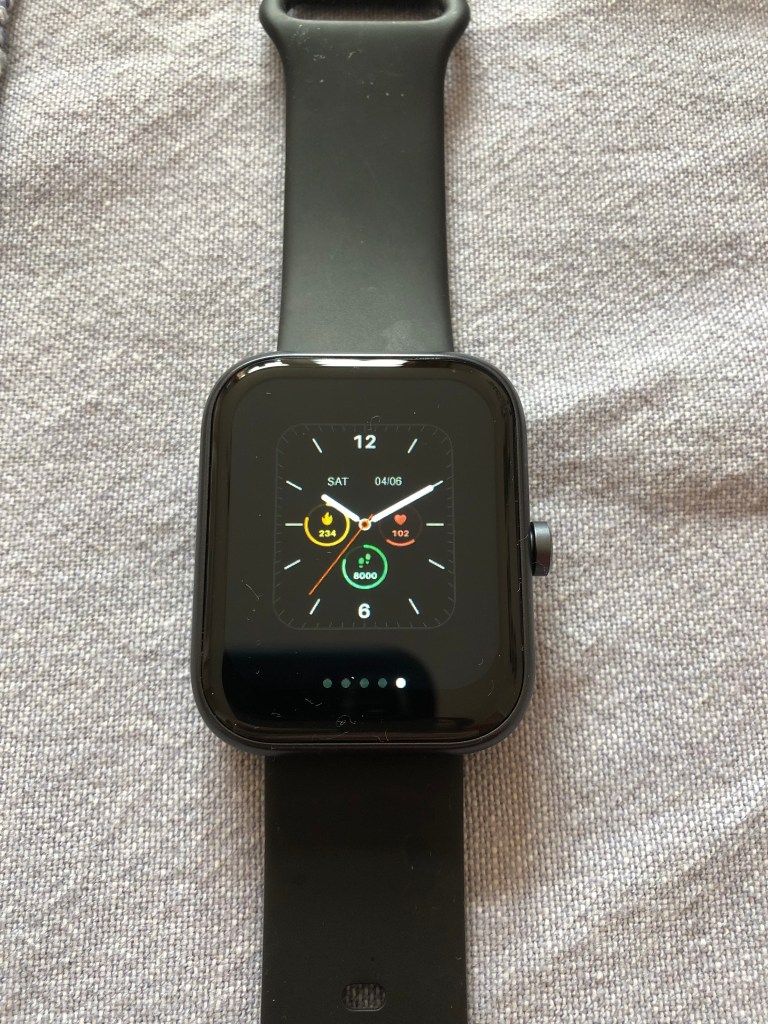
Combine a watch, sports monitor and health monitor with the TOZO S3Ultimate Smart Watch for a stylish wear this summer.
Smart watches have come a long way with most of us using them on daily basis and replacing the mechanical watches that only tell the time and the date at best. The TOZO S3Ultimate Smart Watch contains multiple functions and the latest technology and at less than £50 it costs roughly the same as a cheap watch but with all the benefits. We were sent one to try this week and to see how well it worked and I tracked it during my Park Run and gym sessions to see how well it worked and whether it gave me what I wanted.
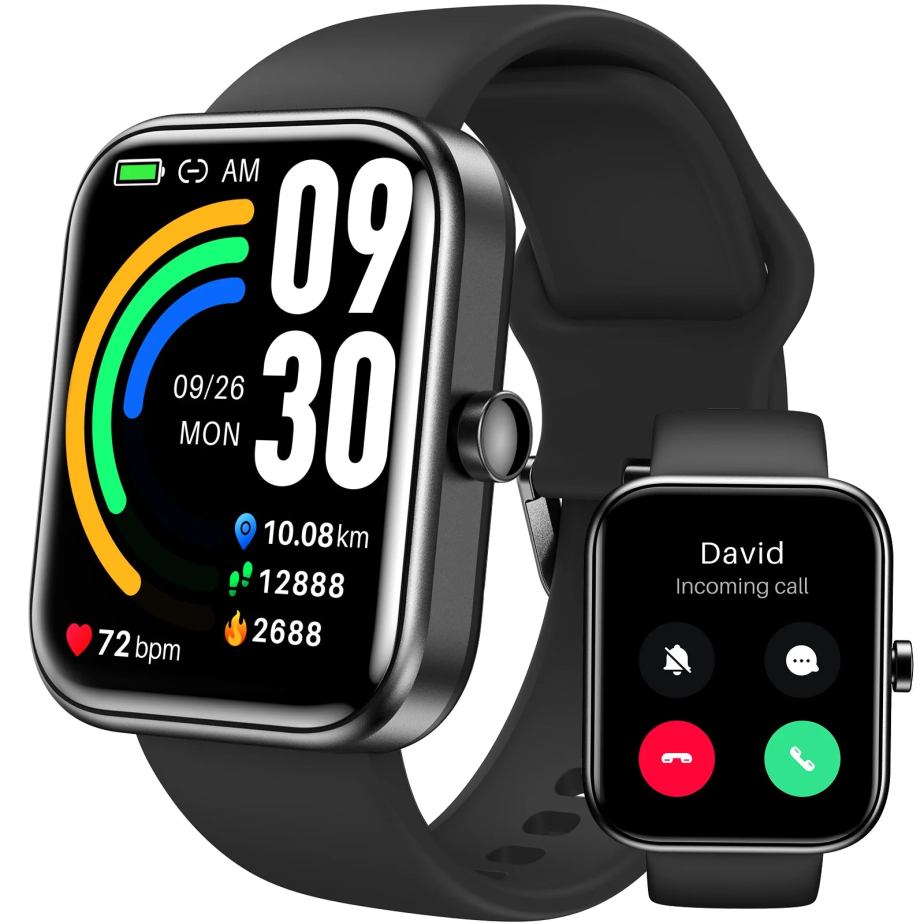
The first aspect of the TOZO S3Ultimate Smart Watch is the screen. It’s 1.83 inches, square and has the touch functionality that makes it distinguishable from the old-fashioned watch. The coloured screen shows information it gathers from throughout the day including date, time, bpm, steps, calories and your sleep information. Touch and hold the screen to see other displays that are available such as a conventional clock face (if you prefer to see analogue time rather than digital) and a sports display showing your number of steps, distance and calories. The other displays give a variation on the health data and time but in different configurations, depending on how you like to see your summary display.
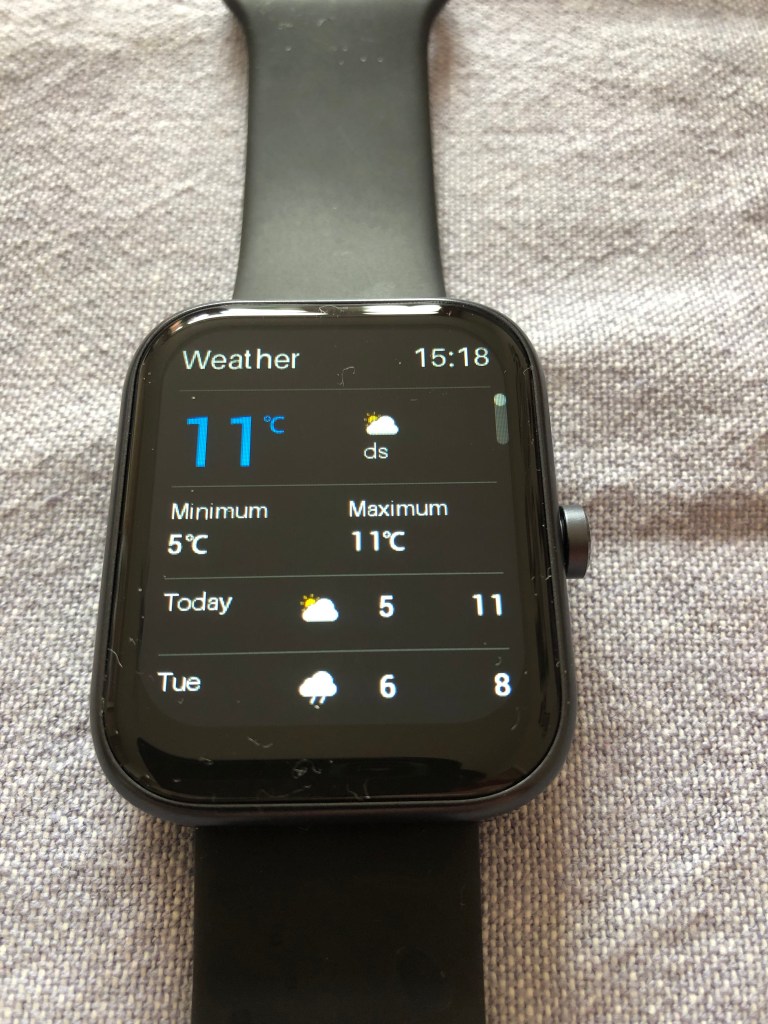
The TOZO S3Ultimate Smart Watch also has a microphone and Bluetooth to connect to your phone (it works with both iPhone and Android) and allows you to call from it. Connecting to Bluetooth was easy – once the Smart Phone was charged, a QR code comes up and allows you to download the app. The app then takes you through the Bluetooth pairing easily. This makes workouts and running easy as you have free hands and can accept or make calls from the touch of the screen. The Smart Watch also notifies you of new messages and allows you to view older messages that come into your phone. If you swipe the face of the smart phone, you can view all sorts of information if you are link your phone via Bluetooth including the weather, stress levels and activity.
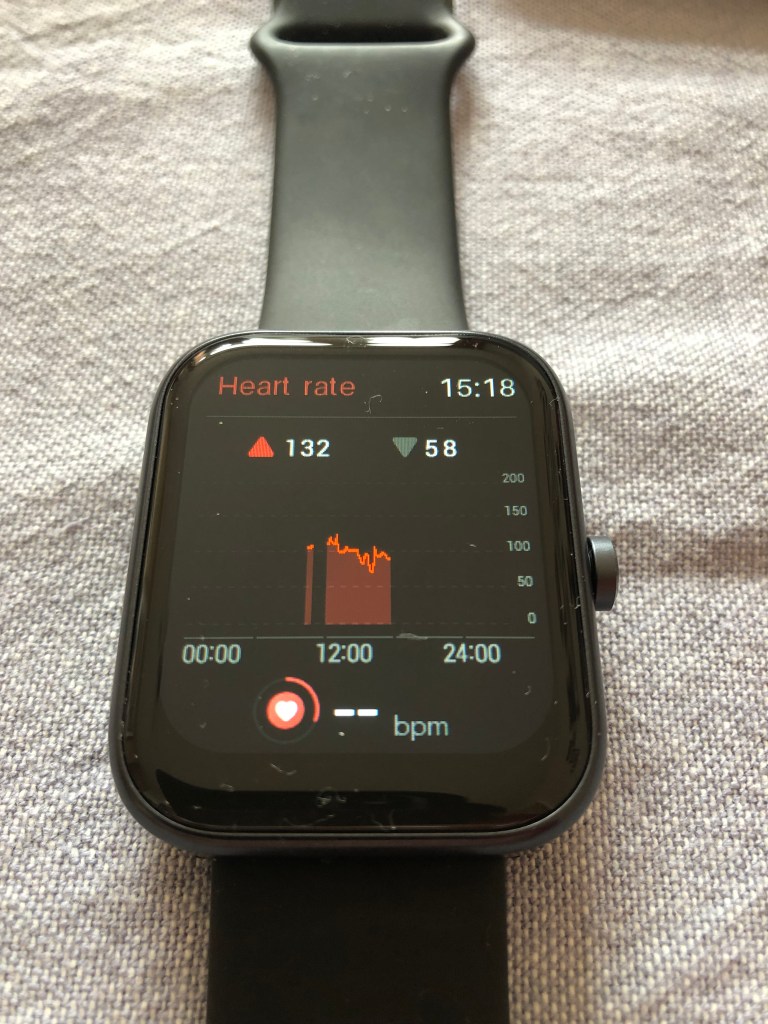
The health monitoring is up there with the best of the smart watches as just by wearing it, your heart rate, sleep, blood oxygen saturation level and activity tracking are stored. Particularly interesting to me was the blood oxygen saturation level so that I can compare it at rest, night and when exercising as I’ve never had this facility before. The distance and steps is not new to me, but it was refreshing having it on a different display and being alerted whenever I got to 3 kilometres. On the app though, you can change any of your goals, so I was able to change it to 5 kilometres once I had used the watch for a while.
The watch arrived with no charge at all so I was able to see how long it took. The cable is included in the pack and works as a magnetic point at one end to attach to the watch and the other end is a USB so you can plug into any socket or any laptop to charge. It took about 1 ½ hours to charge fully and you can see the percentage charge amount on the display screen. The first full charge lasted about 6 days which is longer than my FitBit and longer than my iPhone, but with different variations of use, the battery will last longer.
The app gives more detailed information on all your stats and includes data such as menstrual health, blood oxygenation and standing amount. One of the areas I was most interested in was the ability to record a specific exercise and see individual information. You can set the watch so that when you press the side button, it comes up with your favourite sport (in this case it was Outdoor Running) and it will calculate your time, steps, bpm and other information relating to your exercise. The more detailed information is on the app which you can look at later.
The TOZO S3Ultimate Smart Watch has all you need of a watch, the information that you see on your phone and a detailed health monitor, all in one small device. It’s easy to use, and when you get into the settings and how it works it’s really easy to set up and to make it work for you the way you want it to. For my Park Run, it gave me all the information of my FitBit plus Blood Oxygen Saturation which is new to me, and very interesting.
I would highly recommend the TOZO S3Ultimate Smart Watch as an alternative to the more high end watches which cost a lot, lot more and do the same job just as well. It looks stylish too with the black face and black strap, and dare I say it, looks like it’s a lot more expensive than it is!
Available on Amazon at a discount at the moment but usually £49.99:
Disclaimer – We received this item free for the purpose of this review/feature but all words and opinions are our own.
Edurino create playful learning apps on phones and tablets for children aged 4-8 years old. There’s a variety of different apps, each guided by a cartoon character and cover subjects of learning such as numbers & shapes, word games, plants & wildlife and creativity & design. This Edurino game is for Early Coding Skills – games which stimulate children’s ability to solve puzzles and non-verbal reasoning.
The Early Coding Skills set from Edurino is guided by the character Luca and uses the Luca figuring and Edurino pen which are included in the starter kit. You need your own phone or tablet to download the app (there’s a QR code in the instructions to make it easier) and an adult’s email address for the login. Once the app is downloaded, you put the figurine on the screen so that it reads which starter pack you’re working from, then after entering the login details, you create the character of your child to take part in the story, including their name.
The Edurino Early Coding world takes you on a journey to discover what the Chaos Bugs have done to mess up the factory and along the map, your child solves the puzzles to further the characters along the journey. Some of the puzzles are recognition of shapes and cartoon faces, creating blocks to the right shape in order to fix the wall and simple pattern recognition. The games are all aimed at children aged 4-8 so they’re not super hard, but if your child gets stuck and can’t ask you for help, they can click on Luca onscreen and ask for help. The Edurino Pen is designed to teach children how to hold a pencil properly (there’s even a tutorial onscreen as part of the app) and uses the pen in different ways to challenge their thinking, but also get them used to using the pen, which works on any touchscreen.
Depending on the age and skill of your child, this game could be finished relatively quickly, or you can replay each of the levels to give them more practice. The levels have different skills which are needed to complete them, and build up to a set of skills needed for coding. Even if your child isn’t interested in coding, the games are straightforward and stimulating that they can sit and complete them without much help. If you do need to help, it’s pretty easy to work out what you have to do, and the verbal instructions are really easy to follow.
It did take a while to set up though and you need to be connected to the internet. I couldn’t find a way of playing without creating an account either, so you have to be prepared to give your email address over and be able to verify it so if you’re using this to go on holiday or drive somewhere, make sure you set it up first for children otherwise it will become very frustrating! There’s also places where it directs you to the parent site which is in German, so be prepared to have to re-type to the UK/US version to be able to read in English.
It’s a great way of teaching children the basics of coding and how to problem solve with non-verbal reasoning. The Edurino app is easy to follow for children and safe too with the parental controls which requires the user to be able to read. It’s quite pricy at £44.95 but that includes the price of the Edurino Pen and the figurine too, which children can place over the pen and play with at another time. Even better, they learn a lot too!
Disclaimer – We received this item free for the purpose of this review/feature but all words and opinions are our own.
There is so much choice on the markets for phones nowadays, and with choice comes complicated tech words, specifications and all sorts of apps which just adds to the confusion.
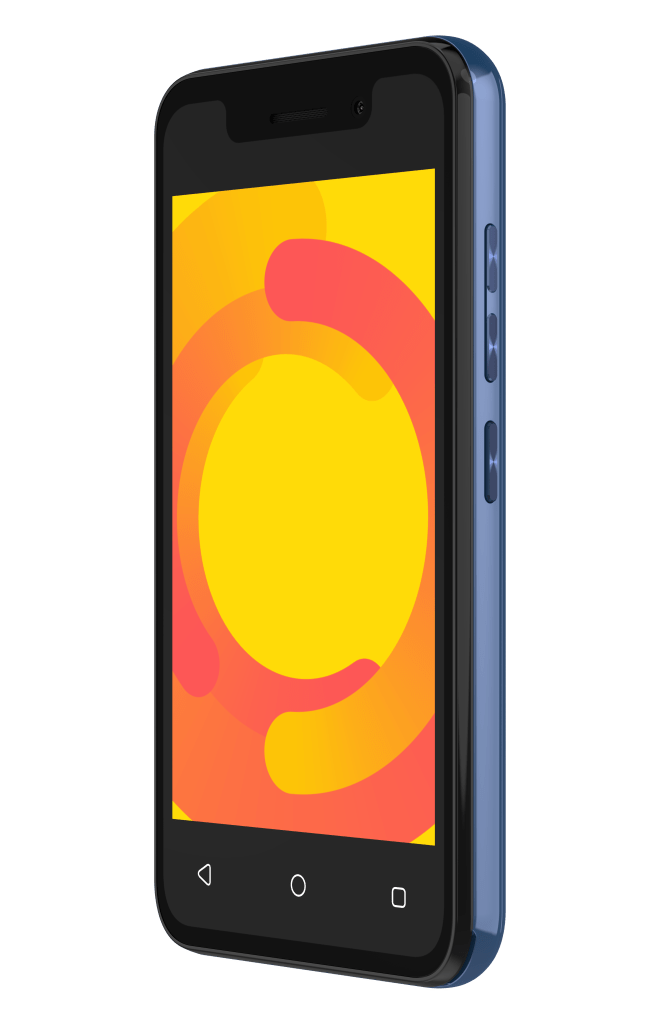
The IMO Q2 Pro Smartphone is an Android model, with all the features you’d want on a modern phone but without the pricetag, or the complications. For as little as £34.99 and available at High Street shops, it saves so much money compared to the bigger players on the phone market without the worry of breaking it or losing it.
As for the specifications, it has what you would want to keep a phone safe. There’s facial recognition to unlock it, so you don’t have to worry about passwords or pin codes. The phone is a standard 16GB of memory which is enough to hold the random photos we all take as well as video but also has an extra Micro SD slot so that you can add 32GB of memory if you need to. I personally find it easier to have a remote hard disk that backs up all your photos and videos so that there isn’t the worry but depending on what you need the phone for, you might prefer just using the memory on the phone.
Speaking of photos, there’s a 5MP rear camera and 2MP front camera (for taking selfies) which isn’t the most powerful phone camera on the market but it is a good quality to be able to take photos to upload to social media. As with all apps too, you can add filters to whichever social media you are uploading to, even if the photo isn’t perfect when you take it.
One of the universal problems with smartphones is the life of the battery when on full charge. The IMO Q2 Pro Smartphone has a battery life of approximately 15 days when on standby and not being used. I found that I didn’t have to charge it for several days with light use and taking some photos, which is much better than most smartphones. The speed when connecting to the internet was excellent too. The IMO Q2 Pro Smartphone is 4G, which is the standard frequency in the UK. The new 5G is rolling out now but doesn’t cover the majority of the country yet and if you have a phone that is only 5G, it won’t convert to 4G when there’s no 5G frequency. The most common frequency is 4G still.
The phone also connects to Wifi and Bluetooth for downloading information or if you want to connect another device (such as a speaker) to play any of the MP3s stored on the phone.
Usability wise, it’s very easy to navigate with just 3 simple buttons and a simple Android 11 userface. It only measures just over 12 centimetres long and 6 centimetres wide so it can fit in your pocket or a handbag, or even in the glove compartment of the car. It’s great for taking on holiday and using with a spare SIM card in case it gets lost or you don’t want to use your expensive phone on adventure days out.
Lastly, this phone is great as a first phone for children that isn’t complicated or expensive if it gets lost or broken or for older people who aren’t familiar with smartphones. It’s easy to use so it doesn’t need much explanation. The long battery life means you can charge it less frequently and it’s still usable.
Disclaimer – We received this item free for the purpose of this review/feature but all words and opinions are our own.
“Play, pause and crank up the volume…”
I was so excited to be receiving a Marshall Bluetooth speak to review, but until it arrived, I had no idea that Marshall speakers were as legendary as their amps, nor did I know why.
Impressive isn’t the word. This isn’t just a speaker but a whole solution for anyone who loves music. Let’s start with what it can do as a speaker first.
Setting up on Bluetooth is so easy I didn’t need instructions. Just turn on the Marshall speaker with the brass button and after the introduction sound, press the Bluetooth button on the top of the unit to make it discoverable. My laptop Bluetooth found it immediately and connected. Easy as that, and I just played my music from my desktop straight onto the speaker. There’s a Bass and Treble control on the Marshall too, so you can adjust how you want to hear your favourite music. The main button allows you to skip, pause or rewind a tune as well and there’s an LED to tell you the battery level. On the back, it connects with AUX or a power cable which is included in the box and how you power it up, giving 20 hours overall.
“Middleton sound… built for the road.”
Marshall are one of those classic brands which last forever in folklore and until you own one, you don’t see the benefit. Much like how Apple users and Tesla drivers were mocked back in the day, once you start using the Marshall products you don’t ever want to switch back. Instead, you just find fault with all the other Bluetooth speakers out there and compare them to ‘your’ Marshall to anyone who is near you, whether they want to know about it or not!
The speaker boasts, two 3/5” tweeters, two 3” woofers and two passive radiators. In all, these are all speakers placed on each side of the Middleton speaker to create 360 degree sound. It’s not just the speaker surround sound which leads to its versatility, but other ‘nice to haves’ are in there too. For example, it can be used indoors and outdoors thanks to the water resistant casing and can last 30 minutes under water. It’s dust resident too, so it’s perfect for the beach, but if you have kids around in the summer, the odd splash, tipped over drink or falling in the dirt isn’t going to harm your Middleton. In fact, with the extra tough casing, not much is going to damage it at all. The casing is made of 55% post- consumer plastic, so it’s not all materials and it’s 100% PVC free.
Are you sold yet?
It’s perfect for festivals too. The battery holds 20 hours of charge but takes only 4.5 hours to fully charge. However, with only 20 minutes of charge you get 2 hours of solid music time – perfect if you need to charge in the car quickly before you go out. It can work as a battery pack as well, allowing you to charge up your phone or appliances using the USB-C cable. It has the most up-to-date Bluetooth 5.1 too, so you can play music from 10 metres (that’s 30 feet) with no problem. So charge your phone in the car, and you can still play your music on your Marshall. It weighs just 1.8 kilograms (that’s 4lbs) so you can carry it on as hand luggage too if you really want… but makes it great and compact for the car too.
Multi host functionality allows you to connect to two devices at once. I didn’t know what this meant, so playing around with the controls and reading the instructions I realised it meant you can connect the speaker to two different devices at once. This means it can be connected to another speaker, phone or Bluetooth device to be able to share the music. If you’re worried about plugging it in to get updates, then don’t fear as the speaker does this remotely over-the-air or you can use the Marshall app on your phone to control the music and updates.
It had never occurred to me to have more than one speaker, but for festivals, this is a great feature. You can literally play the same music across as many Marshall speakers as you like, using a multi-speaker Stack session. It’s like looking at a wall of Marshall amps across a festival stage but in miniature form!
I’m sure once you use it several times and find out how easy the controls are, there are lots of different uses for it. How about Bluetooth-ing the soundtrack to movies on your tablet? Or keeping the children playing in the other room whilst controlling the music from your office as you work? It may seem pricy for one speaker, but with everything it can do and it’s durability, it’s an investment, especially if you love your music.
As time goes on, the Middleton is built for longevity as the updates and app will include new ways of using the Marshall speaker and the craftmanship of the speaker means it will last for a very long time. The only reason you’ll need a new speaker is to stack one in every room!
Disclaimer: We received this product free of charge for the purpose of this review and all thoughts and opinions are our own.
It’s holiday time and we’re off exploring the beautiful countryside in Somerset. We’ve got everything packed, including all our tech – it’s surprising just how many items need charging. A quick look shows two phones, two smart watches, earbuds, a camera, the GPS for my bike and a couple of rechargeable bike lights. That’s a lot of charging cables and there are only two USB sockets in the motorhome.
To make things easier, I’m trying out a USB power bank from iWALK. The PowerSquid has a capacity of 9000mAh and offers quick charging to compatible devices. Its name comes from the fact that it has three built-in charging cables that are permanently attached, looking like the legs of a squid. With micro USB, USB-C and Lightning, many devices are covered but for complete coverage there is of course a standard USB socket too. Charging is via USB-C and a USB-C cable is included.
Mine is white but black and pink models are also available, it weighs 200g and feels really well made. A small LED display gives the percentage charge and also shows if fast charging is being used.
With multiple outputs the PowerSquid is able to charge a number of devices at the same time and it can also take on a charge at the same time, this was perfect in the motorhome where USB sockets are limited. It is also capable of offering fast charge to compatible devices with 5v, 9v or 12v offered on the USB-C and USB-A connector. It can charge a Samsung S22 up to 50% in 30 minutes and was able to charge my phone around one and a half times on a full charge so it will be great for weekends away. The cables all clip neatly into the casing so no more tangled cables in your bag.
It is compatible with iPhone 14/14 Pro Max/iPhone 13 Pro Max/13 Pro/13, Samsung Google Pixel & Apple HomePod devices.
I am really happy with this power bank, it is going to be indispensable when travelling both in the UK and abroad. My teenage sons have already been eying it up so that’s their birthday presents sorted too!
Disclaimer – We received this item free for the purpose of this review/feature but all words and opinions are our own.
Available for Apple iPhones 12 and up, without a case.
Adding extra battery life to your iPhone is a must if you can’t be near a charging socket anywhere. Festival season in particular is a difficult time for charging phones, so any extra help for your iPhone battery is needed!
The iWALK Magnetic Wireless Power Bank is specifically designed for iPhones 12 and up, which have magnetic casings which allow wireless battery charging. The iWALK Magnetic Wireless Power Bank is designed to attach itself via its magnet to the back of your iPhone and add to the battery life. The front of the battery pack shows the percentage charge remaining, so you know how much you have available to charge your phone, and a finger ring at the back to make holding the phone easier and for the removal of the battery pack.
Each full charge of the iWALK Magnetic Wireless Power Bank gives approximately 1 full charge of your iPhone, but this can vary depending on the health of your battery and which model iPhone you have. I found that it gave roughly 1 full charge for my iPhone 12, which in addition to the 24 hours+ charge I have when I plug the phone into the wall, it gave me an extra day that I wouldn’t normally have!
To use the iWALK Magnetic Wireless Power Bank, you need to remove any extra cases on top of the iPhone then attach to the back by the built-in magnets. The battery pack with automatically start charging when you press the power button, which is located on the side. The LED display will show you the amount of charge on the battery pack and the front of the phone shows that it’s being charged. You can remove the battery pack easily and charge it up again using the provided USB cable, which doesn’t take long. You can use the LED display on the front again to see when it’s been fully charged.
It’s slimline, less than 1 inch thick and fits onto the back of your iPhone easily. The finger ring makes removing the battery easier but also works as a handle when using the phone, and as a rest for propping the phone up to read from it or to video hands-free.
As Apple iPhones move towards having magnetic cases, more chargers like the iWALK Magnetic Wireless Power Bank will become available and be handy for charging all appliances, not just iPhones. I also love that it’s available in 5 different colours too (black, white, white, red and mint green) to match your phone casing! It also has an intelligent temperature control so that it doesn’t overheat whilst charging or whilst you’re using it, which is also a safety feature.
The iWALK Magnetic Wireless Power Bank is not just a handy charging gizmo for your iPhone, but an investment for all of your future Apple products which will need magnetic charging sooner than you think.
Disclaimer – We received this item free for the purpose of this review/feature but all words and opinions are our own.
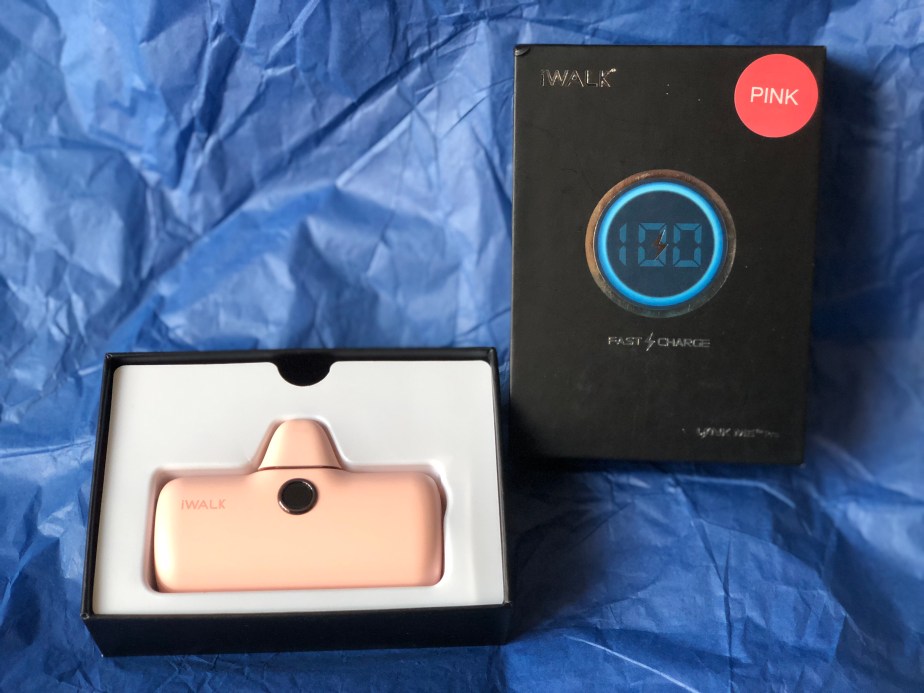
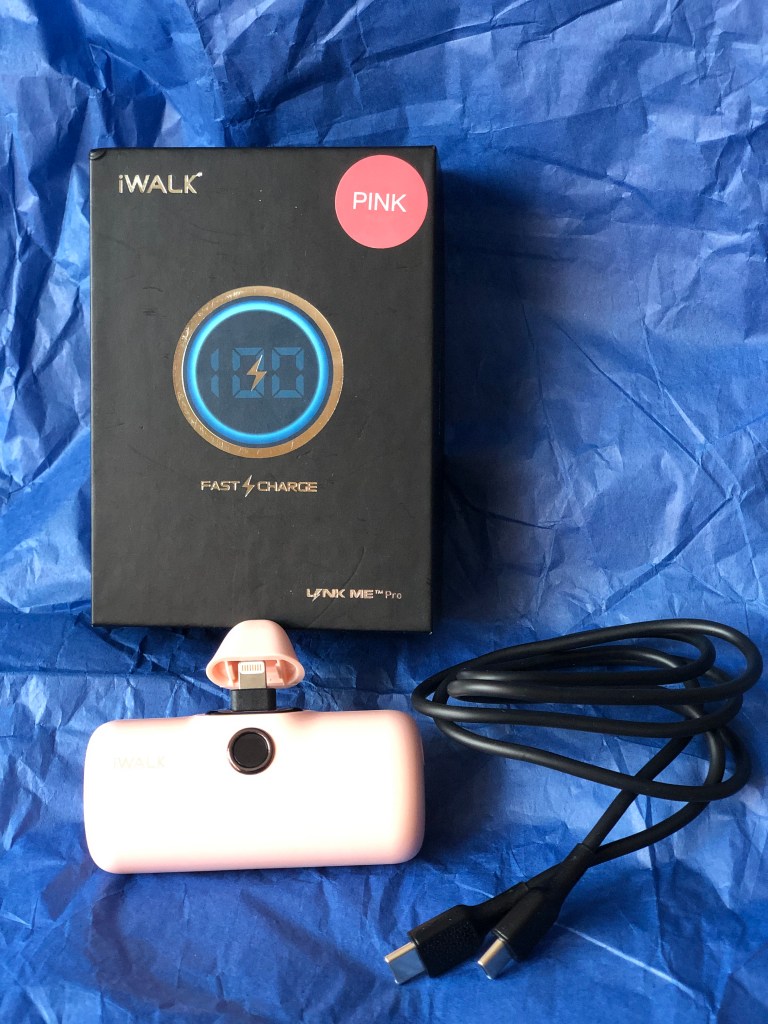
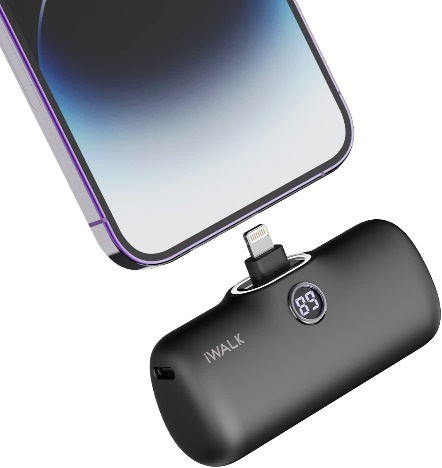
Any iPhone user will know that their phone battery doesn’t last long at the best of times, but the more you use it and the older the phone, the quicker the battery runs out. That’s not great if you’re on holiday, out at a festival or running around after the kids and you can’t put your phone on charge. iWALK have the solution in a very handy, small and portable battery pack which plugs into your phone and charges, even whilst you’re still using it!
The iWALK Portable Charger Power Bank comes in a range of colours (we were sent the colour pink to review) and is accompanied by a USB cable so that you can charge it from any computer or socket with a USB attachment. The Portable Charger is diminutive in size at approximately 3 inches long and just over 2 inches high, it can fit into pockets, handbags and purses or even be kept attached to your phone. The USB cable is approximately 1 metre long so you can attach to your other devices, or if in travel, to the nearest USB socket. The charging plug is protected with an attached cover, so you can just snap it back and charge straight away, then put the power bank away again without damaging the charger.
The iWALK Portable Charger Power Bank delivers a full battery charge quickly (it depends on your phone battery and how much charge you already have as to how long it takes to fully charge) and can also be used on other Apple appliances which have Lightening plugs such as iPads and Apple Watch. I found that the iWALK Portable Charger Power Bank took a little over an hour to charge my phone fully, but that was when I already had about 18% charge to it. There’s a handy LED display on the front giving you an idea of how much charge the Power Bank has left.
The biggest plus of having the iWALK Portable Charger Power Bank to hand is that it’s so compact and easy to carry around, lightweight and fast too. I didn’t notice it when I went out for the day and knew I would use up all the battery on my phone, and with the charger plugged in, I was still able to use my iPhone as normal. The different colours available will match your phone case colour.
Please note, the iWALK Portable Charger Power Bank is only available for iPhones 6 – 14, including most X models.
I’m more than happy with this iWALK Portable Charger Power Bank which is a company I’d never seen before, but they have a range of products available for iphones, some of which we are reviewing later!
Disclaimer – We received this item free for the purpose of this review/feature but all words and opinions are our own.
Back to work this week after the Christmas break and many of us are having to haul laptops into hotdesking offices. The STM Goods Myth Laptop Bag has a clever design and material features which make it stand head and shoulders above other backpacks and lends itself ideally to laptop carrying.
For starters, the handles are designed with a cooling mesh which sits comfortable on your shoulders and allows air to pass through, saving your skin from heating up when there’s a heavy load inside the bag. On the back, there’s also the Pass-port Passthrough, a new design which allows you to slip the backpack onto the handles of a suitcase or hand luggage trolley so that you can transport both with one hand. It saves having the backpack handle clasped onto the suitcase and falling off due to not being balanced.
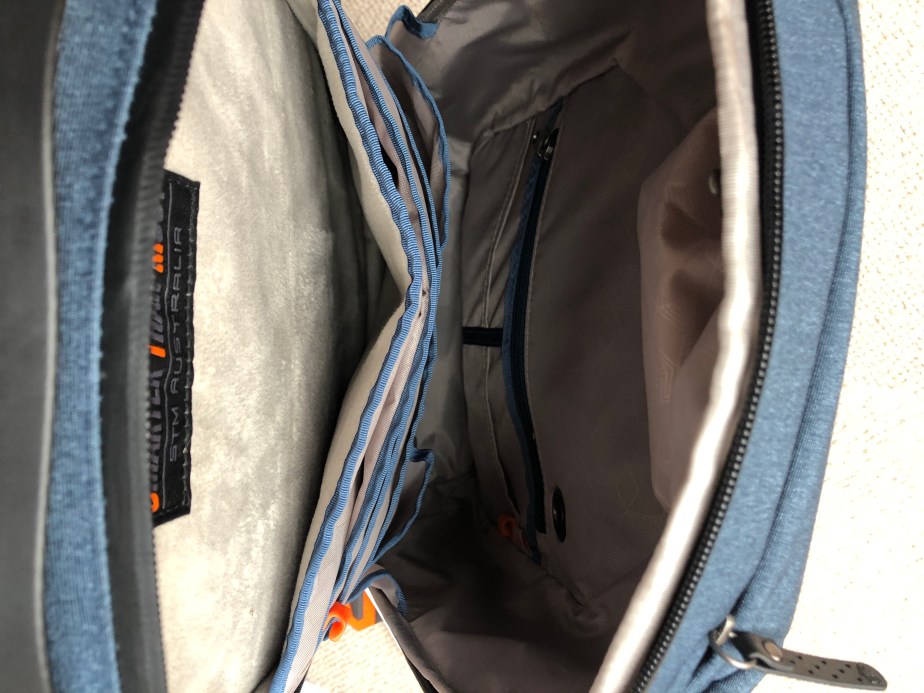
Inside, there’s completely new technology to support your laptop. Instead of just a pocket, there’s a whole compartment which has cushion technology to save your laptop (or tablet) from impact when setting it down on the floor or from being bashed about on transport. You’ll also find tons of other pockets and compartments inside, specially designed for your AirPods, or for wired headphones to be clipped inside and kept safe. The ample pockets are big enough for phones, tablets, notebooks and even pens and are all hidden away inside to make it more difficult for anyone to pickpocket you, as well as being cushioned from impact.
On the front of the backpack, there are more pockets too. If you’re travelling, the front pocket is ample size for passports and travel documents plus a smaller pocket at the top for loose change. Although the STM Myth Laptop Bag is for transporting laptops to and from work, this backpack actually works really well for travelling by plane because of its size (it’s suitable as hand luggage) and the ‘bump’ technology keeps gadgets safe when on transport. However, it also has the durability needed when travelling a lot. Having been completely redesigned, the team at STM have thought about everything. As we don’t use money as much now and rely on our phones to store our credit card details, it means we can carry around less precious items but need to keep phones and laptops safe. The zips on the STM Myth are big enough to accommodate a lock if you need to, and there’s room inside to hide a Tile or Apple AirTag.
The more I look at the bag, the more I find uses for it! I took this away on holiday where I only had a limited amount of hand luggage and found that I could fit most travel items in it easily, and more importantly, they were safe and protected and didn’t get crushed in transit. Even my headphones were safe from being squashed!
The little details in the STM Myth Laptop Bag make it excellent for travelling, working or even as a gift. The zips are protected with a cover to prevent rain and dirt entering, there’s an integrated CableReady system which allows you to charge your laptop or tablet whilst it’s still in the bag and a durable top handle so that you can carry it in one hand, or pick it up easily from the floor or overhead locker. It weighs less than 1kg when empty too, so with most hand luggage being a maximum of 7kg, you still have plenty of room for the laptop, phone and even a snack!
But finally, what does STM stand for? Smarter Than Most… the Australian company who think of everything!
Disclaimer – We received this item free for the purpose of this review/feature but all words and opinions are our own.
If you’ve received a new smartphone for Christmas, or take a lot of photos on your camera you’ll know that the smudge factor is real when it comes to the camera lens. I hate it when I take what I think is the perfect photo, only to find that when I view it, there is that misty blur on all the photos because the lens isn’t clean. It’s the price we pay for handling our phones all day, but there are ways of reducing the smudges.
LensPen Smarty Cleaner for Smartphones is a tiny yet useful gadget for cleaning your camera lens on smartphones. Suitable for all makes of camera phone, the pen is only 4cms long and can fit in your pocket, or in the bottom of your handbag without even noticing it’s there! The cap screws loose to reveal the head of the pen which is a carbon cleaner. There’s no detergent or alcohol involved, just a pad which is small enough to fit through any camera phone casing and erases away all the grime.
I tried this on my iPhone, especially as I frequently get blurry smudges and I can’t clean them away easily with just a tissue or corner of my shirt. The LensPen is small enough to fit, comfortable to use and with minimal effort, it dissolved away the greasy fingerprint on my camera lens. To prove it works, I used it on the front of my camera phone on the touchscreen. The pen does indeed eradicate fingerprints anywhere!
Disclaimer – We received this item free for the purpose of this review/feature but all words and opinions are our own.
Now that most of us are working from home most of the time, I know that I find myself looking for gadgets and technology that make life easier. This Edifier Wireless Bluetooth Headset is one example of how my working practice has changed since the beginning of the pandemic. Let me explain…
The Edifier CC200 Bluetooth Headset is a wireless, Bluetooth mono headset for taking phone calls or listening to music. As its wireless and Bluetooth, it doesn’t need plugging in anywhere but can connect to your laptop and allow you to walk around whilst the noise-cancelling microphone can still pick up your voice, allowing you to do more than just be sat at your PC.
All of the controls are on the headpiece; the on/off switch and volume controls, plus the call pick up button on the back of the earpiece. How the combinations of buttons work is detailed in the instructions, but the headset does allow you to pick up multiple calls, mute and redial all from the headset. With so few buttons, it doesn’t take long to pick up the sequences to be able to work them without having to look at the instructions (which are super easy) and learn what the buttons do by their shape and texture.
The headset charges using the USB cord which is included in the set. The battery life is around 29 hours for calls and 64 hours for music, so if you’re not on a call you can run your music from your laptop or PC and still wander around with a range of around 10 meters! This is great for parents who are on calls with their hands full all day or those who have a job where they need to be away from their desks for long periods of time. It’s not just a PC which the Edifier CC200 can work from either. The headset is compatible with both Windows and Apple technology and some phones as well.
The Edifier technology boasts crystal clear calls as well. I set this up easily with my work laptop. Using the on/off button, you only need to pair it once using Bluetooth. With the headphone on set-up mode, my laptop was able to search for it and lock on to the headset easily. Once they’re paired, your laptop or PC locks onto it again whenever it’s switched on and you can start using it straight away.
I am familiar with wireless and Bluetooth headsets so this worked similarly to other brands I’ve used. The call is crystal clear though, both hearing the other person and your own voice, and it works well when there are a group of you on a call. The charge length of the battery is super long – I am used to charging my headset every day and the Edifier CC200 lasts for days without needing to be charged. The adjustable headset is really good for those of us with a lot of hair, or if you wear your hair tied back etc, and even better, it doesn’t have sharp bits that get caught in your hair too!
This is a great addition to working from home and I really can’t find any faults with it. It’s a brilliant price too for how well it works.
Disclaimer – We received this item free for the purpose of this review/feature but all words and opinions are our own.
I am loving the TCL 30+ Smartphone that was sent to me this week! I am usually an iPhone user and have been for about 10 years so having never tried an Android phone before, I didn’t know what to expect.
TCL 30+M Smartphone
Firstly, the phone looks like a smartphone. Its screen is 16cm height and 7.5cm wide whilst less than 1cm thick, comparable to other smart phones and at 184g it’s lightweight too. The screen isn’t too big for my little hands (and they are little!) and like other smartphones, it’s touchscreen.
If, like me you don’t like reading instructions and just want to get started with setting it up, then it’s easy. You don’t need a SIM card to get started and luckily the phone is already slightly charged so you can take it out the box and start the settings straight away. It doesn’t take that long to set up either. The phone asks you which wi-fi network you want to use so I chose my home network just to get started. Using the QR reader on the phone, it set up and sync-ed with my wifi easily. Next, there was the security which included a ‘pattern’ to open the phone and then the fingerprint recognition. This takes a few minutes as the phone has to build up your profile slowly. You can choose to open the phone with a PIN or face recognition though if you prefer.
There are ample apps already installed or more you can download yourself
Other settings which you can choose are your search engine preferences, G Pay (so you can checkout with your phone for payments), other additional apps like YouTube, Google Drive etc and setting up your Gmail account. It also makes it easy for you to transfer your old apps and data (including photos) from an old device to the TCL 30+.
I particularly liked the ‘Hey Google’ voice recognition. I used this a few times when my hands were full to do things like set up an alarm (the alarm noise was surprisingly soothing!) and ask questions which I was easily able to do from a distance.
Once the phone was set up, I started using it to see how it compared. There are actually 3 cameras; the main camera (50MP), plus two more cameras on the back to give a wider field of view. There’s also a video lens with features such as Steady Snap, Portrait Mode, Movie Mode, Stop Motion and various Filters. Additionally, there’s a 13MP ultrawide camera at the front of the phone, for taking selfies and video. It has features such as Face Beautification, Auto Capture and Touch to Capture.
The cameras are great quality, and to test them, I took the same photo (below) on both the TCL 30+M and my iPhone X. There’s not much difference, you can see that the quality is similar although perhaps slightly better on the iPhone when it comes to detail. The colours are less saturated on the TCL too.
iPhone X image compared to…the same subject on a TCL 30+M phone
There is 128GB of memory on the phone (which is the same as the new iPhone 13 Pro) and the ability to add a MicroSD card up to 1TB. If you prefer not to use a card though, the phone can link up with your Google Drive and you can store all your photos, files and apps on the cloud so there isn’t a huge need for an SD card unless you really want one.
There are so many features that it takes a while to find your way around all the apps etc but once you do they work brilliantly. The box contains a charger and Type-C cable which are the quickest way to charge the phone. The battery life is much longer than my iPhone too, lasting days instead of just 1 day so there isn’t a big need to keep charging it. The phone also comes with a clear plastic cover, a SIM card pin and a device bag.
If I had never owned a Smartphone before, then I would be overwhelmed by all the apps and what was on offer, but I think I would get used to using it very quickly. As much as I hate to admit it though, I can see why people prefer the Android over an Apple iPhone. A lot of the work is already done for you, it’s consistent (and I think easier to use) with a PC and all the modern features you want with a phone are there. You don’t even need to buy extra accessories like a phone cover.
As with every product, there are pros and cons. This is not an exhaustive list, but just a few things I’ve noticed after using the TCL 30+ for a couple of weeks:
Pros
The battery charges quickly and lasts for days!
Easy to set up
Lots of cameras with filters already installed
Already installed with loads of apps including Google apps and social media
More in-depth apps like Weather that also features satellite images, news etc
Cons
Not 5G
Takes a while to register fingerprint security when you pick it up
Response time is slower than I would like when using apps – they take a while to load up or to load more information
At a fraction of the price of an iPhone (currently £159 on Amazon) there are few reasons not to use it, especially if you prefer Androids or aren’t already a Smartphone or Apple user. This would make a fantastic Christmas gift for a teenager, or for anyone who wants to be able to access all of the apps, features and smartphone technology we’ve all come to expect!
Disclaimer – We received this item for the purpose of this review/feature but all words and opinions are our own.
Say Hello to the swipe-free emporia SUPEReasy
emporia Telecom, a leading brand in the design and development of simplified smartphones for seniors, has revealed the World’s easiest smartphone – the emporia SUPEReasy.
This simplified device removes the need to swipe to operate – combining two screens, one to make calls and the second to scroll through for apps, with two physical keys for easy operation.
The SUPEReasy is built on Android 10 and provides a full, content rich and limitless smartphone experience. It is not stripped-down in any way, just simplified to offer the easiest operation and includes useful apps like a QR code reader, magnifier function and NFC for mobile payments.
It has a 13MP camera, a 5” touch screen with three quick dial icons and two large built-in physical keys for ‘answer/send’ and ‘end’ functions.
These physical keys are located directly below the screen for intuitive use. The device comes with a flat charging cradle, interchangeable back cover and emporia’s signature tangle-free headphones – making it a beautifully simple device for the user, regardless of age.
Included:
Two battery covers (one with an emergency button and one without it)
Desktop Charger
Display: Large screen with text that is easy to read & Touchscreen
Features: HAC: compatible with M4/T4 hearing aids and IP54 splash resistance
VoLTE: 4G mobile data connectivity
NFC: for contactless and cashless payments
System: Android 10
Making a phone call with a smartphone has never been easier. With real buttons for accepting and ending a call. Green to accept, Red to hang up – no need to swipe. And of course the tools to surf the web or snap a few nice photos. Everything made simply, SE = everything super easy.
Chris Millington, UK Managing Director at emporia Telecom explains the market opportunity behind this portfolio launch: “This is the first smartphone designed with a specific focus on making and receiving voice calls. Mainstream smartphones are based on the concept of ‘swipe to answer’ – this is often physically challenging for seniors due to age-related changes to circulation and moisture loss in the fingertips. The niche audience for this product is huge. Ofcom’s figures show that only 36% of people aged over 65yrs in the UK own a smartphone – so there are clearly critical barriers for the industry to address that have not really changed in the last 10 years.”
emporia invests heavily in senior insights including an ongoing research collaboration with Cambridge University. As such the business has amassed a deep understanding of the growing ageing population – specifically within the +65yr senior segment. Research shows rising demand and appetite for smart technology, but with an increasingly tactile experience. Studies show that physical buttons and responsive operation are key especially for those users who experience circulation or dexterity issues, meaning a traditional smartphone may be harder to navigate.
Chris concludes: “The pandemic has made our reliance on smart technology far greater – for daily functions including banking, parking and purchases, plus venue check-ins, health management, prescriptions and ticketing. Yet, smartphone penetration within the senior market segment remains relatively low. Our research shows that one of the biggest barriers to adoption is that seniors like physical buttons to answer and end voice calls. We have acted upon this insight with this device, which is not just ‘easy’ – it has revolutionised the design of smartphones. It combines powerful functionality with simplicity. That’s why, with a ‘what you touch is what you get’ design, we are able to offer a unique user experience for this important group.”
Ben Branson, CEO of Fonehouse added: “We are delighted to offer the new SUPEReasy across our retail stores and online. Our success with emporia smartphones over the last year has shown us how to address the needs of this growing customer segment. We find that older users are now often moving away from featurephones, this is a revolutionary step to help make the transition much easier.”


















 The Review Studio