Edifier MF200 Portable Bluetooth Speaker

Disclaimer: We received this product free of charge for the purpose of this review but all thoughts and opinions are our own

We live in a world where most people use electronic devices for entertainment and a good quality set of speakers can really enhance the experience. Edifier is a well-known audio brand that produce a wide range of speakers and are known for their high-quality audio and sleek designs. They recently sent me the MF200 portable speaker, and I was really impressed with both the build quality and sound.

At 490 grams it isn’t heavy, but it is well built and the solid aluminium construction gives a luxury feel to the speaker. It is a simple device and comes with a USB-C input / charging cable and a handy cloth bag for taking it out and about.

At one end of the speaker is a USB-C connection, used for both charging and as an input source and a 3.5mm socket for the AUX input. On the other end is the power switch which doubles as an input selector. There are three options for connecting to the speaker, Bluetooth 5.0, the 3.5mm AUX socket and the USB-C connection for smartphones and PCs. (Edifier does say that it is PC only, but I’ve had no problems connecting my Android phone).

On the front panel are three discreet touch / push controls to adjust the volume, skip tracks or pause playback.

Once connected the sound quality is excellent, producing a rich sound with no distortion, even at full volume and the soft rubber feet efficiently prevent vibrations moving through to the furniture. Internally there are two 4w 36mm full-range drivers and whilst they’re not going to shake the foundations, they’re great as a portable speaker.

This speaker is not just for connecting to your smartphone, it makes a great option for anybody who’s fed up with sub-par sounds from their laptop, just connect and play!

If using the speakers wirelessly, you should get up to 10 hours of use from the built-in 2200mAh high-capacity lithium battery.

I’m really pleased with this speaker, it has a quality feel that is matched by the clear sound of its speakers and its distinctive triangular design looks great wherever I take it.

RRP £69.99

Wahl Mini Massage Gun

Disclaimer – We received this item free for the purpose of this review/feature but all words and opinions are our own.

Aches and pains are an everyday part of life, but don’t have to last long when you have a masseuse at the touch of a button.  The Wahl Cordless Mini Massage Gun has been on my list of items to try, so when the team offered to send me one to review, I was eager to see if it stood up to my expectations! 

The gun itself is only about 15cm long (hence it’s a mini massager) and approximately 10cm high.  Charged with a type C USB cable, there are no batteries involved and the cable is a standard computer lead which comes with the kit but can also be found with other appliances. It can be charged from a USB port on a computer, or on a wall charger.

The gun and attachments come in a handy zip-up case which fits neatly into a gym bag or a drawer at home and contains all 4 attachments as well as the USB lead.  Starting with the gun, it only has one on/off button to operate, which is triggered by holding down the button for just a second. The digital display on the front tells you the intensity of the movement (1 being lowest, 6 the highest) and the amount of battery left. I found that it took up to 4 hours to charge the battery in full but it can take longer. The instructions suggest you charge the gun every 3 months if it hasn’t been used.

The gun is already fitted with the Flat Head attachment, whilst the Round Head, Bullet Head and Spinal Head are contained in the case.  Each attachment pops in and out, there’s no threading to worry about but they are fitted quite snugly so you have to use some effort to change them sometimes.

The instructions don’t give an indication of which attachment to use on any particular part of the body, just techniques for the shoulders, neck, back etc.  I found that it was best to start the massage gun on the lowest level and use the round attachment first on the hands, thighs and upper arms until you get used to the sensation. It’s quite powerful, even at a low level which is exactly what you’re looking for in a massage gun but does take a while to get used to!  I found that the Round Head was good for working the back of my neck.  The gun isn’t very heavy so you can hold it in one place for a long period of time. The attachment is really quite effective though, with the headache I had at the time easing. If you had a person massaging with the same intensity for any length of time, there wouldn’t be as much power, and they would probably get tired very quickly. The fact that you can change the intensity of the motion too means that you can tailor the massage to your needs.

The other attachments were great for other areas too. The Bullet Head works well on certain reflexology points on the feet, giving a precise massage to pressure points. The Flat Head also helps with digestion when you massage the abdomen in circular motions.  It’s very difficult to try the Spinal Head on yourself, but the wishbone shape works on the muscles either side of the spine (never use directly on the spine) to relax the back muscles.  With some ingenuity, you can find the right attachment and the right intensity for any part of the body which needs restoring, which is part of the fun of a massage gun!

The Wahl Mini Massage Gun runs for approximately 20 minutes on a timer or 200 minutes in all on a single charge. If you need more help, or indeed inspiration, Wahl have a tutorial on their website to give you more ideas. 

The Wahl Mini Massage Gun is available from £71.99 at: https://www.wahl.co.uk/product/cordless-mini-massager-gun/

STM Goods Myth Laptop Bag

Disclaimer – We received this item free for the purpose of this review/feature but all words and opinions are our own.

Back to work this week after the Christmas break and many of us are having to haul laptops into hotdesking offices.  The STM Goods Myth Laptop Bag has a clever design and material features which make it stand head and shoulders above other backpacks and lends itself ideally to laptop carrying.

For starters, the handles are designed with a cooling mesh which sits comfortable on your shoulders and allows air to pass through, saving your skin from heating up when there’s a heavy load inside the bag.  On the back, there’s also the Pass-port Passthrough, a new design which allows you to slip the backpack onto the handles of a suitcase or hand luggage trolley so that you can transport both with one hand. It saves having the backpack handle clasped onto the suitcase and falling off due to not being balanced.

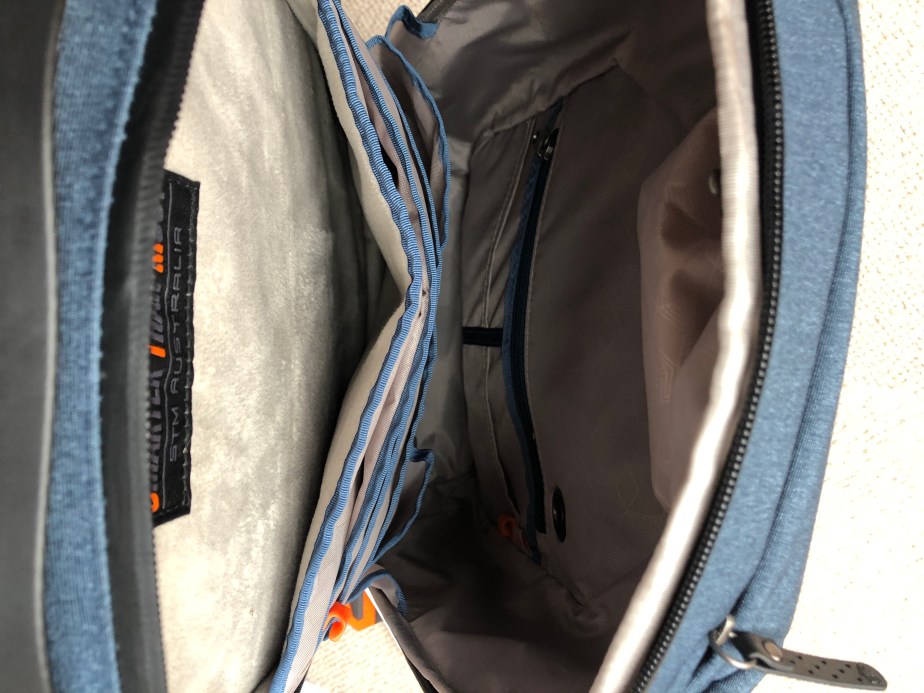
Inside, there’s completely new technology to support your laptop. Instead of just a pocket, there’s a whole compartment which has cushion technology to save your laptop (or tablet) from impact when setting it down on the floor or from being bashed about on transport. You’ll also find tons of other pockets and compartments inside, specially designed for your AirPods, or for wired headphones to be clipped inside and kept safe. The ample pockets are big enough for phones, tablets, notebooks and even pens and are all hidden away inside to make it more difficult for anyone to pickpocket you, as well as being cushioned from impact.

On the front of the backpack, there are more pockets too. If you’re travelling, the front pocket is ample size for passports and travel documents plus a smaller pocket at the top for loose change. Although the STM Myth Laptop Bag is for transporting laptops to and from work, this backpack actually works really well for travelling by plane because of its size (it’s suitable as hand luggage) and the ‘bump’ technology keeps gadgets safe when on transport. However, it also has the durability needed when travelling a lot. Having been completely redesigned, the team at STM have thought about everything. As we don’t use money as much now and rely on our phones to store our credit card details, it means we can carry around less precious items but need to keep phones and laptops safe. The zips on the STM Myth are big enough to accommodate a lock if you need to, and there’s room inside to hide a Tile or Apple AirTag.

The more I look at the bag, the more I find uses for it! I took this away on holiday where I only had a limited amount of hand luggage and found that I could fit most travel items in it easily, and more importantly, they were safe and protected and didn’t get crushed in transit. Even my headphones were safe from being squashed!

The little details in the STM Myth Laptop Bag make it excellent for travelling, working or even as a gift. The zips are protected with a cover to prevent rain and dirt entering, there’s an integrated CableReady system which allows you to charge your laptop or tablet whilst it’s still in the bag and a durable top handle so that you can carry it in one hand, or pick it up easily from the floor or overhead locker. It weighs less than 1kg when empty too, so with most hand luggage being a maximum of 7kg, you still have plenty of room for the laptop, phone and even a snack!

But finally, what does STM stand for? Smarter Than Most… the Australian company who think of everything!

Available on Amazon for £61.73: https://www.amazon.co.uk/STM-Goods-Backpack-Featuring-Pass-Through/dp/B07HY5BPGF/ref=mp_s_a_1_1?adgrpid=66649414279&gclid=EAIaIQobChMIgvLDn9n3-wIVhweLCh3Pagt3EAAYASAAEgLS1fD_BwE&hvadid=335528403538&hvdev=m&hvlocphy=1006948&hvnetw=g&hvqmt=e&hvrand=1753826711841176724&hvtargid=kwd-613724609670&hydadcr=19799_1751391&keywords=stm+myth&qid=1670972400&sr=8-1

LensPen Smarty Smartphone Camera Cleaner

Disclaimer – We received this item free for the purpose of this review/feature but all words and opinions are our own.

If you’ve received a new smartphone for Christmas, or take a lot of photos on your camera you’ll know that the smudge factor is real when it comes to the camera lens. I hate it when I take what I think is the perfect photo, only to find that when I view it, there is that misty blur on all the photos because the lens isn’t clean. It’s the price we pay for handling our phones all day, but there are ways of reducing the smudges.

LensPen Smarty Cleaner for Smartphones is a tiny yet useful gadget for cleaning your camera lens on smartphones. Suitable for all makes of camera phone, the pen is only 4cms long and can fit in your pocket, or in the bottom of your handbag without even noticing it’s there! The cap screws loose to reveal the head of the pen which is a carbon cleaner. There’s no detergent or alcohol involved, just a pad which is small enough to fit through any camera phone casing and erases away all the grime.

I tried this on my iPhone, especially as I frequently get blurry smudges and I can’t clean them away easily with just a tissue or corner of my shirt. The LensPen is small enough to fit, comfortable to use and with minimal effort, it dissolved away the greasy fingerprint on my camera lens.  To prove it works, I used it on the front of my camera phone on the touchscreen. The pen does indeed eradicate fingerprints anywhere!

Available online from $5.99 at: https://www.manfrotto.com/us-en/lenspen-smarty-smartphone-cleaner-black-ln-smarty/

Edifier GX Gaming Headset

Disclaimer: We received this product free of charge for the purpose of this review but all thoughts and opinions are our own.

Christmas is fast approaching and this gaming headset from Edifier would make a perfect present for the gamer in your family – young or old!

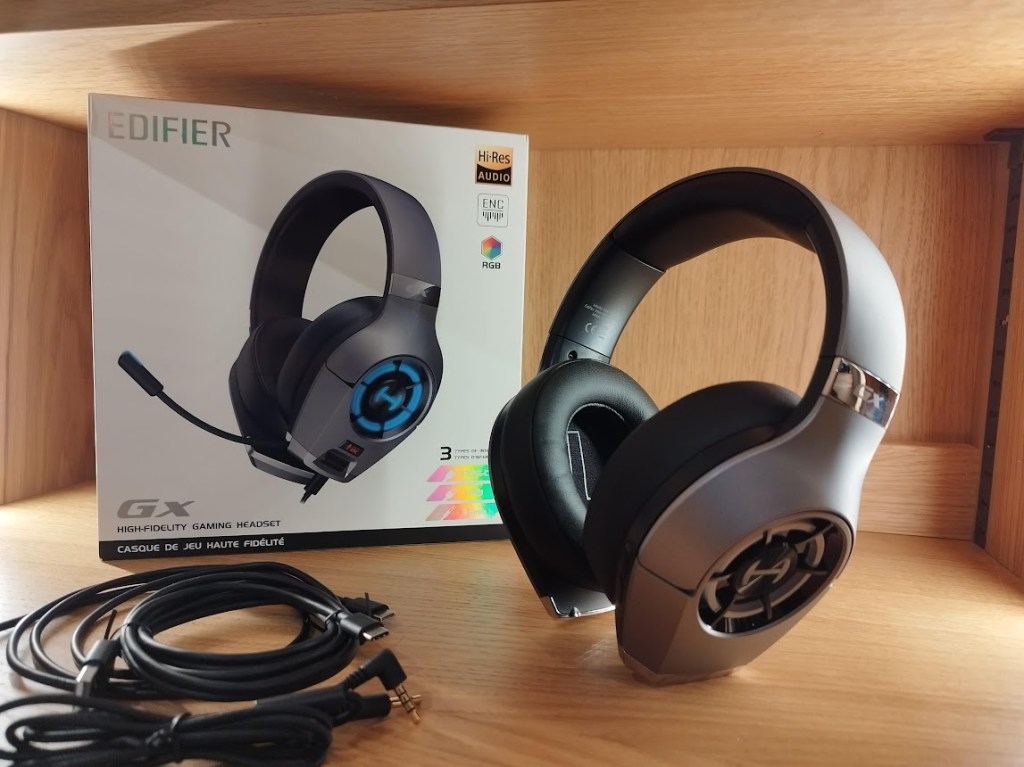
Made of a grey plastic with leatherette ear cups and a lined headband this headset has a really good feel – they certainly don’t feel cheap and are light on the head and comfortable for long periods of gaming.

With any headphones the quality of the sound must be the most important feature and with a pair of 50mm titanium drivers and Hi-Res audio this headset does not disappoint. The earcups provide plenty of insulation from external sounds and music is clear over the whole frequency band.

Three different cables are provided enabling easy connection to a variety of devices. USB-C can be used to connect to most modern smartphones and tablets, A standard Type-A USB cable allows connection to PCs and PS4 consoles whilst a standard 3.5mm jack is provided for connection to pretty much any other device. At 1.2m long they might not be long enough for everybody but can easily be extended / replaced.

For gamers a good microphone is essential and the microphone on this headset works well. It includes a noise cancellation system to give better clarity and when not in use it easily stows away inside the earcup.

The headset has four controls, on the left earcup is a mute button for the microphone and a scroll for volume control. On the rear of the right earcup are controls to switch between gaming mode and music mode and also to control the RGB LEDs. Different colours can be selected and a long press turns them off completely.

These controls are all dependent on power taken from the USB connection which does mean that they do not work when using the 3.5mm jack.

I have worn these for quite some time and find them very comfortable and the refined styling with the ability to turn off the LEDs appeals to me, I had intended to give these to my teenage son but I don’t think I want to part with them now!

I do have one niggle to mention but it is only minor – the controls on the left earcup are well positioned but on the right earcup the controls are positioned right where I hold the headset when taking it off meaning I’m always pressing buttons by mistake.

Overall I am very impressed with these headphones, they are lightweight, comfortable to wear and the sound quality is excellent and at £69.99 are excellent value for money.

Specifications

Frequency response – 20Hz-20kHz

Driver unit – Ф50mm dynamic driver

Sensitivity – 97±3dB

Impedance – 32Ω

Product weight – 345g

Interfaces – Type-C/USB/3.5mm

Edifier CC200 Bluetooth Headset

Disclaimer – We received this item free for the purpose of this review/feature but all words and opinions are our own.

Now that most of us are working from home most of the time, I know that I find myself looking for gadgets and technology that make life easier.  This Edifier Wireless Bluetooth Headset is one example of how my working practice has changed since the beginning of the pandemic. Let me explain…

The Edifier CC200 Bluetooth Headset is a wireless, Bluetooth mono headset for taking phone calls or listening to music.  As its wireless and Bluetooth, it doesn’t need plugging in anywhere but can connect to your laptop and allow you to walk around whilst the noise-cancelling microphone can still pick up your voice, allowing you to do more than just be sat at your PC.

All of the controls are on the headpiece; the on/off switch and volume controls, plus the call pick up button on the back of the earpiece.  How the combinations of buttons work is detailed in the instructions, but the headset does allow you to pick up multiple calls, mute and redial all from the headset.  With so few buttons, it doesn’t take long to pick up the sequences to be able to work them without having to look at the instructions (which are super easy) and learn what the buttons do by their shape and texture.

The headset charges using the USB cord which is included in the set.  The battery life is around 29 hours for calls and 64 hours for music, so if you’re not on a call you can run your music from your laptop or PC and still wander around with a range of around 10 meters!  This is great for parents who are on calls with their hands full all day or those who have a job where they need to be away from their desks for long periods of time.  It’s not just a PC which the Edifier CC200 can work from either. The headset is compatible with both Windows and Apple technology and some phones as well.

The Edifier technology boasts crystal clear calls as well.  I set this up easily with my work laptop. Using the on/off button, you only need to pair it once using Bluetooth. With the headphone on set-up mode, my laptop was able to search for it and lock on to the headset easily. Once they’re paired, your laptop or PC locks onto it again whenever it’s switched on and you can start using it straight away.

I am familiar with wireless and Bluetooth headsets so this worked similarly to other brands I’ve used. The call is crystal clear though, both hearing the other person and your own voice, and it works well when there are a group of you on a call.  The charge length of the battery is super long – I am used to charging my headset every day and the Edifier CC200 lasts for days without needing to be charged. The adjustable headset is really good for those of us with a lot of hair, or if you wear your hair tied back etc, and even better, it doesn’t have sharp bits that get caught in your hair too!

This is a great addition to working from home and I really can’t find any faults with it. It’s a brilliant price too for how well it works.

Available for £49.99 at:

The Contour Pro by Dr Levy

Disclaimer – We received this item free for the purpose of this review/feature but all words and opinions are our own. The Review Studio are not responsible for any of the information provided below and no information should be taken as advice. Consult your doctor before using any new devices especially on the face. Do not use The Contour Pro on the chest/breasts, neck (including the thyroid), within the orbital rim of the eye (including eyelids), on the lips, genitals or groin area. Do not exceed the 3 minute maximum per day.

Every so often a new technology comes on the market to wind back the hands of time and help eradicate the signs of aging.  The Contour Pro by Dr Levy Switzerland is a multitasking technology that helps plump and firms skin, reducing the appearance of fine lines.

Who is Dr Levy?

Dr Philip Levy is a dermatologist who works out of Geneva, Switzerland with an aim of delaying the need for cosmetic surgery and instead uses techniques to reverse the signs of aging and restore glow.

He was the first person to introduce cosmetic botox to Geneva in 1995, and also practices other technologies such as CO2 laser resurfacing and hyaluronic acid injections. When skin stem cells were discovered in 2009, a whole new world of ‘healing’ the skin opened up for Dr Levy who harnessed the skin’s ability to heal itself.  Along with his other treatments, Dr Levy is best known for the Nefertiti Lift® which is used to tighten the jawline.

How does The Contour Pro work?

The Contour Pro is a non-evasive, hand held machine which is used to tone and plump the face.  Using Electro Muscle Stimulation (EMS) and Radio Frequency (RF) in micro-pulsating sequences, it boosts deeper muscle strength and plumps the surface of skin. The radiofrequency stimulates collagen production and stem cell action, all of which help the appearance of skin.  The combination of the Freezing Anti-Fatigue Mask (more about that later!) and the heat generated from The Contour Pro, further boosts the skin to leave it illuminated. 

Why do I need the Freezing Anti-Fatigue Mask too?

It is highly recommended to use the Freezing Anti-Fatigue Mask with The Contour Pro for two reasons. Firstly, you MUST have a gliding gel on your face before using The Contour Pro. This is to ensure even texture, and it’s never a good idea to put an electrical appliance right onto the face, especially if you have never used such an instrument before.

The Freezing Anti-Fatigue Mask has been specially designed to be used with The Contour Pro because the benefits of this mask compliment the technology used in The Contour Pro.  

What do I need to do to use The Contour Pro?

Before I explain in depth, be assured that there is a well-designed and thought out booklet that comes with The Contour Pro which explains even more and has diagrams to help!

Firstly, you need to clean your skin thoroughly to remove any make up and residue. Dr Levy recommends the 3DeepÔCell Renewal Micro-Resurfacing Cleanser. You can also apply the Eye Booster Concentrate over the eye contour area and the Booster Serum all over the face. Once the products have been on your face for one minute (in order to penetrate the skin), you can add the gliding gel.

Dr Levy Switzerlandâ’s Freezing Anti-Fatigue Mask (a gel) is recommended as the gliding agent.  Distribute the gel all over the face and especially on the target areas. The device may stop working if you don’t have enough gel. Now you are ready to use The Contour Pro.

About The Contour Pro

The Contour Pro device is hand held, charged by a USB cord (only ever use the cord which is provided!) and easy to operate.  The head of The Contour Pro has 4 discs which administer the radio frequency and electrical pulses. There is one Universal Button on the front of the device which turns on and off, and changes the intensity. You can tell the intensity of The Contour Pro by the blades of the propeller on the front. 1 blade means the lowest intensity whilst 3 blades is the highest. Start with the lowest intensity first.

There are no other buttons to learn on The Contour Pro, making it easy to use!

Before you start…

Always undertake a patch test on the inside of your arm the day before using The Contour Pro. Check that the skin doesn’t have a negative reaction to either the Freezing Anti-Fatigue Mask or the device.

The full workouts are detailed in the enclosed booklet, which include the workout for eyes  (“Fox Eyes”),”Cheekbones contouring” and “Lips contouring.”  It is important to never use The Contour Pro on the eyes or eyelids, lips, breast and chest area or other sensitive areas especially not on the face. 

The booklet also states;

  • To use The Contour Pro slowly, in an upward motion, and with light pressure.
  • Always STOP if the skin becomes hot or red.
  • Do not stay more than 3 seconds on any general application area and continuously move the device.

What happens when you use The Contour Pro?

Once you have tried the patch test, you can start using The Contour Pro the next day. With the Freezing Anti-Fatigue Mask gel applied all over your face especially the target areas, follow the workouts detailed in the booklet. Start on the lowest intensity level.

When you turn on the device, there is no sound and no movement, which threw me at first. The intensity dial lights up but you only know it’s working once you apply it to your skin and feel the sensation.

I found that the electrical pulses, which are intermittent, were a bit of a strange sensation at first. They felt like sharp vibrations, and although they didn’t hurt, they took a while to get used to. It’s similar to holding the vibrating head of an electric toothbrush against your lips when you’re not used to it. I’m glad I took the advice and started on the lowest intensity!

Working for only 10 minutes maximum at a session with one session a day, work around the eye area (not the eyelid or the eye though!), cheekbone and lip area.  It’s best to do the workouts 2-3 times a week, not every day.

So, what was the outcome???

The Contour Pro is a sophisticated bit of kit which takes some getting used to.  It starts to work immediately with the device heating up and pulsating the skin, helping the products to seep into the deeper layers.  At first, you can see your skin reacting to the heat and stimulus with plumping of the skin surface.  After a few sessions (the course of a week if you are taking the advice and repeating every other day) the pulsations and electricity are more familiar and you will have learned the workouts to use.  I could feel that my skin was softer from the combination of the Freezing Anti-Fatigue Mask and The Contour Pro together, and it was as if the underlying muscle and tissue was ‘working’ which I took to be the muscles toning up and the skin repairing itself.  The contour of my jaw and cheekbones was smoother too, and my face felt like it had had a workout all of its own!

Over time, I’m sure the benefits will continue even if you don’t use The Contour Pro as often. I think once you get the desired effect and are used to the sensation it will be easier to increase the intensity and use it to maintain the benefits rather than having to use it so often. It’s difficult to show the physical changes in such a short amount of time, which is why I haven’t posted photos but I know that my skin and face has already started to feel different.

I especially like that The Contour Pro is an alternative to cosmetic surgery and non-intrusive.  You can adapt the intensity yourself and concentrate on one target area, or several, depending on your needs. It’s also very small and handy! I have used it for over a week now and the battery hasn’t run out yet.  I will be taking this on holiday with me soon, so that I can use it at my leisure and tone up those muscles even more!

The Contour Pro is available for £249 and the Freezing Anti-Fatigue Mask for £69 at: 

Dr Levy – https://www.drlevy.swiss/en/product/the-contour-pro

Cult Beauty –https://www.cultbeauty.co.uk/dr.-levy-switzerland-the-contour-pro/13974127.html

Oclean X Pro Elite Smart Electric Toothbrush

Disclaimer – We received this toothbrush for the purpose of this review. All thoughts and opinions are our own.
Did you know that 90% of gum disease and cavities are caused by incorrect brushing? In fact only 1 in 10 people actually brush their teeth correctly (that’s pretty worrying isn’t it!).

Luckily the OCLEAN X Pro Elite is also one of the smartest brushes on the market with a fantastic battery life of up to 35 days and Qi Quick Charge technology enabling it to fully charge in just 3.5 hours!

The X Pro Elite certainly knows its stuff when it comes to oral hygiene and it can help you improve your brushing technique via the Oclean app! The app connects to the X Pro Elite via Bluetooth and gives you derailed analysis of your toothbrushing technique.

Using an ingenious AI algorithm, the X Pro Elite analyses the way you brush your teeth and recommends how you can improve your technique, using a dental model on its 0.96-inch touch screen display which enables you to develop good brushing habits with its 4 modes and 32 intensities for clean mode.

To ensure its users get the deepest clean possible, the X Pro Elite’s motor spins at the speed of sound, delivering a maximum of 42,000 rpm that helps you reach and defeat difficult plaque and stain build ups with ease.

OCLEAN’s new self-developed WhisperClean™ technology also means that the toothbrush emits just 45dB when operating at maximum power: a drastic decrease compared to it’s more pricey big name competitor’s (55-65 dB).

The Xpro Elite also benefits from a wall-mounted holder which was easy to attach to my bathroom wall and it helps to keep it dry to prevent the growth of bacteria.

The OCLEAN X Pro Elite is available to purchase online for RRP £74

More information can be found at: https://www.oclean.com/products/oclean-x-pro-elite

Oclean Flow Rechargeable Electric Toothbrush

Disclaimer – We received this item free for the purpose of this review/feature but all words and opinions are our own.

If you’re looking for an electric toothbrush, you will be astounded at both the range available and the price of them! Oclean have launched a reasonably priced toothbrush at less than £25 which is both rechargeable by USB and sonic.  They sent us one this week to try out.

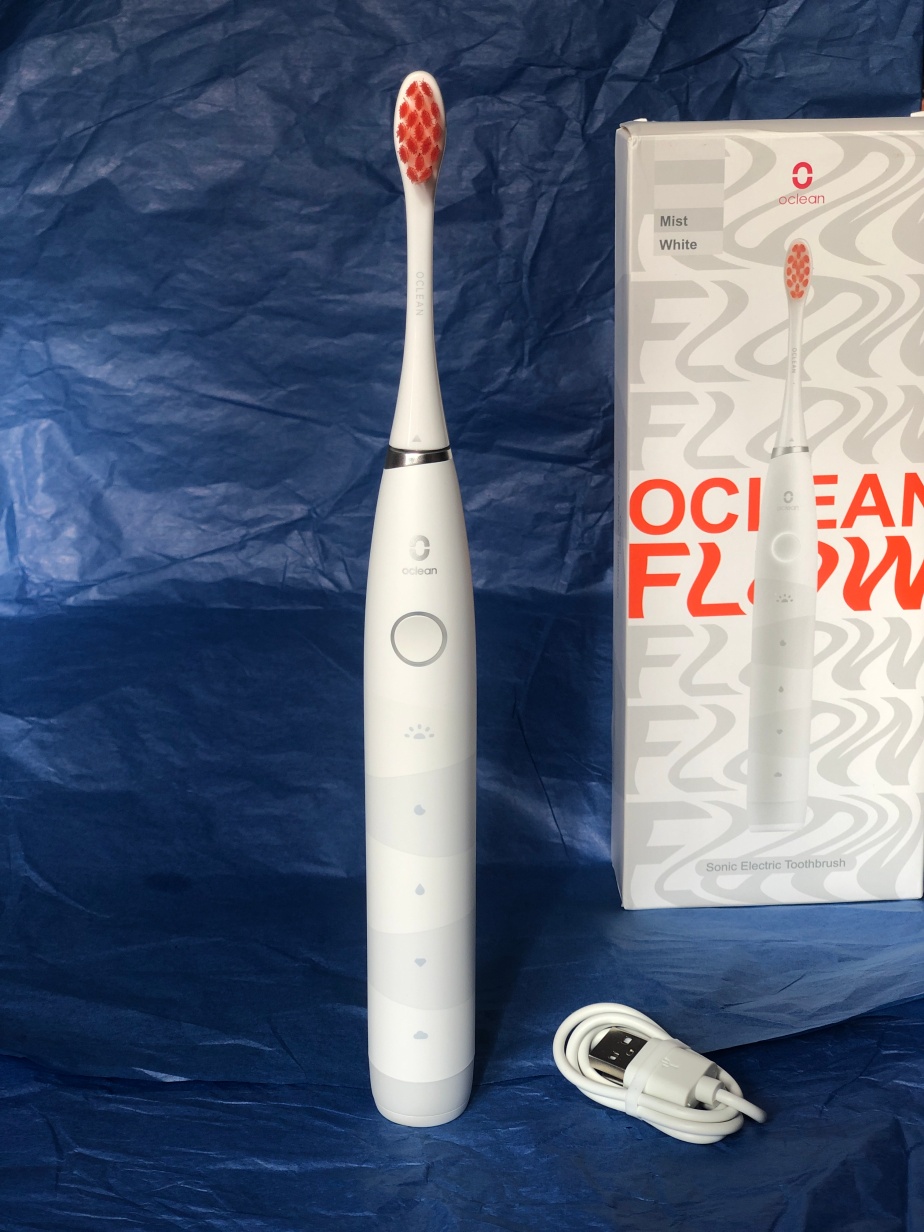
The Oclean Flow toothbrush has everything you would expect but at that surprising price.  It has Sonic Technology, so that’s sonic speed to the brush oscillation which is 38,000 strokes per minute. It has 5 easy to use brush modes (Morning, Night, Standard, Whitening and General) with a 2-minute smart timer. Flicking through each of the modes is just at the touch of the one on/off button so there isn’t anything complicated to learn or read up about in order to get your routine. You can even do two of the modes back-to-back if you want to go the extra mile.

The toothbrush comes with one brush head which is made of DuPont bristles. I liked the bright orange bristles, which make it much easier to see in the dark mornings! They also act as an indicator to let you know when the brush head needs replacing.

Charging is easy with the USB Type-C lead which comes with the toothbrush. The Type-C port is at the base of the toothbrush which is accessible from a lid which flips open. You know when there is 10% or less charge left in the toothbrush because the round button flashes red to indicate it needs charging. One single charge can last up to 25 weeks though with morning and evening brushing.

When using it, the instructions give you a warning that it may make your gums tingle if you haven’t used an electric toothbrush before, but as I usually do, it wasn’t a problem for me. I liked the firmness of the bristles and how easy it is to use especially with just one control button and nothing too complicated for late at night or early in the morning. The same goes with the 2-minute timer so you don’t have to think much. My teeth were left clean and fresh afterwards, as you would expect!

It is surprising that this brush is so cheap and that it’s aimed at adults and teenagers because it’s rather sophisticated for what it can do, but easy to use. I think most children would be able to use it easily, and the white look and packaging makes it universal for everyone.  Perhaps good for taking on holiday, especially with such a long charge amount and the ability to charge from a USB outlet? It’s a fabulous present for anyone and looks like it’s a lot more expensive than it is!

Available for £21.10 at:

Sennheiser Momentum Ear Buds

Disclaimer: We received this product free of charge for the purpose of this review but all words and opinions are our own.

The first time I had headphones I was a teenager in the 80’s and back then headphones were firmly attached to your Walkman. Thankfully technology has evolved and improved a lot since then and I was really pleased to be given the opportunity to try out the Sennheiser MOMENTUM True Wireless 3 earbuds

The stylish grey fabric charging case is nice and solid and closes with a satisfying click. It holds the earbuds securely and once placed in the case the earphones start charging automatically. The USB-C connection makes the case easy to charge and there is also the option to use Qi wireless charging too. A single charge provides 7 hours of playback with the case providing an additional 21 hours of charge, so in total you can enjoy 28 hours of playback before you need to charge. When it does run out of charge, 10 minutes of ‘fast charging’ offers an hour’s playback and a full charge takes just 90 minutes. 

Included in the box are four pairs of silicone ear tips, three pairs of ear fins, and a charging cable. The earpieces are IPX4 rated for water resistance, and each earbud has three microphones for voice and Active Noise Cancellation (ANC) functionality.

When I first received the earbuds, I found that they had 40% charge, so I was able to use them straight away – all I needed to do was fit the ear fins and then pair them to my phone.

Pairing the earbuds was simple – just touch and hold both earbuds and then select them on your Bluetooth device and they pair to your device easily. The earbuds power off when placed in the case and the lid closed and power on and connect automatically to your device the moment you open the case.

Once paired, I downloaded the Sennheiser Smart Control app. The app not only allows you to control settings on the earbuds but there is also an option to go through a ‘Sound check’ where you select your preferred sound from a choice of 3. There is also the option to set “Sound Zones” where you customise locations you frequent, like your home, gym or workplace and save preferred Active Noise Cancellation and Equaliser settings. Once you enter the radius—set by you on the location map—your settings automatically change to the saved setting when you are in that Sound Zone.

The earbuds feel light, well made, and with IPX4 sweat resistance they are perfect for the gym or when I am out walking.

So I’ve talked about the fit, pairing and app so what is the sound quality like?  

Well, it’s excellent, the sound is crisp and clear with no distortion, every song I played sounded amazing, whether it was rock, pop or classical music.

You can also use the earbuds to make and receive telephone calls – if you are playing music it stops whilst you are on the call. I found that the call quality (for both people) was very clear and background noise was minimal.

Answering calls, skipping tracks and turning on/off different modes can all be executed by tapping the earbuds. Once you get the hang of tapping they are very simple to use, the sensitivity is very good and works well all the time.

Overall, I was very impressed with the Sennheiser MOMENTUM True wireless 3 earbuds – superior sound, excellent Bluetooth connectivity and a secure and comfortable fit. They are definitely a premium pair of wireless earbuds and anyone receiving them this Christmas won’t be disappointed.

RRP £219.99 available from the Sennheiser website here

Edifier TWS1 Pro True Wireless Earbuds

Disclaimer – We received this item free for the purpose of this review/feature but all words and opinions are our own.

I have never had wireless headphones before, and with all the commuting I do and going to the gym, I really should have done before now!  Opening these pink Edifier ear buds, it was nice to have them in their own case, which also doubles up as a charging unit.  The buds fit snugly in the magnetic case where they snap into place and fit the connectors to charge.  

Placing them straight into my ears was obviously the first thing I did, but like any good reviewer, I tried to connect them to my iPhone X without reading the instructions.  It turns out that these TWS1 Pro headphones are super easy to set up. From my phone, all I had to do is go to the Bluetooth settings and the headphones were already there. I just clicked on ‘connect’ and the headphones were working, playing the songs from my phone straight away. They turn themselves on when you take them out of the case and turn themselves off again when put back in place.

Using the headphones was easy too. It was just a matter of tapping once (on either ear) to play or pause, twice on the left ear for the previous track and twice on the right for the next track.  Volume up and down is a hold on either ear bud. It’s one tap to accept a call and 2-3 taps to disconnect a call on your phone too.

The ear phones stayed in for the whole of my cycle and weights workout which I was surprised about.  The sound is balanced between both ear buds but there’s not the best bass on them and I can’t find a way of changing the settings. There’s a long battery life on them and they’re very sharp when listening to audio books etc.

For the price, these are great stocking fillers or for teenager who already have a smart phone.  It’s difficult to go wrong with how easy they are and compact but well designed in the case and they come with not one but two sets of spare ear pieces.  I am converted to using these headphones now instead of my wire ones for everyday use and I’m not going back!

Available for £59.99 at:

Edifier W240TN True Wireless Noise Cancellation In-Ear Headphones

Disclaimer – We received this item for the purpose of this review/feature but all thoughts and opinions are our own.

I love music, especially heavy metal and rock, but my music choices aren’t to everyone’s taste, so a good set of headphones is a must for me.

The Edifier W240TN headphones are the perfect choice for me as they not only look great in a stylish gunmetal black (available in gunmetal black or white finish) they feel comfortable and most importantly the sound quality is astonishing!

I have had in-ear headphones before both wireless and wired that didn’t fit well, had connectivity problems and sounded very tinny.

Thankfully, the Edifier W240TN ticks all the boxes and is a cracking set of earphones with fast charging, meaning you can use them sooner (a 10 minute charge will give you approximately 2 hours of use).

Connecting them to my devices was simple via Bluetooth and the booklet gives a rundown of all the settings available.

When it comes to earphones, one size does not fit all and Edifier has helped with this by including 4 different sized pairs of rubber earbuds XS, S, M and L meaning the Edifier W240TN can fit all.

The active noise cancellation with ambient sound mode is a great feature, meaning you won’t be disturbed whilst listening and you really will be immersed in your music, calls, film or game, etc.

Advanced Bluetooth V5.3AI DNN noise cancellation is another great feature meaning calls using the Edifier W240TN are crystal clear, which is what we all want!

Long-lasting battery life with almost 7 hours playback per charge, the Edifier W240TN has by far the longest battery life I’ve experienced in earphones and I am really impressed with them.

Customized settings can be created via Edifier Connect App, which I downloaded from the Google Play Store.

Overall, the Edifier W240TN are a tremendous pair of earphones, the sound quality is superb, and the appearance is very sleek and trendy, the W240TN is inspired by the shape of a robust piston head and looks effortlessly stylish.

The metallic design carries the legacy of the TWS1 Pro and the finished product speaks volumes about Edifier’s pursuit of style.

The result has an iconic profile that balances modern lines with a retro, almost 80s-like character; think Robocop meets Blade Runner 2049.

RRP £79.99

Available to buy from Amazon

XGIMI Elfin Projector

Disclaimer – We were loaned this item for the purpose of this review. All thoughts and opinions are our own.

Are you struggling to treat the tech lover in your life this Christmas?

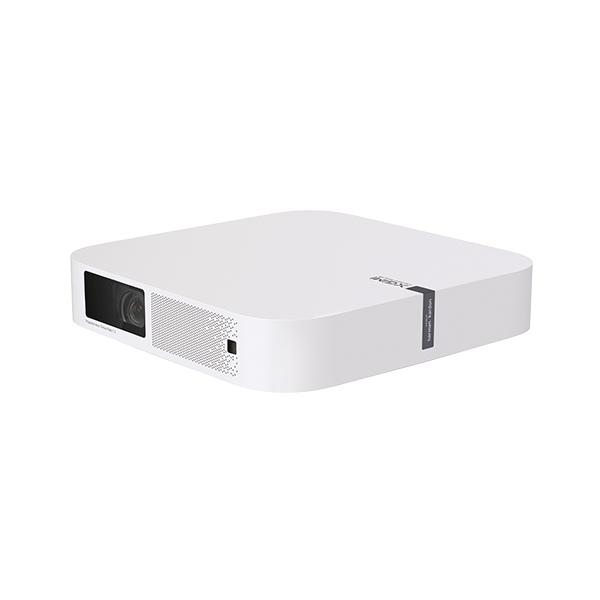
Look no further as the XGIMI Elfin Projector is a wonderful gadget and bound to be received well by any lucky recipient.

Projectors have certainly come a long way in terms of design and user ability since my childhood. Gone are the bulky space taking projectors and in their place are a new generation of slimline devices.

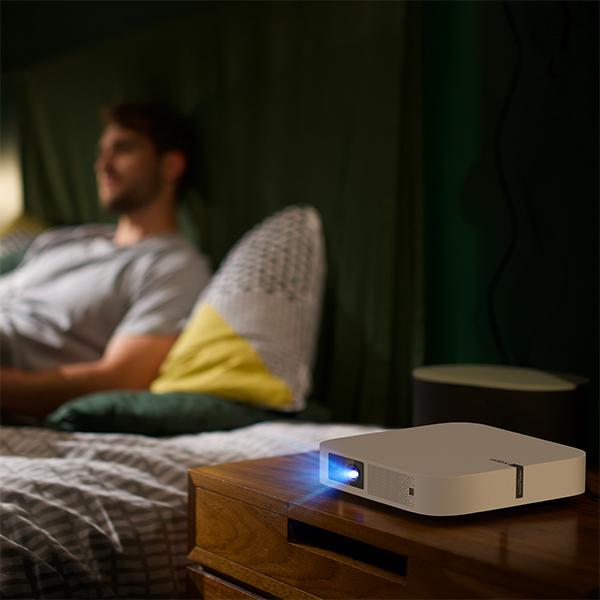
Elfin’s slim, lightweight design is similar in size to a standard book and can be transported easily in a bag wherever you go.

As a family of keen campers, we think the Elfin would make a welcome addition to our camping kit as it takes up minimal space, and would be a great way to entertain us all by providing some much needed relaxation during the evenings at the campsites we visit. The idea of a movie under the stars after a fun day’s camping really excites our children.

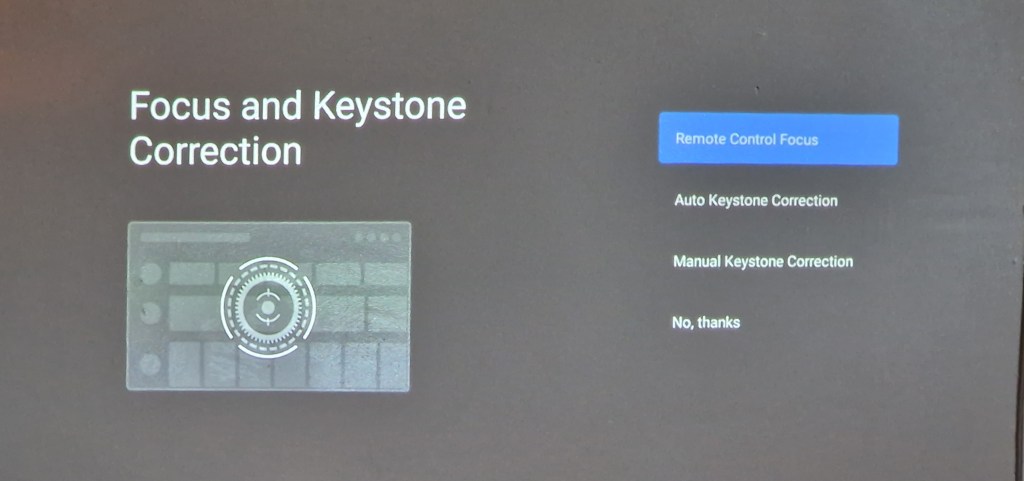
The XGIMI Elfin Projector was really easy to set up (remote control takes 2 x AAA batteries which were not included) and the user manual was easy to understand and came in a variety of languages.

The Elfin doesn’t come with a stand as standard but this can be bought separately for £72 from XGIMI.

Elfin’s Intelligent Screen Adaption (ISA) technology automatically optimizes your display in seconds meaning more time for movies!

1080p, 800 ANSI Lumens provides a crystal clear and vividly colourful visual experience for anyone watching thanks to its super powerful lens.

Choosing the right place to protect your movie is important. A patterned wallpaper wouldn’t be suitable so a plain wall is perfect. Our walls are a latte colour and this didn’t affect the colours at all, which was brilliant.

Alternatively, a projector screen can be used. We used our own projector screen outside to see how well the projector would work and it was perfect! The projected images were again crystal clear, and it felt like we were watching a TV.

The integrated Android TV™ delivers 5000+ apps, including Prime Video, Netflix, Hulu, and Disney +. It was really easy to download these apps with a few clicks of a button and all that I needed to do was log in to my accounts.

Sound wise the Elfin didn’t disappoint, its two 3W built-in Harman Kardon speakers really enhanced our viewing experience with high-quality surround sound.

Overall I am really impressed with the XGIMI Elfin Projector and have really enjoyed using it, it’s an amazing piece of tech!

RRP £599

Available to buy from https://uk.xgimi.com/products/elfin

Thinkware Dash Cam X800

Disclaimer – We received this item free for the purpose of this review/feature but all words and opinions are our own.

You never think you need a dash cam until after you need one.  I found this out a few years ago, and it wasn’t because of my bad driving but the dash cam did prove it was someone else’s bad driving. For that reason alone, a dash cam is a good idea. However, I didn’t realise until I bought the Thinkware Dash Cam X800 that my old dashcam wasn’t working and hadn’t been for 3 years!

The new X800 is an improvement on older dash cams (my old one wasn’t a Thinkware model) because the SD cards don’t need reformatting periodically in order to keep recording on a loop. So when I saw the X800 didn’t need reformatting every so often, I knew it was time to change!

Before we go into more detail about the dash cam, what is included in the box. Apart from the camera, the kit also includes a window mount, car charger (cigarette), MicroSD memory card and some wire mounts for installation. There are other accessories which are sold separately such as a rear camera, hardwiring cable and external GPS receiver too.

Setting up needs relatively little input from the instruction manual.  The MicroSD card needs installing first, then the windscreen mount.  The 3M adhesive mount prevents the camera from falling down in hot weather and allows you to position it perfectly on the windscreen.  The charging cable, which appears to be extra long, fits into the cigarette charger and the cable mounts make it easy to fix if needed.

Now for the camera itself.  Once mounted, all you see is the touchscreen and thankfully mine was already set with the correct date and time. All I had to set was the time zone and a few other preferences.  The camera starts recording as soon as you switch the engine on, and you know it’s recording because the voice greets you and tells you to drive safely! It took a bit of getting used to but the LCD screen turns off automatically after 30 seconds of not using it. This is an option which can be changed in preferences though so that it is on constantly.

Driving is recorded in small files which are easy to find.  From the home screen, choose File List and a list of all the files is listed by date and time, which you can find by scrolling through the pages. Tapping on a file plays it for you on the device. You can turn off the ability to record sound on the videos but I find it really helps when playing back. However, if you want to play back a recorded file without the sound, the screen has a mute button. There is also a zoom function to magnify an area on screen during playback as well.

An interesting advanced feature of the Thinkware Dash Cam X800 is the Forward Collision Warning System (FCWS). When the vehicle drives at 40km/h or above, the FCWS will detect forward collision danger such as if the distance to the vehicle ahead decreases after an initial collision warning.  A similar warning is made using the urban FCWS (uFCWS) but this is only activated at 30km/h. Each of these systems can be switched off in the Settings.

Other features of the Thinkware Dash Cam X800 include:

  • Wintertime battery protection
  • PC viewer (see http://www.thinkware. com/Support/Download for details)
  • 150 degree angle of view
  • 30 fps frame rate
  • Super Night Vision
  • Parking Recording

There are numerous other options which can be bought to go with the X800 but for the time being, I’m happy with the camera as it is. A few questions you might be asking at this time:

Is it easy to set up?

I found I could set up the camera relatively easily without the manual. Some of the advanced features needed the manual to explain what they were but the manual is clear.

Does it record easily? Do I need to think about it?

Once you install the camera on the mount and the charging cable, the camera is set up to start recording as soon as you start the engine. You might want to look at changing the settings to suit you though.

Is it worth the price?

Currently for sale on Amazon at £169.00 it isn’t as expensive as some dash cams, and is probably an average price.  The fact that it works with fleets of cars/lorries and has so many optional extras means that serious drivers will get a lot out of this model.

What doesn’t it do?

At the moment, it doesn’t seem to sync with the Thinkware Cloud software which downloads the recordings to a cloud server. There isn’t a lot online about this model yet though, so I’m hoping in time there will be more apps and online functions available. 

There are a few other features I’d like to see that my previous dashcam had, like speed camera warnings and speed alerts.

Will it make me a better driver?

It won’t make you a better driver but from what I’ve seen already it will give you some reassurance when you are driving that you have proof of what’s gone on in front of you!

Overall…

The Thinkware Dash Cam X800 is a nice addition to your car kit, and I would say it’s probably a good second camera so if you’ve had a dash cam before and looking to upgrade, the features on this model would suit you. It’s also great for people who drive a lot with the advanced collision features. The lack of camera alerts or speed alerts is annoying though but if they get the Thinkware Cloud connection working that would make a huge difference to the usability.  Just by plugging it in though, you have enough functionality to be able to use it straight away without any fuss.

The Thinkware Dash Cam X800 can be purchased on Amazon (currently for £169.00) at:

Edifier TWS1 Pro Earbuds Review

Disclaimer: We received the earbuds for the purpose of this review but all words and opinions are our own.

I have been trying out the Edifier TWS1 Pro wireless earbuds for the last week and I’m really impressed with them. They are comfortable to wear and feel very secure in my ear, I had got out of the habit of listening to music on the go as my previous pair kept slipping out and I never felt happy wearing them, so I am really pleased to have found a replacement that do actually stay put.

The earbuds are really easy to set up, simply switch on the Bluetooth pairing, connect & go. The earbuds power off when placed in the case and the lid is closed and power on and connect automatically to your device the moment you open the case.

To use the earbuds you simply tap them, controls include play, pause and skip to the next track as well as adjusting the volume and answering calls.

The Edifier TWS1 Pro earbuds feature Qualcomm®’s second-generation aptX™ adaptive technology which combines aptX™ high definition audio and aptX™ low latency, and dynamically switch to the best option depending on different scenarios. I found the sound quality to be excellent, with no distortion and perfect for my rock and pop playlists!

The charging case holds the earphones securely with magnets and once placed in the case the earphones start charging automatically A single charge provides 12 hours of playback time and the case provides an additional 30 hours of charge, so in total you can enjoy 42 hours of playback before you need to charge, which is enough for most people. When it does run out of charge the case has fast charging capabilities and reaches a full charge within 40 minutes. 

I wear my earbuds when exercising so was pleased to discover that the earbuds have an IP65 dust and water-proof test rating making them the perfect choice for any outdoor activity.

The earbuds have a RRP of £49.99 and are available in black, dark grey, ivory or pink from Amazon

TCL 30+ M Android Smartphone

Disclaimer – We received this item free for the purpose of this review/feature but all words and opinions are our own.

I am loving the TCL 30+ Smartphone that was sent to me this week!  I am usually an iPhone user and have been for about 10 years so having never tried an Android phone before, I didn’t know what to expect.

TCL 30+M Smartphone

Firstly, the phone looks like a smartphone.  Its screen is 16cm height and 7.5cm wide whilst less than 1cm thick, comparable to other smart phones and at 184g it’s lightweight too. The screen isn’t too big for my little hands (and they are little!) and like other smartphones, it’s touchscreen.

If, like me you don’t like reading instructions and just want to get started with setting it up, then it’s easy. You don’t need a SIM card to get started and luckily the phone is already slightly charged so you can take it out the box and start the settings straight away.  It doesn’t take that long to set up either. The phone asks you which wi-fi network you want to use so I chose my home network just to get started. Using the QR reader on the phone, it set up and sync-ed with my wifi easily. Next, there was the security which included a ‘pattern’ to open the phone and then the fingerprint recognition.  This takes a few minutes as the phone has to build up your profile slowly.  You can choose to open the phone with a PIN or face recognition though if you prefer.

There are ample apps already installed or more you can download yourself

Other settings which you can choose are your search engine preferences, G Pay (so you can checkout with your phone for payments), other additional apps like YouTube, Google Drive etc and setting up your Gmail account.  It also makes it easy for you to transfer your old apps and data (including photos) from an old device to the TCL 30+.

I particularly liked the ‘Hey Google’ voice recognition. I used this a few times when my hands were full to do things like set up an alarm (the alarm noise was surprisingly soothing!) and ask questions which I was easily able to do from a distance.

Once the phone was set up, I started using it to see how it compared.  There are actually 3 cameras; the main camera (50MP), plus two more cameras on the back to give a wider field of view. There’s also a video lens with features such as Steady Snap, Portrait Mode, Movie Mode, Stop Motion and various Filters. Additionally, there’s a 13MP ultrawide camera at the front of the phone, for taking selfies and video. It has features such as Face Beautification, Auto Capture and Touch to Capture.

The cameras are great quality, and to test them, I took the same photo (below) on both the TCL 30+M and my iPhone X. There’s not much difference, you can see that the quality is similar although perhaps slightly better on the iPhone when it comes to detail. The colours are less saturated on the TCL too.

iPhone X image compared to…
the same subject on a TCL 30+M phone

There is 128GB of memory on the phone (which is the same as the new iPhone 13 Pro) and the ability to add a MicroSD card up to 1TB. If you prefer not to use a card though, the phone can link up with your Google Drive and you can store all your photos, files and apps on the cloud so there isn’t a huge need for an SD card unless you really want one.

There are so many features that it takes a while to find your way around all the apps etc but once you do they work brilliantly.  The box contains a charger and Type-C cable which are the quickest way to charge the phone.  The battery life is much longer than my iPhone too, lasting days instead of just 1 day so there isn’t a big need to keep charging it. The phone also comes with a clear plastic cover, a SIM card pin and a device bag.

If I had never owned a Smartphone before, then I would be overwhelmed by all the apps and what was on offer, but I think I would get used to using it very quickly.  As much as I hate to admit it though, I can see why people prefer the Android over an Apple iPhone. A lot of the work is already done for you, it’s consistent (and I think easier to use) with a PC and all the modern features you want with a phone are there. You don’t even need to buy extra accessories like a phone cover. 

As with every product, there are pros and cons. This is not an exhaustive list, but just a few things I’ve noticed after using the TCL 30+ for a couple of weeks:

Pros

  • The battery charges quickly and lasts for days!
  • Easy to set up
  • Lots of cameras with filters already installed
  • Already installed with loads of apps including Google apps and social media
  • More in-depth apps like Weather that also features satellite images, news etc

Cons

  • Not 5G
  • Takes a while to register fingerprint security when you pick it up
  • Response time is slower than I would like when using apps – they take a while to load up or to load more information

At a fraction of the price of an iPhone (currently £159 on Amazon) there are few reasons not to use it, especially if you prefer Androids or aren’t already a Smartphone or Apple user.  This would make a fantastic Christmas gift for a teenager, or for anyone who wants to be able to access all of the apps, features and smartphone technology we’ve all come to expect!

Introducing the World’s Easiest Smartphone Ever!

Disclaimer – We received this item for the purpose of this review/feature but all words and opinions are our own.

Say Hello to the swipe-free emporia SUPEReasy

emporia Telecom, a leading brand in the design and development of simplified smartphones for seniors, has revealed the World’s easiest smartphone – the emporia SUPEReasy.

This simplified device removes the need to swipe to operate – combining two screens, one to make calls and the second to scroll through for apps, with two physical keys for easy operation.

The SUPEReasy is built on Android 10 and provides a full, content rich and limitless smartphone experience. It is not stripped-down in any way, just simplified to offer the easiest operation and includes useful apps like a QR code reader, magnifier function and NFC for mobile payments.

It has a 13MP camera, a 5” touch screen with three quick dial icons and two large built-in physical keys for ‘answer/send’ and ‘end’ functions.

These physical keys are located directly below the screen for intuitive use. The device comes with a flat charging cradle, interchangeable back cover and emporia’s signature tangle-free headphones – making it a beautifully simple device for the user, regardless of age.

Included:

  • Two battery covers (one with an emergency button and one without it)
  • Desktop Charger
  • Display: Large screen with text that is easy to read & Touchscreen
  • Features: HAC: compatible with M4/T4 hearing aids and IP54 splash resistance
  • VoLTE: 4G mobile data connectivity
  • NFC: for contactless and cashless payments
  • System: Android 10

Making a phone call with a smartphone has never been easier. With real buttons for accepting and ending a call. Green to accept, Red to hang up – no need to swipe. And of course the tools to surf the web or snap a few nice photos. Everything made simply, SE = everything super easy.

Chris Millington, UK Managing Director at emporia Telecom explains the market opportunity behind this portfolio launch: “This is the first smartphone designed with a specific focus on making and receiving voice calls. Mainstream smartphones are based on the concept of ‘swipe to answer’ – this is often physically challenging for seniors due to age-related changes to circulation and moisture loss in the fingertips. The niche audience for this product is huge. Ofcom’s figures show that only 36% of people aged over 65yrs in the UK own a smartphone – so there are clearly critical barriers for the industry to address that have not really changed in the last 10 years.”

emporia invests heavily in senior insights including an ongoing research collaboration with Cambridge University. As such the business has amassed a deep understanding of the growing ageing population – specifically within the +65yr senior segment. Research shows rising demand and appetite for smart technology, but with an increasingly tactile experience. Studies show that physical buttons and responsive operation are key especially for those users who experience circulation or dexterity issues, meaning a traditional smartphone may be harder to navigate.

Chris concludes: “The pandemic has made our reliance on smart technology far greater – for daily functions including banking, parking and purchases, plus venue check-ins, health management, prescriptions and ticketing. Yet, smartphone penetration within the senior market segment remains relatively low. Our research shows that one of the biggest barriers to adoption is that seniors like physical buttons to answer and end voice calls. We have acted upon this insight with this device, which is not just ‘easy’ – it has revolutionised the design of smartphones. It combines powerful functionality with simplicity. That’s why, with a ‘what you touch is what you get’ design, we are able to offer a unique user experience for this important group.”

Ben Branson, CEO of Fonehouse added: “We are delighted to offer the new SUPEReasy across our retail stores and online. Our success with emporia smartphones over the last year has shown us how to address the needs of this growing customer segment. We find that older users are now often moving away from featurephones, this is a revolutionary step to help make the transition much easier.”

The emporia SUPEReasy is available from http://www.fonehouse.co.uk and Amazon UK with an RRP of £200.

Silk’n Toothwave Electric Toothbrush

Oral health is incredibly important and something that we need to take more seriously. I remember my parents telling me to look after my teeth as they will be the I my set I get and from that day I have cared for my pearly whites.

Over the years I’ve tried many electric toothbrushes but found them horribly abrasive or the vibrations far too strong. Tooth brushing should be a pleasant experience not one you dread.

As part of #worldsmileday I have been reviewing the Silk’n Toothwave electric toothbrush, the 1st toothbrush with patented DentalRF™ technology.

So far it’s been a great experience!

The Toothwave box contained the following…2 brush heads, 1 handle, 1 charging cable with USB cable & transparent bade, 1 USB wall adapter, 1 warranty booklet and 1 user manual.

From the moment I unwrapped the toothbrushe I knew I had something incredibly special as it’s stunning with its sleek white and silver colouring and a pop of lime green on the brush heads. It’s a very attractive toothbrush and significantly bigger and more robust than my usual electric toothbrush.

Charging took little time and the 3 intensity setting were easy to master. I used my Toothwave for 2 minutes morning and night and it didn’t feel like a chore.

The soft bristles were not harsh on my gums nor did it feel abrasive.Driven by innovation, the Silk’n ToothWave uses DentalRF™ technology.

This works by sending radiofrequency waves consisting of charged molecules, to the surface of each tooth, even reaching under the gumline. These molecules destabilise the strong bonds that connect impurity molecules to the tooth’s surface until they are detached and washed away. Impurity molecules get replaced by new, harmless water and toothpaste molecules, creating a strong protective layer.

After 6 weeks the Toothwave shows a significant reduction of tartar, stains, gum inflammation and bleeding compared to other electric toothbrushes.

This toothbrush is amazing and is a real treat to use. Gone are the days of my violent vibrating brushes and in their place is the beautiful Silk’n Toothwave.

Available to buy here https://www.boots.com/silkn-toothwave-electric-toothbrush-10280521

RRP £299

Oppo Earbuds Review

Disclaimer – We received this item for the purpose of this review/feature but all words and opinions are our own.

I have been trying out these wireless OPPO Enco Free2 earbuds and I’m really impressed with them. They’re lightweight and are very comfortable in the ear, feeling nice and secure. I had got out of the habit of listening to music on the go as my previous pair kept slipping out, meaning I never felt happy wearing them out of the house, but I’m really pleased with the fit of these. With a choice of three sizes of silicone ear tips you can select the one that fits best, ensuring a perfect fit. 

Pairing is really simple, open the charging case and the earphones go straight into pairing mode and then you simply add them to your device. Once paired they will re-connect whenever the case is opened. 

The touch controls allow you to skip tracks, adjust volume and switch between the normal active noise cancellation and transparency listening modes. I thought that using a swipe to control the volume rather than a tap worked really well. Taking one earbud out of your ear pauses the player, resuming when it is replaced. The sound quality is fantastic, the sound is clear and the noise cancellation works very well and can be tuned within the app. The app also allows several different equaliser settings to be used meaning you can adjust the sound to suit.

The charging case holds the earphones securely with magnets and once placed in the case the earphones start charging automatically. The charge level is easy to see with an LED whenever the case is opened. I haven’t used them enough to run them down but the manufacturer claims up to a 30 hour run time (including the charge in the case) – impressive! Charging the case is done with USB C and a cable is included.

These earbuds are available in black or white with a dust and water-resistant design to stylishly go the distance and provide users with the ultimate listening experience come rain or shine. They strike the perfect balance between luxury and affordability with a RRP £89.99. Android and IOS ompatible.

Disclaimer: We received these earbuds for the purpose of this review but all words and opinions are our own.

Edifier X3 Wireless Headphones

Disclaimer – We received this item for the purpose of this review/feature but all words and opinions are our own.

True Wireless Stereo Earbuds

  • Qualcomm® aptX™ audio decoding delivers high-definition audio with rich details
  • Compact and lightweight design for optimum wearing comfort
  • 6 hours of playtime per charge and 24 hours in total with the charging case
  • Bluetooth V5.0 ensures a stable and faster signal transmission
  • IP55 rated dust and water resistance for outdoor activities
  • Easy operation by touch control

Immersive music experience

The crystal-clear sound offer you as close as possible to the sensation of hearing your favorite music live.

24 Hours Play Back Time

6 hours working time per charge for the earbuds, 24 hours of total playback time of full charge by the charging case. X3 wireless stereo earbuds brings extended playback time and enjoyment.

High Fidelity AptX Audio Decoding

AptX audio decoding, 16bit/44.1kHz audio frequency. Decoding rate is up to 352kbps, with CD quality sound.

Stylish and Compact Design

Ergonomically designed earbuds comfortably sit in your ears so you can enjoy your music for hours on end.

CVC8.0 Noise-Cancellation or Clear Communication

CVC V.8.0 noise-cancellation technology reduces environmental noise. Stable signal for clear detailed sound.

Faster Connection

When removed from charging case, the earbuds automatically activate and pair to each other.

IP55 Waterproof For Outdoors Activities

IP55 dust and water resistance. Splash and sweat are no longer a problem.

Bluetooth V5.0 Stable and Fast Signal Transmission

Adopt professional Bluetooth 5.0 Qualcomm chipset with low-power consumption technology and stable signal transmission to extended playback time.

Available to buy at https://www.edifier.com/product-x3.html