Disclaimer – We were loaned this item for the purpose of this review. All thoughts and opinions are our own.
Are you struggling to treat the tech lover in your life this Christmas?
Look no further as the XGIMI Elfin Projector is a wonderful gadget and bound to be received well by any lucky recipient.
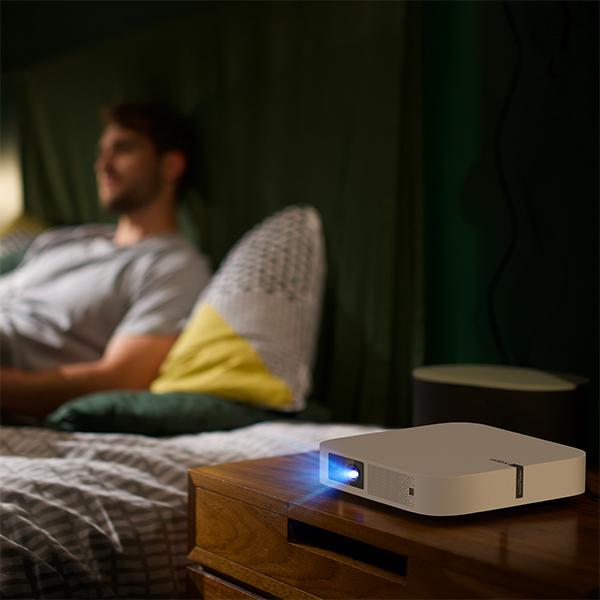
Projectors have certainly come a long way in terms of design and user ability since my childhood. Gone are the bulky space taking projectors and in their place are a new generation of slimline devices.
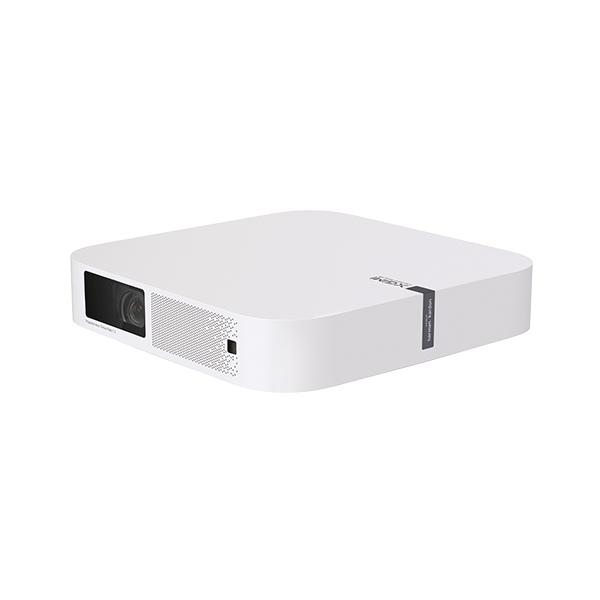
Elfin’s slim, lightweight design is similar in size to a standard book and can be transported easily in a bag wherever you go.
As a family of keen campers, we think the Elfin would make a welcome addition to our camping kit as it takes up minimal space, and would be a great way to entertain us all by providing some much needed relaxation during the evenings at the campsites we visit. The idea of a movie under the stars after a fun day’s camping really excites our children.
The XGIMI Elfin Projector was really easy to set up (remote control takes 2 x AAA batteries which were not included) and the user manual was easy to understand and came in a variety of languages.
The Elfin doesn’t come with a stand as standard but this can be bought separately for £72 from XGIMI.
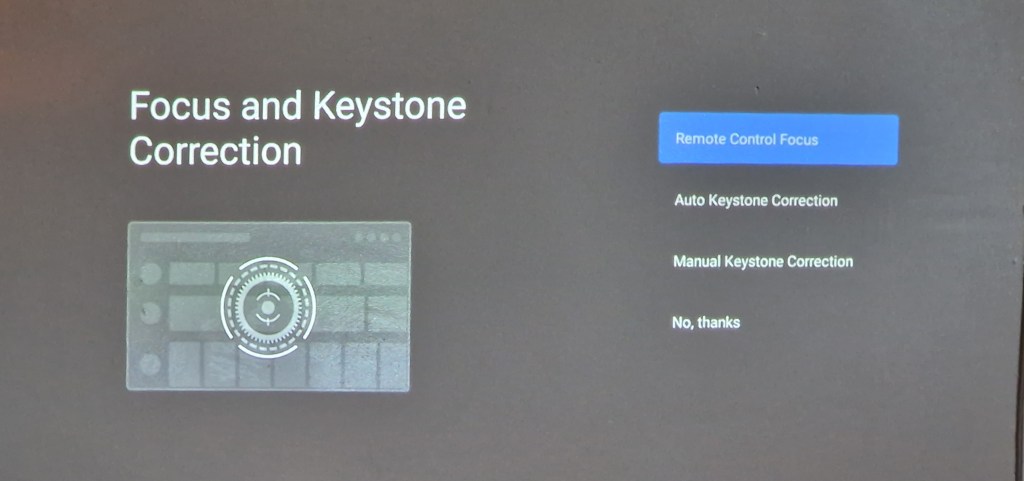
Elfin’s Intelligent Screen Adaption (ISA) technology automatically optimizes your display in seconds meaning more time for movies!
1080p, 800 ANSI Lumens provides a crystal clear and vividly colourful visual experience for anyone watching thanks to its super powerful lens.
Choosing the right place to protect your movie is important. A patterned wallpaper wouldn’t be suitable so a plain wall is perfect. Our walls are a latte colour and this didn’t affect the colours at all, which was brilliant.
Alternatively, a projector screen can be used. We used our own projector screen outside to see how well the projector would work and it was perfect! The projected images were again crystal clear, and it felt like we were watching a TV.
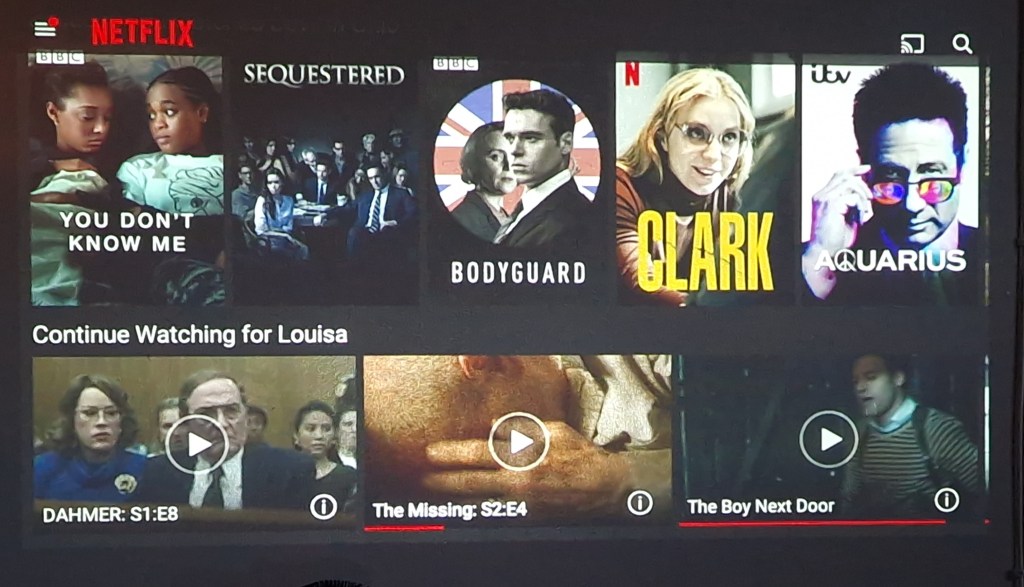
The integrated Android TV™ delivers 5000+ apps, including Prime Video, Netflix, Hulu, and Disney +. It was really easy to download these apps with a few clicks of a button and all that I needed to do was log in to my accounts.
Sound wise the Elfin didn’t disappoint, its two 3W built-in Harman Kardon speakers really enhanced our viewing experience with high-quality surround sound.
Overall I am really impressed with the XGIMI Elfin Projector and have really enjoyed using it, it’s an amazing piece of tech!
Disclaimer – We received this item free for the purpose of this review/feature but all words and opinions are our own.
You never think you need a dash cam until after you need one. I found this out a few years ago, and it wasn’t because of my bad driving but the dash cam did prove it was someone else’s bad driving. For that reason alone, a dash cam is a good idea. However, I didn’t realise until I bought the Thinkware Dash Cam X800 that my old dashcam wasn’t working and hadn’t been for 3 years!
The new X800 is an improvement on older dash cams (my old one wasn’t a Thinkware model) because the SD cards don’t need reformatting periodically in order to keep recording on a loop. So when I saw the X800 didn’t need reformatting every so often, I knew it was time to change!
Before we go into more detail about the dash cam, what is included in the box. Apart from the camera, the kit also includes a window mount, car charger (cigarette), MicroSD memory card and some wire mounts for installation. There are other accessories which are sold separately such as a rear camera, hardwiring cable and external GPS receiver too.
Setting up needs relatively little input from the instruction manual. The MicroSD card needs installing first, then the windscreen mount. The 3M adhesive mount prevents the camera from falling down in hot weather and allows you to position it perfectly on the windscreen. The charging cable, which appears to be extra long, fits into the cigarette charger and the cable mounts make it easy to fix if needed.
Now for the camera itself. Once mounted, all you see is the touchscreen and thankfully mine was already set with the correct date and time. All I had to set was the time zone and a few other preferences. The camera starts recording as soon as you switch the engine on, and you know it’s recording because the voice greets you and tells you to drive safely! It took a bit of getting used to but the LCD screen turns off automatically after 30 seconds of not using it. This is an option which can be changed in preferences though so that it is on constantly.
Driving is recorded in small files which are easy to find. From the home screen, choose File List and a list of all the files is listed by date and time, which you can find by scrolling through the pages. Tapping on a file plays it for you on the device. You can turn off the ability to record sound on the videos but I find it really helps when playing back. However, if you want to play back a recorded file without the sound, the screen has a mute button. There is also a zoom function to magnify an area on screen during playback as well.
An interesting advanced feature of the Thinkware Dash Cam X800 is the Forward Collision Warning System (FCWS). When the vehicle drives at 40km/h or above, the FCWS will detect forward collision danger such as if the distance to the vehicle ahead decreases after an initial collision warning. A similar warning is made using the urban FCWS (uFCWS) but this is only activated at 30km/h. Each of these systems can be switched off in the Settings.
Other features of the Thinkware Dash Cam X800 include:
There are numerous other options which can be bought to go with the X800 but for the time being, I’m happy with the camera as it is. A few questions you might be asking at this time:
Is it easy to set up?
I found I could set up the camera relatively easily without the manual. Some of the advanced features needed the manual to explain what they were but the manual is clear.
Does it record easily? Do I need to think about it?
Once you install the camera on the mount and the charging cable, the camera is set up to start recording as soon as you start the engine. You might want to look at changing the settings to suit you though.
Is it worth the price?
Currently for sale on Amazon at £169.00 it isn’t as expensive as some dash cams, and is probably an average price. The fact that it works with fleets of cars/lorries and has so many optional extras means that serious drivers will get a lot out of this model.
What doesn’t it do?
At the moment, it doesn’t seem to sync with the Thinkware Cloud software which downloads the recordings to a cloud server. There isn’t a lot online about this model yet though, so I’m hoping in time there will be more apps and online functions available.
There are a few other features I’d like to see that my previous dashcam had, like speed camera warnings and speed alerts.
Will it make me a better driver?
It won’t make you a better driver but from what I’ve seen already it will give you some reassurance when you are driving that you have proof of what’s gone on in front of you!
Overall…
The Thinkware Dash Cam X800 is a nice addition to your car kit, and I would say it’s probably a good second camera so if you’ve had a dash cam before and looking to upgrade, the features on this model would suit you. It’s also great for people who drive a lot with the advanced collision features. The lack of camera alerts or speed alerts is annoying though but if they get the Thinkware Cloud connection working that would make a huge difference to the usability. Just by plugging it in though, you have enough functionality to be able to use it straight away without any fuss.
The Thinkware Dash Cam X800 can be purchased on Amazon (currently for £169.00) at:
Disclaimer: We received the earbuds for the purpose of this review but all words and opinions are our own.
I have been trying out the Edifier TWS1 Pro wireless earbuds for the last week and I’m really impressed with them. They are comfortable to wear and feel very secure in my ear, I had got out of the habit of listening to music on the go as my previous pair kept slipping out and I never felt happy wearing them, so I am really pleased to have found a replacement that do actually stay put.
The earbuds are really easy to set up, simply switch on the Bluetooth pairing, connect & go. The earbuds power off when placed in the case and the lid is closed and power on and connect automatically to your device the moment you open the case.
To use the earbuds you simply tap them, controls include play, pause and skip to the next track as well as adjusting the volume and answering calls.
The Edifier TWS1 Pro earbuds feature Qualcomm®’s second-generation aptX™ adaptive technology which combines aptX™ high definition audio and aptX™ low latency, and dynamically switch to the best option depending on different scenarios. I found the sound quality to be excellent, with no distortion and perfect for my rock and pop playlists!
The charging case holds the earphones securely with magnets and once placed in the case the earphones start charging automatically A single charge provides 12 hours of playback time and the case provides an additional 30 hours of charge, so in total you can enjoy 42 hours of playback before you need to charge, which is enough for most people. When it does run out of charge the case has fast charging capabilities and reaches a full charge within 40 minutes.
I wear my earbuds when exercising so was pleased to discover that the earbuds have an IP65 dust and water-proof test rating making them the perfect choice for any outdoor activity.
The earbuds have a RRP of £49.99 and are available in black, dark grey, ivory or pink from Amazon
Disclaimer – We received this item free for the purpose of this review/feature but all words and opinions are our own.
I am loving the TCL 30+ Smartphone that was sent to me this week! I am usually an iPhone user and have been for about 10 years so having never tried an Android phone before, I didn’t know what to expect.
TCL 30+M Smartphone
Firstly, the phone looks like a smartphone. Its screen is 16cm height and 7.5cm wide whilst less than 1cm thick, comparable to other smart phones and at 184g it’s lightweight too. The screen isn’t too big for my little hands (and they are little!) and like other smartphones, it’s touchscreen.
If, like me you don’t like reading instructions and just want to get started with setting it up, then it’s easy. You don’t need a SIM card to get started and luckily the phone is already slightly charged so you can take it out the box and start the settings straight away. It doesn’t take that long to set up either. The phone asks you which wi-fi network you want to use so I chose my home network just to get started. Using the QR reader on the phone, it set up and sync-ed with my wifi easily. Next, there was the security which included a ‘pattern’ to open the phone and then the fingerprint recognition. This takes a few minutes as the phone has to build up your profile slowly. You can choose to open the phone with a PIN or face recognition though if you prefer.
There are ample apps already installed or more you can download yourself
Other settings which you can choose are your search engine preferences, G Pay (so you can checkout with your phone for payments), other additional apps like YouTube, Google Drive etc and setting up your Gmail account. It also makes it easy for you to transfer your old apps and data (including photos) from an old device to the TCL 30+.
I particularly liked the ‘Hey Google’ voice recognition. I used this a few times when my hands were full to do things like set up an alarm (the alarm noise was surprisingly soothing!) and ask questions which I was easily able to do from a distance.
Once the phone was set up, I started using it to see how it compared. There are actually 3 cameras; the main camera (50MP), plus two more cameras on the back to give a wider field of view. There’s also a video lens with features such as Steady Snap, Portrait Mode, Movie Mode, Stop Motion and various Filters. Additionally, there’s a 13MP ultrawide camera at the front of the phone, for taking selfies and video. It has features such as Face Beautification, Auto Capture and Touch to Capture.
The cameras are great quality, and to test them, I took the same photo (below) on both the TCL 30+M and my iPhone X. There’s not much difference, you can see that the quality is similar although perhaps slightly better on the iPhone when it comes to detail. The colours are less saturated on the TCL too.
iPhone X image compared to…the same subject on a TCL 30+M phone
There is 128GB of memory on the phone (which is the same as the new iPhone 13 Pro) and the ability to add a MicroSD card up to 1TB. If you prefer not to use a card though, the phone can link up with your Google Drive and you can store all your photos, files and apps on the cloud so there isn’t a huge need for an SD card unless you really want one.
There are so many features that it takes a while to find your way around all the apps etc but once you do they work brilliantly. The box contains a charger and Type-C cable which are the quickest way to charge the phone. The battery life is much longer than my iPhone too, lasting days instead of just 1 day so there isn’t a big need to keep charging it. The phone also comes with a clear plastic cover, a SIM card pin and a device bag.
If I had never owned a Smartphone before, then I would be overwhelmed by all the apps and what was on offer, but I think I would get used to using it very quickly. As much as I hate to admit it though, I can see why people prefer the Android over an Apple iPhone. A lot of the work is already done for you, it’s consistent (and I think easier to use) with a PC and all the modern features you want with a phone are there. You don’t even need to buy extra accessories like a phone cover.
As with every product, there are pros and cons. This is not an exhaustive list, but just a few things I’ve noticed after using the TCL 30+ for a couple of weeks:
Pros
The battery charges quickly and lasts for days!
Easy to set up
Lots of cameras with filters already installed
Already installed with loads of apps including Google apps and social media
More in-depth apps like Weather that also features satellite images, news etc
Cons
Not 5G
Takes a while to register fingerprint security when you pick it up
Response time is slower than I would like when using apps – they take a while to load up or to load more information
At a fraction of the price of an iPhone (currently £159 on Amazon) there are few reasons not to use it, especially if you prefer Androids or aren’t already a Smartphone or Apple user. This would make a fantastic Christmas gift for a teenager, or for anyone who wants to be able to access all of the apps, features and smartphone technology we’ve all come to expect!
Disclaimer – We received this item for the purpose of this review/feature but all words and opinions are our own.
Say Hello to the swipe-free emporia SUPEReasy
emporia Telecom, a leading brand in the design and development of simplified smartphones for seniors, has revealed the World’s easiest smartphone – the emporia SUPEReasy.
This simplified device removes the need to swipe to operate – combining two screens, one to make calls and the second to scroll through for apps, with two physical keys for easy operation.
The SUPEReasy is built on Android 10 and provides a full, content rich and limitless smartphone experience. It is not stripped-down in any way, just simplified to offer the easiest operation and includes useful apps like a QR code reader, magnifier function and NFC for mobile payments.
It has a 13MP camera, a 5” touch screen with three quick dial icons and two large built-in physical keys for ‘answer/send’ and ‘end’ functions.
These physical keys are located directly below the screen for intuitive use. The device comes with a flat charging cradle, interchangeable back cover and emporia’s signature tangle-free headphones – making it a beautifully simple device for the user, regardless of age.
Included:
Two battery covers (one with an emergency button and one without it)
Desktop Charger
Display: Large screen with text that is easy to read & Touchscreen
Features: HAC: compatible with M4/T4 hearing aids and IP54 splash resistance
VoLTE: 4G mobile data connectivity
NFC: for contactless and cashless payments
System: Android 10
Making a phone call with a smartphone has never been easier. With real buttons for accepting and ending a call. Green to accept, Red to hang up – no need to swipe. And of course the tools to surf the web or snap a few nice photos. Everything made simply, SE = everything super easy.
Chris Millington, UK Managing Director at emporia Telecom explains the market opportunity behind this portfolio launch: “This is the first smartphone designed with a specific focus on making and receiving voice calls. Mainstream smartphones are based on the concept of ‘swipe to answer’ – this is often physically challenging for seniors due to age-related changes to circulation and moisture loss in the fingertips. The niche audience for this product is huge. Ofcom’s figures show that only 36% of people aged over 65yrs in the UK own a smartphone – so there are clearly critical barriers for the industry to address that have not really changed in the last 10 years.”
emporia invests heavily in senior insights including an ongoing research collaboration with Cambridge University. As such the business has amassed a deep understanding of the growing ageing population – specifically within the +65yr senior segment. Research shows rising demand and appetite for smart technology, but with an increasingly tactile experience. Studies show that physical buttons and responsive operation are key especially for those users who experience circulation or dexterity issues, meaning a traditional smartphone may be harder to navigate.
Chris concludes: “The pandemic has made our reliance on smart technology far greater – for daily functions including banking, parking and purchases, plus venue check-ins, health management, prescriptions and ticketing. Yet, smartphone penetration within the senior market segment remains relatively low. Our research shows that one of the biggest barriers to adoption is that seniors like physical buttons to answer and end voice calls. We have acted upon this insight with this device, which is not just ‘easy’ – it has revolutionised the design of smartphones. It combines powerful functionality with simplicity. That’s why, with a ‘what you touch is what you get’ design, we are able to offer a unique user experience for this important group.”
Ben Branson, CEO of Fonehouse added: “We are delighted to offer the new SUPEReasy across our retail stores and online. Our success with emporia smartphones over the last year has shown us how to address the needs of this growing customer segment. We find that older users are now often moving away from featurephones, this is a revolutionary step to help make the transition much easier.”
Disclaimer – We received this item free for the purpose of this review/feature but all words and opinions are our own.
The heatwave isn’t over yet! Regardless of how hot it is, these Havaianas flip-flops from Brazil can be worn spring until autumn. We were sent a pair from the new More Joy range by Christopher Kane to try this week, and thankfully, the weather has been kind to us whilst testing them!
Priced at £40 for a pair, you might think twice at paying so much for a pair of flip flops when the local supermarket store carries the same sort of design for less than £5. Well, the very trendy Havaianas are made of 100% rubber on the soles and PVC silk for the straps, making them hard-wearing, but the rubber sole also makes them more comfortable. They’re made from one continuous block of rubber, so there are no stuck-on soles or coatings which wear off over time. Instead, the thick rubber creates a cushioning effect to make them more comfortable to walk in for long periods of time, and of course, much cooler than shoes!
Havaianas More Joy Flip Flops
The More Joy designs are a trendy version of the ‘Peace Sign’ for the fingers, but this time for the toes! Don’t believe me? Have a look at the red and white designs and you’ll see the Peace Sign is represented on the upper sole…
I have been wearing these at the weekend to walk around town and the garden. They’re very comfortable, and show no sign of wearing like some flip-flops do. The dark rubber and straps show little sign of dirt either so they can go on and on.
Check out the Havaianas store online for lots of other designs for men, women and kids as well as lots of other summer clothes.
Oral health is incredibly important and something that we need to take more seriously. I remember my parents telling me to look after my teeth as they will be the I my set I get and from that day I have cared for my pearly whites.
Over the years I’ve tried many electric toothbrushes but found them horribly abrasive or the vibrations far too strong. Tooth brushing should be a pleasant experience not one you dread.
As part of #worldsmileday I have been reviewing the Silk’n Toothwave electric toothbrush, the 1st toothbrush with patented DentalRF™ technology.
So far it’s been a great experience!
The Toothwave box contained the following…2 brush heads, 1 handle, 1 charging cable with USB cable & transparent bade, 1 USB wall adapter, 1 warranty booklet and 1 user manual.
From the moment I unwrapped the toothbrushe I knew I had something incredibly special as it’s stunning with its sleek white and silver colouring and a pop of lime green on the brush heads. It’s a very attractive toothbrush and significantly bigger and more robust than my usual electric toothbrush.
Charging took little time and the 3 intensity setting were easy to master. I used my Toothwave for 2 minutes morning and night and it didn’t feel like a chore.
The soft bristles were not harsh on my gums nor did it feel abrasive.Driven by innovation, the Silk’n ToothWave uses DentalRF™ technology.
This works by sending radiofrequency waves consisting of charged molecules, to the surface of each tooth, even reaching under the gumline. These molecules destabilise the strong bonds that connect impurity molecules to the tooth’s surface until they are detached and washed away. Impurity molecules get replaced by new, harmless water and toothpaste molecules, creating a strong protective layer.
After 6 weeks the Toothwave shows a significant reduction of tartar, stains, gum inflammation and bleeding compared to other electric toothbrushes.
This toothbrush is amazing and is a real treat to use. Gone are the days of my violent vibrating brushes and in their place is the beautiful Silk’n Toothwave.
Disclaimer: We received the SodaStream Art for the purpose of this review but all words and opinions are our own.
The forecast next week is predicted to be hot, hot, hot with temperatures up in the 30’s. We are not used to those temperatures in the UK so it is really important to stay hydrated. We all know we should drink 8 glasses of water a day, but I really struggle to do this so was really pleased when Sodastream sent me a Sodastream Art to try.
SodaStream have been making fizzy bubbles for over 100 years now and their aim is simple, allowing people to make fizzy drinks in their own homes and saving the planet in the process. One SodaStream bottle can save up to thousands of single use plastic bottles, so is the perfect swap this Plastic Free July.
The Sodastream Art is a stunning machine with its sleek black housing and looks great in the kitchen. I was a little disappointed that the machine didn’t come with any syrups so until I could get to the shops, we just made fizzy water and added it to cordial which is a great way to get children (and adults) to drink more water. When I went shopping, I discovered our local supermarket stocked the Pepsi Max and 7Up , so I picked a bottle of each, much to the delight of my sons!
We were really impressed with the flavours of the syrups and the thing I liked most was each drink can be made fresh, so they are always fizzy. Normally once you open a 2l bottle you really need to drink it the same day, otherwise it quickly goes flat but with SodaStream each drink can be made fresh and you can even control the fizz, making your drink lightly sparkling to super fizzy.
The C02 cylinder that comes with the machine holds enough gas to make 60 litres of sparkling drinks and refills are available from the Sodastream website.
Staying hydrated has never been easier and when it’s hot why not liven up your drinks with plenty of ice and a slice of lemon or lime.
Mindful Eating for Weightless through Hypnosis and BWRT®
Last month, we reviewed a session of hypnosis of weight loss with Hypnotherapist Lizzie Smith. Since then, I have gone on to complete the 4 session course (paid for by me!) to see how hypnotherapy, and later BWRT® could benefit a healthier way of life.
Weekly, I met with Lizzie online again via Zoom calls to talk about my progress and take the next leap forward with another hypnotherapy session. Lizzie speaks to you at length at the start of each session to see how you are getting on since the last time she saw you, make notes on what adjustments might be needed for this session and to talk through any worries. For me, we decided that BWRT® would help me with breaking the connection between me snacking (especially after dinner) and replacing it with something else.
BWRT® is not hypnosis but is a powerful tool to ‘reprogramming’ the brain. After my second session of hypnosis, we scheduled BWRT® for a different day. The session started with Lizzie explaining in detail how it worked, asking questions around my snacking habit and asking me to make mental pictures which would fit with how she runs the session. The BWRT® itself lasted only about 30 minutes but crucially, you don’t think about the technique or how it works, instead letting your brain process the treatment. I won’t go into detail about how it works but it was quick, easy and not emotional at all.
The following two hypnotherapy sessions were similar to the first, with Lizzie asking questions about my progress, what kind of situations had triggered me and what the outcome was. With some awesome encouragement, Lizzie uncovered some situations I hadn’t thought of, each of which had a positive outcome.
Each session comes with an audio file which is messaged to you so that you can listen to it over and over again. One of them is for a meditative walk and the final audio file is for going to sleep. Each of them solidifies what was covered in Lizzie’s hypnotherapy sessions.
After 4 session (over 4 weeks) have I lost any weight yet? Yes! I have lost 1kg (a bit more than 2lbs) but more importantly my eating habits have changed. Instead of reaching for the snacks after dinner, that part of my consciousness has been eliminated. Snacking during the day has become more mindful now, with me questioning whether I really want to snack, or whether I’m hungry or not. Hypnosis, as Lizzie explains, is not a quick-fix but more about changing your perception and mindful behaviour around eating, in order to lose weight in the long run.
I have booked 6 extra sessions, one every month until Christmas, to re-enforce the hypnosis I have already completed and to keep in contact with Lizzie over time and let her know how I’m getting on!
Disclaimer – We received this item for the purpose of this review/feature but all words and opinions are our own.
I have been trying out these wireless OPPO Enco Free2 earbuds and I’m really impressed with them. They’re lightweight and are very comfortable in the ear, feeling nice and secure. I had got out of the habit of listening to music on the go as my previous pair kept slipping out, meaning I never felt happy wearing them out of the house, but I’m really pleased with the fit of these. With a choice of three sizes of silicone ear tips you can select the one that fits best, ensuring a perfect fit.
Pairing is really simple, open the charging case and the earphones go straight into pairing mode and then you simply add them to your device. Once paired they will re-connect whenever the case is opened.
The touch controls allow you to skip tracks, adjust volume and switch between the normal active noise cancellation and transparency listening modes. I thought that using a swipe to control the volume rather than a tap worked really well. Taking one earbud out of your ear pauses the player, resuming when it is replaced. The sound quality is fantastic, the sound is clear and the noise cancellation works very well and can be tuned within the app. The app also allows several different equaliser settings to be used meaning you can adjust the sound to suit.
The charging case holds the earphones securely with magnets and once placed in the case the earphones start charging automatically. The charge level is easy to see with an LED whenever the case is opened. I haven’t used them enough to run them down but the manufacturer claims up to a 30 hour run time (including the charge in the case) – impressive! Charging the case is done with USB C and a cable is included.
These earbuds are available in black or white with a dust and water-resistant design to stylishly go the distance and provide users with the ultimate listening experience come rain or shine. They strike the perfect balance between luxury and affordability with a RRP £89.99. Android and IOS ompatible.
Disclaimer: We received these earbuds for the purpose of this review but all words and opinions are our own.
Disclaimer – We received this item for the purpose of this review/feature but all words and opinions are our own.
True Wireless Stereo Earbuds
Qualcomm® aptX™ audio decoding delivers high-definition audio with rich details
Compact and lightweight design for optimum wearing comfort
6 hours of playtime per charge and 24 hours in total with the charging case
Bluetooth V5.0 ensures a stable and faster signal transmission
IP55 rated dust and water resistance for outdoor activities
Easy operation by touch control
Immersive music experience
The crystal-clear sound offer you as close as possible to the sensation of hearing your favorite music live.
24 Hours Play Back Time
6 hours working time per charge for the earbuds, 24 hours of total playback time of full charge by the charging case. X3 wireless stereo earbuds brings extended playback time and enjoyment.
High Fidelity AptX Audio Decoding
AptX audio decoding, 16bit/44.1kHz audio frequency. Decoding rate is up to 352kbps, with CD quality sound.
Stylish and Compact Design
Ergonomically designed earbuds comfortably sit in your ears so you can enjoy your music for hours on end.
CVC8.0 Noise-Cancellation or Clear Communication
CVC V.8.0 noise-cancellation technology reduces environmental noise. Stable signal for clear detailed sound.
Faster Connection
When removed from charging case, the earbuds automatically activate and pair to each other.
IP55 Waterproof For Outdoors Activities
IP55 dust and water resistance. Splash and sweat are no longer a problem.
Bluetooth V5.0 Stable and Fast Signal Transmission
Adopt professional Bluetooth 5.0 Qualcomm chipset with low-power consumption technology and stable signal transmission to extended playback time.
Disclaimer – We received this service for the purpose of this review/feature but all words and opinions are our own.
Losing Weight is a multi-billion dollar business throughout the world. Many of us have tried, and like me, you might be constantly aiming to lose weight but without long term success. Have you tried everything though? What about hypnosis?
I recently met up with Lizzie Smith (https://www.lizziesmithhypnotherapy.co.uk) to talk about how hypnotherapycan help you lose weight, and more importantly, to change the habits which are causing you to self-sabotage your attempts at weight loss.
Who is Lizzie?
Lizzie Smith
Lizzie has been a hypnotherapist for over 6 years, having worked around the non-medical therapy industry for a lot longer. Her non-judgemental but thorough conversation set me at ease as I found out more about hypnotherapy as well as how it could help me. Yes, you are instantly at ease talking to her, which is part of the hypnosis process! Based in the UK, Lizzie now conducts all her hypnosis sessions via Zoom since the pandemic. If you’re wondering whether hypnosis still works over the internet then the answer is yes, and Lizzie has proven that over the past 2 years of the pandemic.
Lizzie explained, “Weight loss through hypnosis is not about a diet, it’s about changing your mindset towards eating and breaking bad habits and learned behaviours. Obviously, you’re not going to lose 4 stone in 4 weeks, but over time, hypnosis help you to make better food and lifestyle choices. It’s a mindful approach and not about denying yourself – a little of what you fancy is fine!”
It’s all about getting the subconscious on board
Hypnosis, unlike other weight loss treatments, has no side effects. The initial consultation with Lizzie is firstly to find out what your goals are (mine was to reduce or eliminate my nemesis – sugar) but also for Lizzie to hear about how your internal dialogue works and how she needs to target the language in her sessions. Lizzie’s questions aren’t uncomfortable but they are personal, and one question in particular threw me. I wasn’t prepared for the question on OCD, which was not a connection I had previously made regarding will power.
Intrigued?
Lizzie Smith Hypnotherapist
What happens in a session?
The Mindful Eating course is 4 sessions and starts with a 90 minute initial consultation, via Zoom which is a quick chat, followed by a longer questionnaire where Lizzie gets more in-depth. The first session finishes with some hypnosis which also serves as a brilliant relaxation session.
After the first session, Lizzie sent me a recording of a 10 minute relaxation audio file which can be downloaded to your phone or iPod to listen to over time. Each session includes a catch-up and a bespoke hypnosis session plus further recordings which you can listen to at your own pace. Lizzie suggests listening to her recordings every night to really cement the message and get to your subconscious, giving yourself the best chance of success and makingmindful eating a way of life rather than a diet or relying solely on will power.
There is also some paperwork to complete regarding where your mind is, how you are being more mindful about eating and any barriers or changes in behaviour that come up.
Throughout the course, Lizzie offers support in the form of tips to eating less, and practical advice that other clients have benefited from. Some people like to come back for extra maintenancesessions every few weeks, or for top-ups in the future, which Lizzie is happy to arrange. She also has other techniques such as Emotional Freedom Technique (EFT) and BWRT (BrainWorking Recursive Therapy™) both of which will support you, and Lizzie often brings them into the sessions, depending on what you have targeted to work on with her.
What else can hypnosis with Lizzie help with?
Hypnosis isn’t just for weight loss. The traditional stage hypnosis you see on TV is nothing like the clinical use of hypnotherapy which can help with everything from smoking cessation to fears of flying and other phobias. Lizzie’s biggest clientele in more recent years has been younger people in their 20s suffering from anxiety, especially students. There isn’t a limit to what hypnosis can help with – Lizzie is very willing to discuss in a free 15 minute call. Since working exclusively on Zoom, Lizzie also has clients from all over the world so distance is no barrier!
How much does the course cost?
Lizzie’s website (https://www.lizziesmithhypnotherapy.co.uk) is a wealth of information and gives you more background on all of her courses. An initial consultation costs £90 with each subsequent session costing £75 for 60 minutes. The 4-week Weight Loss course costs an up-front fee of £299 but Lizzie is running a promotion this month with the code LSH2022
when you book online. Compared to the commercial calorie counting courses, that’s less than a years’ membership and provides a more tailored, long-term behaviour changing method.
Does it work?
I’ve only had the first session of the 4-part course which concentrated on the consultation and my goals. The rest of the course works on the subconscious and has some paperwork to do to support Lizzie in tailoring your sessions. Part of that paperwork is assessing what your weight/size/measurements are right now so that it’s easier to assess how well you progress as well as tracking your emotional relationship with food.
I shall update you in the coming weeks as the sessions progress!




 The Review Studio