Disclaimer: We received this product free of charge for the purpose of this review however all thoughts and opinions are our own
The Royal British Legion are the country’s largest Armed Forces charity, with 180,000 members, 110,000 volunteers and a network of partners and charities. In 2021 they celebrated their 100th birthday and to mark the occasion they partnered with Eminent Wines and launched a trio of champagnes, the RBL100 range, which includes these three champagnes.
Reveille (Brut) – A name inspired by the music which follows The Last Post and Two Minute Silence at Remembrance services. £45.00
Champs de Fleurs (Rosé) – translates from French to ‘fields of flowers’, in reference to the fields of poppies that flourished on the Western Front following the First World War, which lead to the red poppy becoming a symbol of Remembrance and hope for a peaceful future.
Centurion (Blanc de Blanc) – A name, quite simply, in reference to 100 years of the Royal British Legion.
They kindly sent us a bottle of the Champs de Fleurs (Rosé) champagne to try which has a lovely illustration of poppies on the label and I think it would make a lovely Valentine’s gift. The champagne is pink in colour and fizzed up nicely in my tall flute and there were plenty of bubbles which popped satisfyingly on my tongue. When I tasted the champagne it has a crisp, clean flavour and the lively delicate bubbles leave your tongue tingling.
This February The Royal British Legion are suggesting you celebrate Valentine’s Day with a Poppy instead of a Rose which I think is a lovely idea, not only do you get a lovely bottle of champagne you are helping to support The Royal British Legion with 10% of the bottle price going to the charity.
I am sure your Valentine would be thrilled to receive a bottle on Valentine’s Day and if you are lucky they might even share it with you!
Valentine’s Day is on the horizon and whilst there are plenty of gifts available for women it can prove a little more difficult finding the perfect gift for the special man in your life. In my experience alcohol and food always go down a treat and if your husband/boyfriend loves snacking – especially on pork crackling, nuts and cider then Roberts Dorset is the place to go!
With products suitable for those following a Keto or Vegan lifestyle they have a fantastic selection of gift boxes that can be customised to suit the recipient.
Robert’s Dorset began back in 2011 in the family kitchen, initially selling their products at their local Dorset markets. They quickly discovered that their snacks were incredibly popular and worked hard to create new flavours, now supplying their tasty snacks all over the country.
I have always liked pork crackling but never realised there was a choice of flavour beyond “pork”. I was therefore intrigued to discover that Roberts Dorset produce a variety of flavours – Sea Salt, Salt & Vinegar, Extreme Naga Chilli, BBQ, Salt & Pepper, Sage & Onion and Garlic and have enjoyed sampling them all.
These delicious savoury bites are incredibly moreish and I haven’t been able to stop myself dipping into the pots for my crackling fix. The crackling is crunchy and crisp with the slightly pork fat taste, that I remember so well from Friday nights at the local pub!
As well as the crackling the Scrumptious Combination gift box also included a couple of tubs of peanuts (sea salt and sweet chilli) along with a couple of cans of St Austell Brewery “Proper Job” IPA.
I enjoyed all the flavours but be warned the Naga Chilli flavour is incredibly hot and not for the faint hearted. I would say that all the flavours are suitable snacks to have alongside drinks as a change to the more traditional crisps and peanuts. The tubs are recyclable but have a good fitting lid which makes them very useful if kept. Eaten in conjunction with the excellent St Austell Brewery “Proper Job” IPA’s they make a perfect Valentine’s treat.
So soon after the indulgence of Christmas some might wonder about the healthiness of pork crackling but as they are gluten free, high in protein and MSG free, surely they can count as a health food!?
The many different options that Roberts Dorset offer mean that there is something for everyone. They make a superb gift idea – something that little bit different and a nice change from the standard box of chocolate or smellies.
Take a look at the fantastic selection of Gift boxes here, prices start at £17.50
Disclaimer: We received this product free of charge for the purpose of this review however all thoughts and opinions are our own
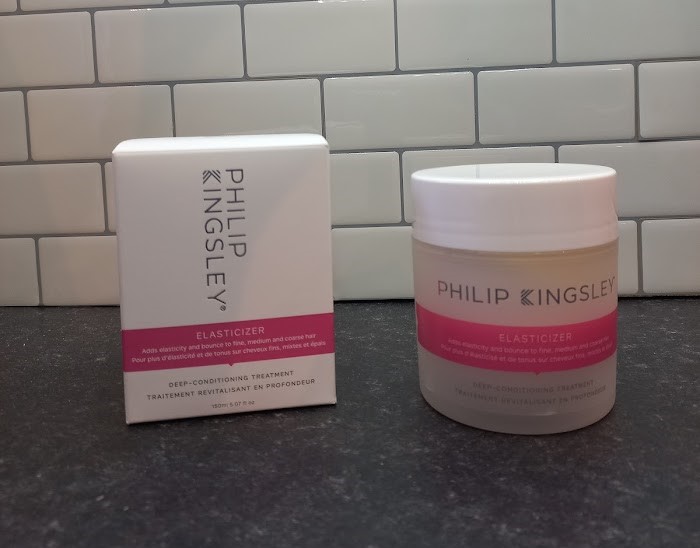
I’m the first to admit that that I’m not the best at taking care of my hair and it’s currently not only long overdue a cut but dry and frizzy too. I was therefore really pleased to receive a pot of Philip Kingsley Elasticizer and to see if this cult product could transform my unruly mop of hair.
Originally designed for Audrey Hepburn back in 1974, this classic hair product was created to deep condition her hair after being damaged by weeks of styling on set. Fast forward almost 50 years and it is still a best seller and loved by many, including Kate Winslet, Georgia May Jagger and Cate Blanchett.
Developed by leading trichologists it can be used in a couple of different ways – as an overnight conditioner to treat very dry, brittle or damaged hair and as an intensive anti-frizz treatment.
As it is a pre shampoo product it is really easy to use, simply wet your hair and then apply in sections to ensure all your hair is covered. You then cover your hair with a shower cap (don’t worry there’s one in the box) or a warm towel and leave it to work it’s magic for 10-20 minutes. The heat created helps open your hair’s cuticles enabling them to absorb the nutrients in the mask.
I tend to wash my hair in a morning and have found if I apply the Elasticizer just before bed I get the best results as it has all night to soak into my hair. Once applied I use a turban style towel that fastens with a button, rather than a shower cap, which also helps to protect my pillowcase overnight. In the morning all I need to do is rinse it off and then shampoo and condition my hair as normal.
I have noticed that once my hair is dry it feels much softer, smoother and the dreaded frizz has gone. My curls are now much bouncier and healthy looking and it has been so easy to fit it into my haircare routine so no more bad hair days for me!
Available in 4 sizes – 75ml, 150ml, 500ml and 1000ml starting from £19.50 from the Philip Kingsley website here
Disclaimer: We received this product free of charge for the purpose of this review but all thoughts and opinions are our own.
Galentine’s Day is a new concept and was started back in 2010 on the American comedy television series Parks and Recreation. Celebrated on 13th February it is a day to celebrate important female friendships and is the perfect excuse to get your girlfriends together for the evening.
If you are planning a get together at home this Galentine’s Day then the 5 Second Rule Uncensored Round 2 from Playmonster Games is bound to give you a good giggle. The game is a spin-off of the popular family game but in this version the cards contain some questions with an adult content and comes with a recommended age of 17+
Inside the box are:
150 doubled-sided question cards
Twisted timer – which makes a silly noise whenever it’s flipped.
Rules
The game is really easy to set up, you simply choose a question card from the box, turn the timer and you’re ready to play. You have 5 seconds to name 3 things on the card – which sounds easier than it actually is so you do have to think quickly. With questions like “Name 3 things you nibble”, “Name 3 things you can do with whipped cream” and “Point to 3 places sand gets stuck after a trip to the beach” it’s not a game for people who are easily embarrassed or prudish. There are some quite risqué questions in the box too so it’s probably best to play it with people you know very well and not your Mum!
To score a point you need to name 3 items and you then keep the card, making keeping track of the points nice and easy. If the player can’t name 3 items, play passes onto the next player however, they can’t use any of the answers that have already been used, making it quite tricky.
If no one can get three answers and all the players have had a turn, the original person is awarded the point by default. The player to the right of the starting player then picks a card and it starts again until the agreed upon number of rounds has finished.
We had a great night playing 5 Second Rule Uncensored, it is a great adult party game that quickly gets everyone laughing.
Disclaimer – We received this item free for the purpose of this review/feature but all words and opinions are our own.
The most perfect Valentine’s gift, a handbag which you can use again and again, is even more perfect when you realise its vegan leather!
Vendula London celebrate 20 years in business this year, and are planning some new collections to celebrate the achievement. The Flower Shop Pink Heart handbag is one of them and we road tested it this weekend to see how it fares.
The 15cm by 16cm bag comes with two straps, one shoulder strap and one jumbo pearl strap to make it a clutch. The heart-shaped bag is covered in fluted pink fabric with a single brass clasp fastener. Inside, there is one compartment and it’s lined with the iconic Vendula London lining. The details on the front of the bag are hand stitched pink and white hearts with pink rose details.
Although a great Valentines gift, this handbag could be used all year round especially to match a pink dress, or to dress up a plain black or white number. Going to a summer wedding? This would be ideal for a friend-of-the-bride, or even as a gift for a Matron of Honour! It’s also a great prom accessory, to go with a long gown and the talk of the town. I can really see this Vendula London handbag making an appearance at Ascot this year too!
The fine detail on the bag is really tactile, but well made. It really looks like leather but is actually completely vegan. As it comes with two different straps, it’s more versatile for going out but the straps can be taken off completely and used as a hand clutch. The bag is quite wide at 8cms but can’t fit too much in so you either need someone else to carry your phone for you or to have good pockets in your outfit! It would carry a cash card and keys easily though. It is great for packing though as it doesn’t crush easily with its metal frame and all the decorations are flat. You can fit each of the straps inside as well if you need to transport it in luggage.
The Vendula Flower Shop Valentines handbag makes a very cute gift and a lovely accessory to a night out or wedding. It looks and feels like a collection piece which you’ll keep for ever and ever and won’t go out of fashion.
Even better, Vendula were voted the Most Innovative UK Vegan Accessory Brand 2022 by Life Lux Magazine too!
Disclaimer: We received these products free of charge for the purpose of this review but all thoughts and opinions are our own.
It can feel quite daunting choosing a new shampoo, there are so many different ones available for every hair type, so whether your hair is short, long, curly, coloured, oily, dry or anything in between there is a product for you. Whilst we are spoilt for choice when it comes to the haircare market it can start to get expensive trying new products, and it’s quite frustrating spending hard earned money on new products only to find they don’t suit your hair. We’re all feeling the pinch at the minute, so The Review Studio have been trying out a selection of hair products and sharing our favourites with you.
FFØR stands for Free From, Original, Real and as you’ve probably guessed from the name are an ethical company who believe in Clean Beauty, both for you and the planet. Their products are vegan, cruelty free and free from nasties and they only work with likeminded, ethical suppliers who can provide verified information about their sourcing, and who share their important values. They are also winners of the Marie Claire 2022 Hair Awards and the Global Green Beauty Awards so with such impressive credentials I was keen to see how the products performed on my dry frizzy hair.
The Re:Nourish shampoo lathers up nicely into a rich foam and rinses out very easily. My hair felt very clean and well hydrated after use. The shampoo is perfect for dry and damaged hair and is infused with organic orange and cinnamon giving it a lovely fragrance which is subtle but very pleasant.
The Re:Nourish conditioner is rich and creamy and easy to apply to my hair, before rinsing I scrunched it into my hair which helps add moisture to my curls. It rinsed out easily leaving my hair tangle free.
I use a hair mask weekly so was pleased to find a Re:Plenish hair mask in the gift set. It is thicker than the conditioner and once applied I combed it through from root to tip to ensure that it was applied evenly. The instructions say to leave it on your hair for 3-5 minutes before rinsing so as my hair needs lots of moisture, I left it on for the full 5 minutes so that it could penetrate my hair properly. Afterwards my hair was soft, smooth, nourished, frizz free and smelt lovely too.
After using these products for 2 weeks I can see a huge improvement in my hair, it feels nourished and moisturised, and the frizz has gone, it also looks a lot shinier than it was before. My curls look great, even without extra styling products and they are defined and bouncy.
The Re:Nourish gift set costs £39 so why not give the gift of great hair this Galentine’s Day with FFØR.
Disclaimer: We received this product free of charge for the purpose of this review but all thoughts and opinions are our own
Love is in the air at The Review Studio this week and we are currently surrounded by a fantastic selection of Valentine’s products and looking forward to sharing our favourites over the next few days.
One present that always goes down is alcohol and this delicious Cranberry and Blood Orange Liqueur from Cranes will make a lovely gift for the special person in your life.
This striking red liqueur has been created by the founders of Cranes – twin brothers Ben & Dan along with one of the UK’s top mixologists. Made from Wisconsin cranberries and infused with blood orange juice and orange rind, this double award-winning liqueur is sweet with underlying, but not overpowering, sourness – imagine a ‘sour’ candy sweets but add a 17% alcoholic kick!
The bottle comes with minimal cardboard packaging and the distinctive square glass bottle is nice and chunky and is the type that look good on a drinks trolley.
The liqueur can be drunk neat, on the rocks or why not add some Prosecco to make a delicious Cranbellini cocktail.
Talking of cocktails there are a couple of ideas on the box to try
Cosmopolitan (Cranes Liqueur, Cranberry juice, Vodka and lime)
Lemon Berry (Cranes liqueur, Limoncello and Sicilian lemonade)
Shaddock’s G&T (Cranes liqueur, Gin, Tonic water and Pink Grapefruit Juice)
Cranes Spritz (Cranes liqueur, Soda water, Prosecco)
It a sweet, fruity liqueur but there is a hint of sharpness, and like any liqueur is best drunk slowly so you can savour every sip. It also goes well in cocktails and having tried all the ones above (well someone has to!!) we decided that the Cranes Spritz was our favourite, it’s a light and refreshing cocktail and the accompaniment toa Valentine’s Afternoon Tea.
It makes an ideal Valentine’s Day gift or why not buy a bottle and make some delicious cocktails to accompany a romantic night in.
Disclaimer – We received this item free for the purpose of this review/feature but all words and opinions are our own.
I’m a lover of afternoon tea. I also love Indian food, so when they mentioned Indian afternoon tea, there was no way I wasn’t going to try it!
Colonel Saab, located at the Holborn Old Town Hall at 193-197 High Holborn, London WC1 was only opened in October 2021 but is already winning awards. Just walking through the door, you can see all the accolades, including the Forbes top 40 Indian restaurants in London.
Inside, the 134 covers restaurant is situated over the ground floor and a cut-o mezzanine floor. As soon as you pass the bar, it’s the giant multitude of rose glass Indian chandeliers which leave you fascinated with the décor. Photos of owner Roop Partap Choudhary’s family, antique paintings and at the back, a photo each of his parents, Colonel Choudhary and his wife, Binny Choudhary. The restaurant is named after Colonel Choudhary and is a love letter to their relationship since their marriage more than 40 years ago.
We were there to review the Indian Afternoon Tea, a specialty of Colonel Saab which takes a bit of explaining as India isn’t known for their own Afternoon Teas. Firstly, Champagne was brought out to each of us before the tea arrived. You don’t have to have the typical English Breakfast Tea to accompany your meal, so I tried the Massala Chai tea whilst my guest had a latte coffee. Massala Chai is a special blended tea, with milk, which has spices such as cinnamon and a touch of sugar to give a full bodied, slightly sweet tea that challenges the usual English Breakfast. I ordered a second pot of Massala tea in the end as it was so delicious!
The beautiful afternoon tea cage was brought over to our table with the familiar three tiers, but with an Indian twist. The first tier of sandwiches were cucumber and yoghurt, and dhokla fingers. If you’re not familiar with dhokla, it is an Indian cake-like fermented batter that is savoury but flavoured through the middle. The middle layer had the familiar scones with cream and jam, but their added Indian twist here was a vegetable samosa!
The final layer at the top were the cakes! Carrot cake, Lemon Meringue, two different flavours of macaron and a chocolate truffle each. If, like us, you were particularly full by this time, you can always ask for the cakes to be boxed for you to take away. However, they are so delicious, it’s easier to just have another cup of tea and work your way through them!
With the delicious afternoon tea finished, I was given a tour of Colonel Saab to show where the idea came from and the facilities beyond just the restaurant floor. The bar, on the ground floor, is available at any time and doesn’t need booking. Around the corner are the family photos of Roop Partap Choudhary [the founder] and love letters between his parents. Behind the front door, there are the private dining rooms, which were beyond magnificent! One large room, or a divider makes them two smaller rooms, the area is dominated by a huge canopied fireplace. You can’t miss the enormous mobile bar though – which although made by Aspreys of London, belonged to Colonel Choudhary and travelled around with him whilst on campaign. It is stunning, and still looks as if it could serve drinks today.
Going upstairs, there’s more tables, all of which have different styles. At the far end of the mezzanine there is a quiet ‘nook’ area of a canopied table for four. A perfect hideaway and position to watch the restaurant downstairs!
I was also told to walk downstairs to the bathrooms as this is one of the most ‘Instagramable’ areas of the restaurant. Dark red walls festooned with family photos and even more of the beautiful rose glass chandeliers. The bathroom itself was also very beautiful with carefully designed soft furnishings and retro sinks.
Don’t forget the two portraits of Binny and Colonel Choudhary in the main restaurant, with so many decorative plates around them, and the 6th centuries old painting between them that is an Indian traditional and takes literally years to paint.
By the time we had finished, we had been there nearly two hours and didn’t want to leave. The atmosphere of the restaurant and the friendliness of the staff, all of whom said hello to us whilst we were there made this a hidden treasure. Just outside of Covent Garden but not quite in theatre land, it’s easier to get to than you think and as well as the fantastic food, it’s fascinating to visit.
Afternoon tea is £25 per person or £48 for two. Champagne afternoon tea starts at £41 per person.
Disclaimer – We received this item free for the purpose of this review/feature but all words and opinions are our own.
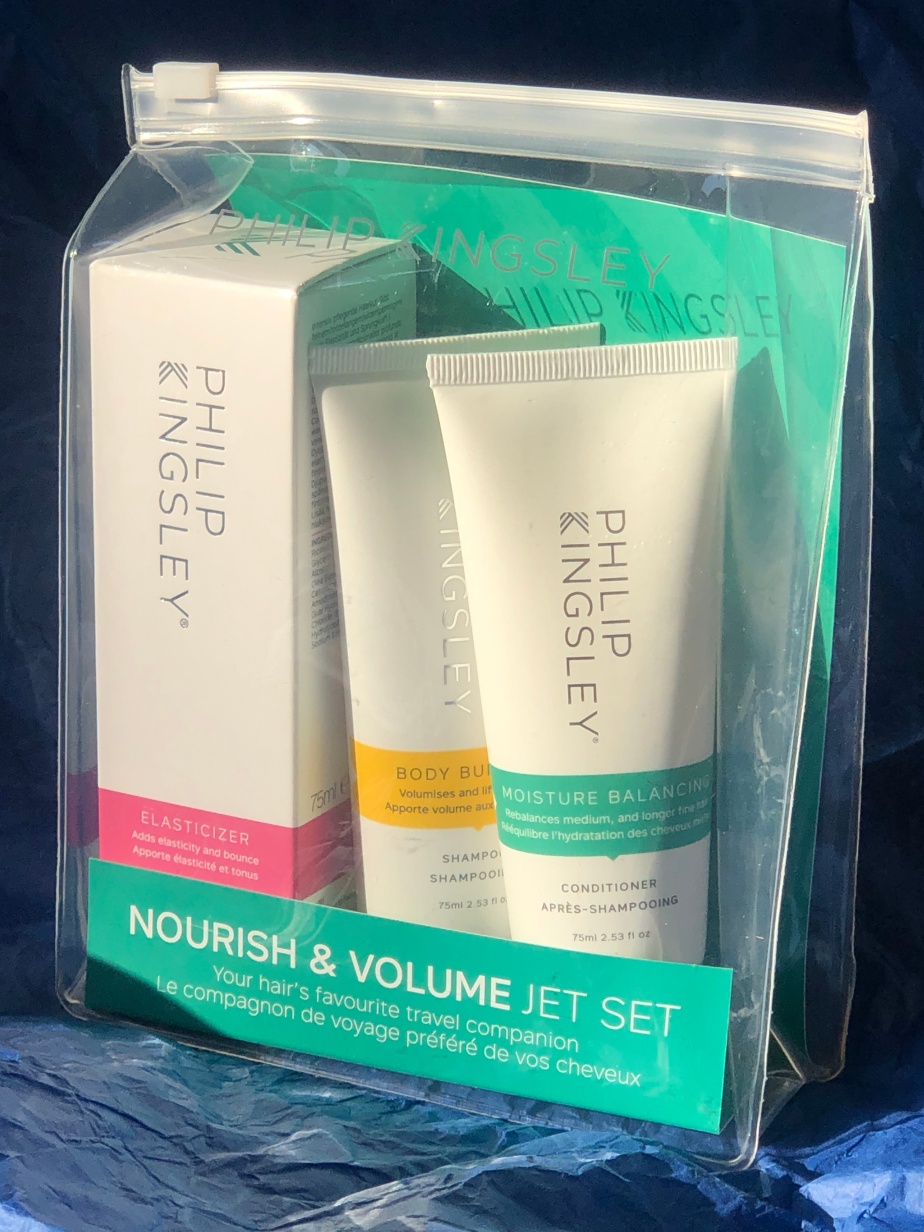
Philip Kingsley is synonymous with quality hair products as well as great gifts. We were sent the Nourish & Volume Jet Set pack – a set of Elasticizer, Body Building Shampoo and Moisture Balance Conditioner in travel sizes, all set for going on holiday this summer!
I have bought Philip Kingsley before and was impressed by with the high quality of their shampoos and conditioners so to have a travel set that I can take away with me, and not have to rely on whatever shampoo the hotel provides makes it a travel must have for me. Whilst we’re on the subject, why do hotels only provide shampoo and not conditioners when you stay? Do we not want luscious, glossy locks whilst we’re on holiday, or do they assume we will bring our own? Well with this shower-proof pack (the set comes in a zip bag) there isn’t a question.
The Philip Kingsley Elasticizer (75ml) is step 1 in your haircare routine. To apply, wet your hair before shampooing and work the Elasticizer into all sections. Cover with a shower cap for 10-20 minutes, the longer the better, then rinse off and use the other Philip Kingsley products. The pre-conditioner works on your hair before you take off the residue with the shampoo, leaving it softer, conditioned and as the name suggests, elasticised.
The Body Building Shampoo (75ml) works with the Elasticizer to cleanse the hair but also leave it voluminous and bouncy. It actually cleans really deeply too to leave your hair properly clean, and as I like my hair, squeaky clean! It has a lovely light fragrance too.
The Moisture Balance Conditioner is the last of the Philip Kingsley haircare steps and is great for when you’re on holiday because it nourishes and moisturises hair which might have been exposed to sea water, chlorine and the weather. Used in combination with the Elasticizer, it’s slightly more gentle, but leaves hair soft and bouncy and manageable too. It also has a lovely fragrance like the shampoo.
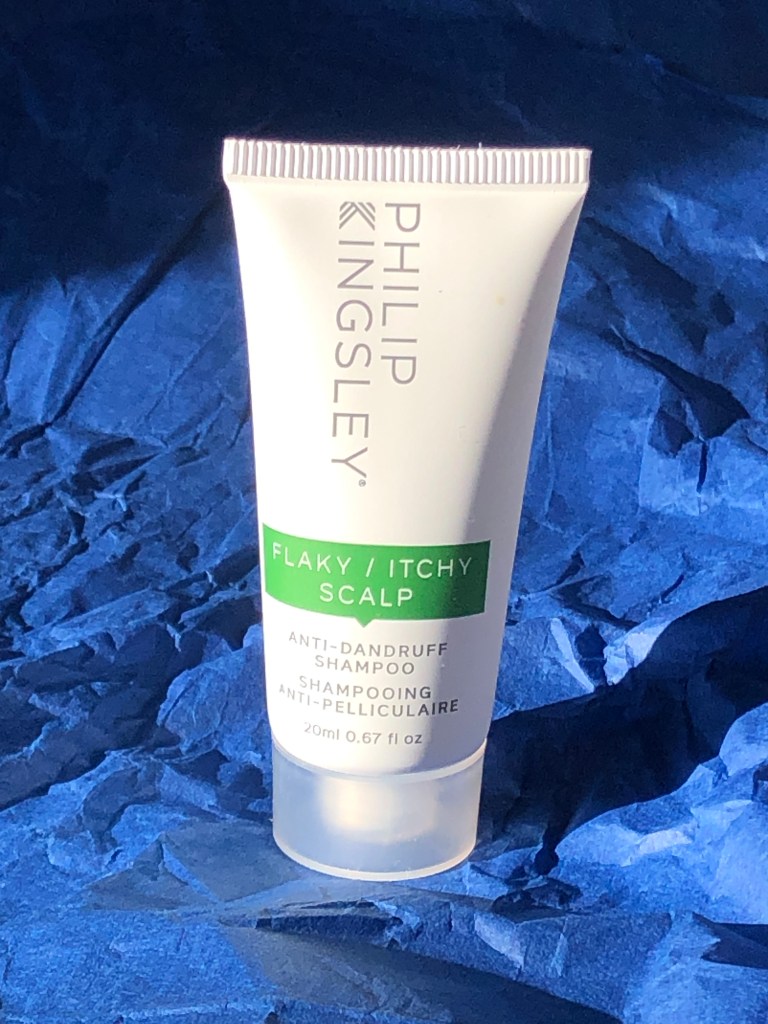
All Philip Kingsley products are available on their website and are 100% recyclable and cruelty free. All orders on their website are postage free and also come with a free sample – I had a 20ml shampoo sample with mine so I can take that on holiday too!
Philip Kingsley have a huge range of haircare products on their website and works with trichologists to develop the very best in haircare products.
Disclaimer: We received this product free of charge for the purpose of this review but all thoughts and opinions are our own
We live in a world where most people use electronic devices for entertainment and a good quality set of speakers can really enhance the experience. Edifier is a well-known audio brand that produce a wide range of speakers and are known for their high-quality audio and sleek designs. They recently sent me the MF200 portable speaker, and I was really impressed with both the build quality and sound.
At 490 grams it isn’t heavy, but it is well built and the solid aluminium construction gives a luxury feel to the speaker. It is a simple device and comes with a USB-C input / charging cable and a handy cloth bag for taking it out and about.
At one end of the speaker is a USB-C connection, used for both charging and as an input source and a 3.5mm socket for the AUX input. On the other end is the power switch which doubles as an input selector. There are three options for connecting to the speaker, Bluetooth 5.0, the 3.5mm AUX socket and the USB-C connection for smartphones and PCs. (Edifier does say that it is PC only, but I’ve had no problems connecting my Android phone).
On the front panel are three discreet touch / push controls to adjust the volume, skip tracks or pause playback.
Once connected the sound quality is excellent, producing a rich sound with no distortion, even at full volume and the soft rubber feet efficiently prevent vibrations moving through to the furniture. Internally there are two 4w 36mm full-range drivers and whilst they’re not going to shake the foundations, they’re great as a portable speaker.
This speaker is not just for connecting to your smartphone, it makes a great option for anybody who’s fed up with sub-par sounds from their laptop, just connect and play!
If using the speakers wirelessly, you should get up to 10 hours of use from the built-in 2200mAh high-capacity lithium battery.
I’m really pleased with this speaker, it has a quality feel that is matched by the clear sound of its speakers and its distinctive triangular design looks great wherever I take it.
Disclaimer – We received this item free for the purpose of this review/feature but all words and opinions are our own.
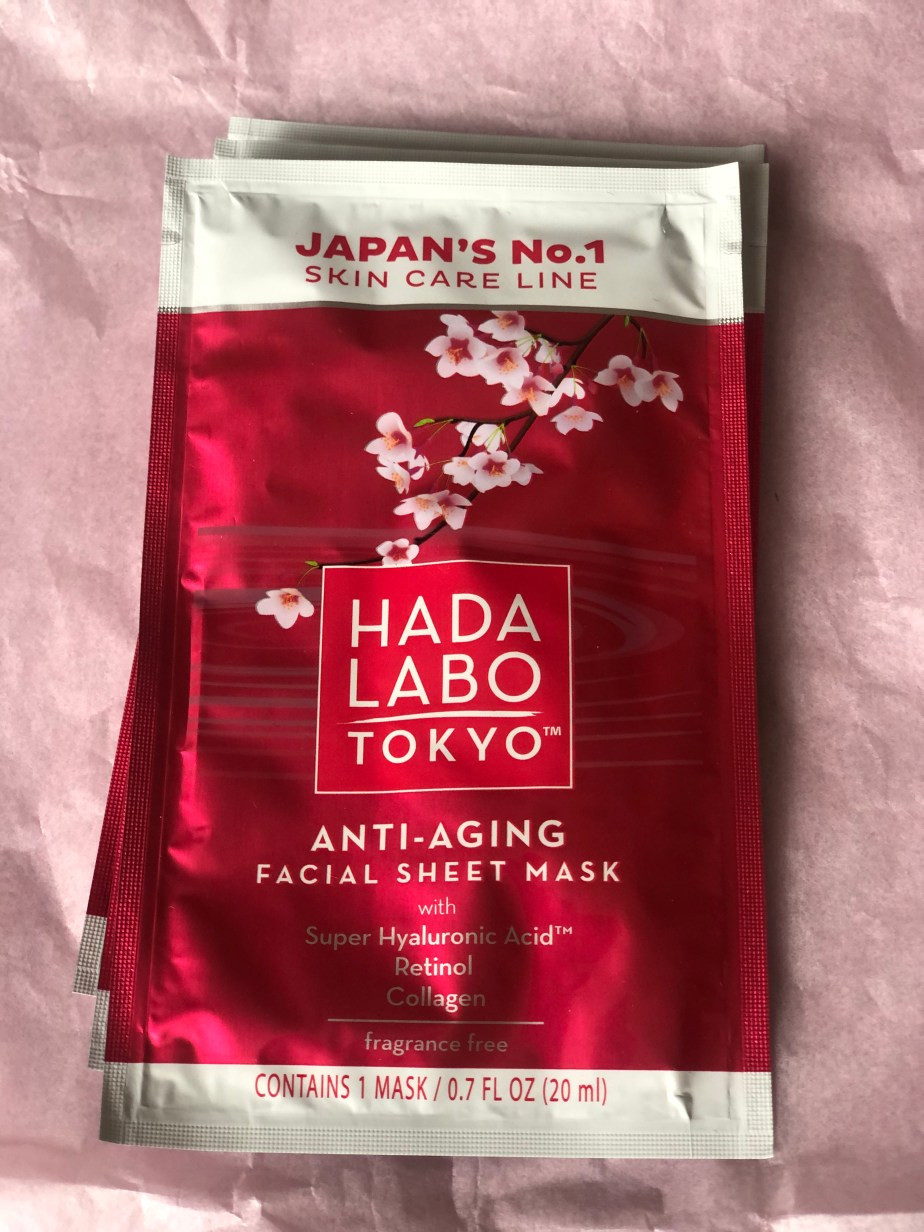
Hada Labo Tokyo is Japan’s favourite skincare brand, and it’s now available over here in the UK, selling at Superdrug. The team at Hada Labo sent me some lovely Anti Aging Sheet Masks to try out, and seeing as the weather has got so cold and the heating has been turned up, I am going to need some hydrating, and anti-aging!
Each mask costs £2.99 and although they can only be used once, you can use a mask three times a week. The mask itself is infused with hydrating serum, in fact it’s dripping in serum so you can adhere it to your face but also top up the mask whilst it’s on your face, or on the neck and décolletage. The Hada Labo Anti-Aging Facial Sheets are pre-cut with the holes for eyes, nose and shaped around the hairline. The sheet is left on for 15 minutes.
I left the mask on for the given time, but I did find that it was a bit big for me, and I had to wrap the edges a bit like hospital corners. The mask does stay on though, probably due to the amount of serum used. I could feel the cooling effect of the products seeping into my skin, and thankfully, the mask didn’t dry out, even with the heating on.
Taking off the mask, my skin was still covered in hydrating serum so I let it sink in a little and rubbed in the remaining amount in the packet. As it started to dry, I could feel that my skin was more hydrated and smoother, taking away the dryness from the central heating after I’d been indoors all day.
Disclaimer – We received this item free for the purpose of this review/feature but all words and opinions are our own.
New Year, New Routine!
With New Year comes change, and many of us are looking to improve our self care. Image Skincare offers a whole range of options for all skin types, from moisturisers and serums to SPF sunscreens and facial cleansers.
Starting with the MAX Facial Cleaner, this luxurious cleanser is mild enough to be used morning and evening to take away impurities on the skin as well as any make-up. Work a generous amount into the skin and rinse off with warm water followed by a cool splash to brighten up your skin tone.
The MAX Facial Cleaner combines plant stem cell technology and botanicals to create a sumptuous, rich cream which provokes your sense of smell with citrus and floral tones. The peptides promote youthful looking skin and target the visible signs of aging but cleverly, don’t include traditional sulfates.
Trying this before my beauty routine and the rest of the Image Skincare products, it’s the heavenly fragrance that hits you first. The cleanser is effective but doesn’t dry the skin out with use. I particularly liked the richness of the formula which didn’t feel abrasive on me at all, and didn’t foam up and get in my eyes. It felt like when you have a facial and the steam and products are lathered on by your beautician and then gently exfoliated away to leave clean, crisp skin ready for papering.
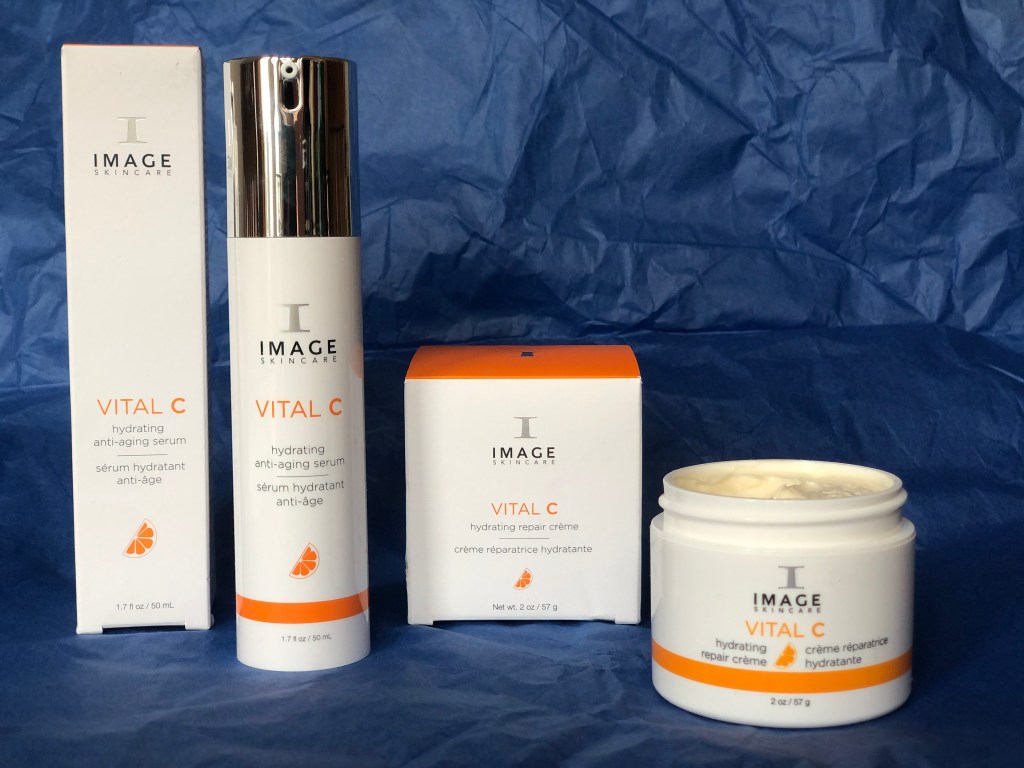
Before moisturiser, Image Skincare have the Vital C Hydrating Anti-Aging Serum. A handy 50ml pump of morning and evening pre-moisturising serum to go under make-up and skincare. The Vital C promotes elasticity and signs of aging, softens wrinkles and combats environmental damage before it even hits the lower dermal levels.
Vital C Hydrating Serum contains many different forms of Vitamin C (hence the name) to impart brightness and glow to the skin, whilst hyaluronic acid helps with moisture control and antioxidants defend against skin stresses. It can be applied day or night onto cleansed skin, and works best when an moisturiser is applied on top, but is equally good on its own.
I loved this serum. With a similar scent to the cleanser, it really moisturisers deeply in the skin and exudes a richness that gives away the quality of Image Skincare. It does sit on the skin momentarily before it is absorbed in but once it does, it’s dewy and soft and leaves your skin feeling fresh. The citrus fragrance also helps, and reminds you of the lovely Vitamin C it contains!
In the same range is the Vital C Hydrating Repair Créme. Another of the Image Skincare products to fight the signs of aging and fine lines, it also contains Vitamin C and hyaluronic acid to add bounce and vitality to the skin. Any skin which is lacking nutrients will enjoy the benefits of the added nutrients of this Hydrating Repair Créme and the Vitamin A which refreshes skin texture and tone.
Once you open the pot, you’ll see there’s a tiny applicator to use instead of dipping in a finger! The créme itself is just as rich as the other Image products, and also has the Vitamin C kick that gives it the same citrus smell. Applied on top of the Vital Hydrating Serum this combination created the salon-like texture of new facial and the freshness of a spring spa break, just without the blossom! Once the hydrating crème sinks in, you can feel the texture of your skin smooth and elasticity is added where once was lost. Yes, it really does feel that poetic.
Lastly, we were also sent the Image Skincare PREVENTION+ Daily Ultimate Protection Moisturiser. My one gripe with modern moisturisers is that so many of them still don’t contain SPF despite us knowing about the cost of sunlight to our skin. The PREVENTION+ Protection Moisturiser is a very handy 50 SPF, so much higher than most moisturisers in this country but also useful for travelling abroad when you might need to wear a higher Sun Factor Protection.
The uniqueness of the PREVENTION+ is that it can be used as a sunscreen when needed, or as a daily moisturiser. If you’re using it as a sunscreen, then it needs to be applied 15 minutes before you go out in the sun. It needs to be applied every 2 hours as well. As a daily moisturiser with the added sunscreen factor, less can be applied. The more product you use though, the higher the sunscreen protection and longer it lasts. It also works best if applied to cleanses skin.
The PREVENTION+ Protection Moisturiser is another excellent skincare product from Image Skincare, with a richness which makes it easy to wear but not greasy enough for you to notice it. It also has a lovely fragrance to it, although not as citrus as the other products featured but works beautifully as either a moisturiser or a sunscreen.
All of the Image Skincare products are available online, and I can’t recommend them highly enough, especially for upcoming Valentines gifts.
Disclaimer: We received this product free of charge for the purpose of this review. All thoughts and opinions are our own
We’re almost half way through Dry January and with so many new and exciting non-alcoholic drinks to try I’ve found I haven’t missed alcohol at all!
Ordinarily I do enjoy a nice G&T so was really pleased to receive a bottle of BOWSER LEAF from Conker Distillery. Launched in 2021 LEAF is a unique botanical blend offering all the complexities of a premium gin but without the alcohol. It can be served with ice and tonic for a refreshing drink or if you are feeling a little more adventurous you can create a mocktail?
Distilled in copper pot stills using New Forest Spring Water, five carefully selected botanicals – Patchouli, Mint, Basil, Tarragon and Thyme are distilled separately and blended carefully to create a well-balanced, complex spirit that has a beautiful mouthfeel and that vital fresh dryness that you expect from a premium gin. I tried it with an unflavoured light tonic to get the full flavour and I was really impressed.
A hint of spice, followed by fresh mint and thyme, this is a sophisticated drink that is refreshing, light and best of all doesn’t leave you with a hangover the following morning. It has the classic gin bitterness but with none of the alcohol or calories (BOWSER is calorie free) so it is much better for your waistline too!
BOWSER is perfect when you want something special that isn’t alcoholic. A party taste without the hangover – what’s not to like!
A 70cl bottle costs £20 and is available from Ocado
Disclaimer – We received this item free for the purpose of this review/feature but all words and opinions are our own.
Hada Labo is Japan’s Number 1 skin care line, which although being available from Superdrug in the UK, it isn’t very well known here. It is remarkably cheap though for such a good quality product as I discovered when I tested the Hada Labo Day Cream-In-Milk.
The product gets it’s name from the milky essence of the moisturiser, delivered in a pump to make it easier to carry and travel with. It contains 5 types of hyaluronic acid, which is not only the newest type of skincare ingredient but is very fashionable at the moment, found in a lot of the high-end skincare products available on the market. Hada Labo’s Day Cream-In-Milk works on different layers of the skin to provide moisture, filling and wrinkle-smoothing throughout the day.
Best used in the morning, it is best to pat the cream into the face and neck area rather than rubbing it in, which can damage the structure of the moisturiser and doesn’t particularly help repair the skin. You can then apply make-up on top of the Day Cream but Hada Labo suggests using their Premium Lotion Super Deep Hydrator and night cream. As it’s a rich moisturiser, it is particularly good for lifeless skin that might be dehydrated. Anyone living in the UK at the moment probably has dehydrated skin, thanks to the cold weather and the need for central heating this time of year!
Using the cream in the mornings after my shower, the fragrance-free Day Cream-In-Milk blends into your skin beautifully, although it is quite rich. I can see why it has the moniker ‘In-milk’ because it does have that slightly rich texture of milk but it does blend in easily. I could see that at first, it left my skin quite dewy then as it absorbed and dries, it leaves a base moisturiser which is great for applying make-up over the top. It certainly as a filling effect on the fine lines on my face too.
For the price, this is a remarkably good day cream, with all the ingredients you find in the top day creams available today and with a lovely texture to boot, too.
Disclaimer – We received this book free for the purpose of this review/feature but all thoughts and opinions are our own.
I recently celebrated by 50th birthday and unlike some of my friends who were dreading the big 5-0, I am actually embracing growing older. I’m not quite sure where 50 years have gone and I’m certainly not ready for slowing down anytime soon – if anything I’m doing more than I ever have and I try to think more about myself than I did, which is a lot easier now my children are older. I’m really enjoying this new phase of my life as I’ve much more confidence than I did in my 20’s and a bit more money (well I did until the cost of living crisis hit!)
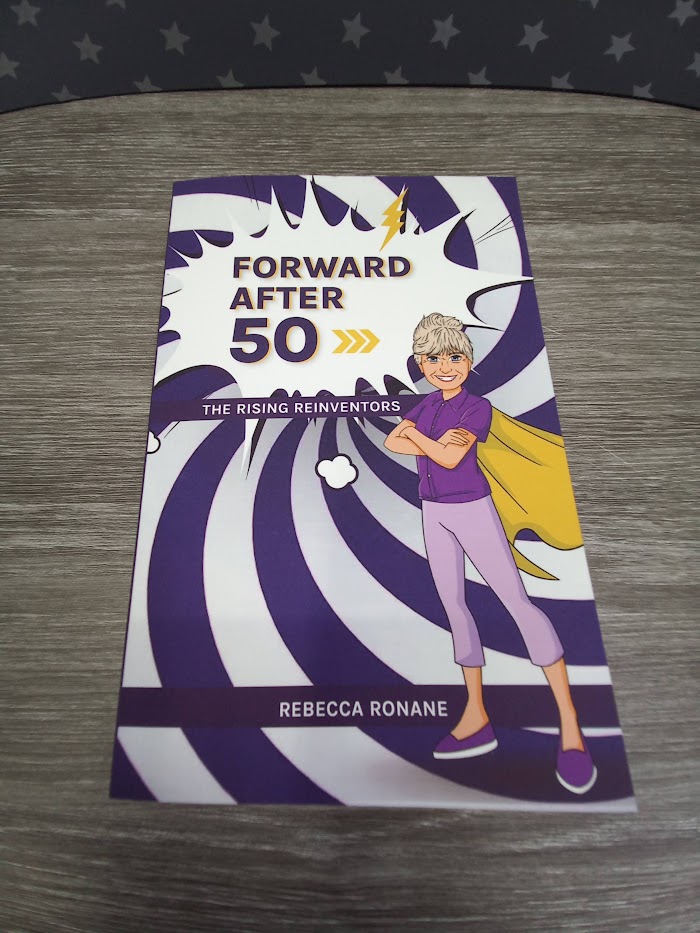
Whilst I already have a forward-thinking attitude, I still learnt a lot from Rebecca Ronane’s new book – Forward After 50. This inspiring book shows women than there is so much to look forward to and just because we are 50 it doesn’t mean we’re over the hill. Rebecca offers inspiring and practical advice to help make these changes happen.
The book is split into two parts – Part 1 explores ageist views and how your values and beliefs can shape your life and Part 2 explores how you can invent yourself by reviewing your work, time and independence.
Each part is split into chapters with plenty of humour to keep you going, along with inspirational quotes to help you on your journey. I especially liked the chapter in part 1 about Mindset – I have always been a people pleaser and the book gave me the confidence to start saying no which was difficult at first but the more I say no the easier it has become. Initially I felt guilty but now I find it quite liberating and wish I had read Rebecca’s book sooner as I have wasted so much time doing things I didn’t want to do for fear of upsetting someone.
Rebecca fills the reader’s mind with all the tools they need to reinvent themselves and helps them to realise that there is life after 50. In-short it’s a book I’ll be referring back to regularly to reinforce and remind me that its ok to say no, and it’s ok to be selfish and to chase those dreams whilst I can.
Disclaimer: We received this product free of charge for the purpose of this review however all thoughts and opinions are our own
Arran Sense of Scotland is based on the beautiful Isle of Arran, if you haven’t visited Arran, I recommend that you do – the island is beautiful and the breath-taking views from the summit of Goatfell are definitely worth the climb! Their skin care products and home fragrances are inspired by the unspoiled way of life on Arran and the intoxicating fragrances aim to help reconnect you with nature.
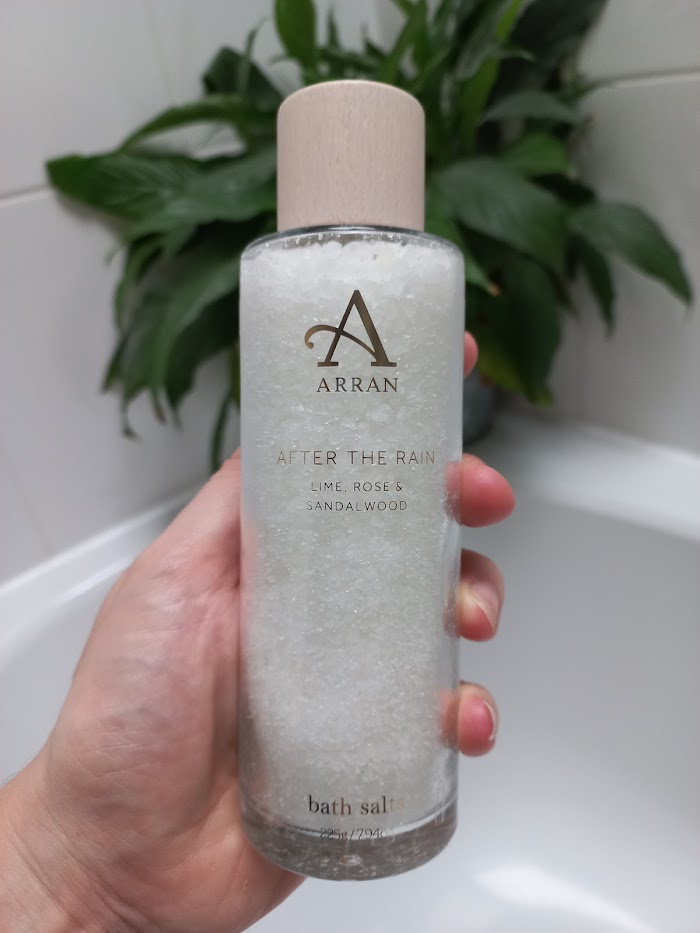
The latest addition to their iconic After the Rain collection is the After The Rain Bath Salts. A carefully crafted blend of natural sea salt and Epsom salts, they are fragranced with Lime, Rose and Sandalwood and are formulated to revitalise skin, relax the mind and aid restful sleep. As a perimenopausal woman I struggle a lot with sleep, often waking several times a night, so I was very interested to see if the salts could help.
I added a good handful of the salts to a hot running bath and the salts quickly dissolved, filling the whole bathroom with comforting scents of Lime, Rose and Sandalwood. The salts created a heavenly experience to unwind in, especially when teamed with candlelight and I was soon laying in a relaxed state feeling the warm water over my body. All my worries seemed to melt away and when I finally dragged myself out of the bath I was asleep as soon as my head hit the pillow. I even slept all night, waking up feeling energised and rested which was amazing.
If getting a good night’s sleep is top of your list of priorities, this product is definitely worth trying. Using the salts and following a simple sleep routine has worked wonders for me and has enabled me to enjoy a peaceful night’s sleep and soothed my aching body and tired mind.
With Valentine’s Day fast approaching why not treat your loved one to a bottle of these amazing bath salts?
Disclaimer – We received this item free for the purpose of this review/feature but all words and opinions are our own.
Valentine’s Day is only a month away and you may (or may not!) have started thinking of gift ideas. Whilst the traditional gifts of chocolates, flowers or fragrance are always well received I always think a personalised gift means a lot more as the recipient will appreciate the thought that has gone into creating it.
Vistaprint have a huge range of products on their website that would make superb Valentine’s gifts including photo books, canvas prints, mugs, cushions and my favourite – a fleece blanket to snuggle up with rather than turning the heating on!
The website is really easy to navigate with all the personalised gifts on one webpage. Each gift has clear images and the prices are clearly shown. Once you have selected your gift it is really easy to create your masterpiece. Simply choose the photos you love and Vistaprint will turn them into personalised artwork and gifts that you and your family can enjoy for years to come.
I created a photobook which was really easy to do – there is a choice of 8 different sizes and once you have decided you are ready to start creating your photobook. I found it very easy to add photos and once I had selected them I just clicked the upload button and the photos were quickly uploaded. I was amazed how fast this process was, the last time I created a photobook I remember this stage taking ages so this was a definite improvement. Once the photos are uploaded you can use Vistaprint’s “Smart Selection” which removes any duplicates, blurry or out of focus pictures so you only have the best pictures in your album.
Once you are happy with your design it is then straightforward to finalise the order, just choose either standard or premium glossy paper and you are ready to go. Vistaprint have a range of delivery options including free economy delivery on orders over £40.
Ordering was very easy, once the order had been placed I received a confirmation email with estimated delivery dates and a second email once my products had been despatched. I actually received my gifts before the estimated delivery date which was quite impressive.
Now that it has arrived I am thrilled with my photobook, it looks very professional and I know my husband will love it. I will certainly use Vistaprint again as after seeing the quality of the photo book I am really interested in trying some of the other photo products that they do. With such a wide choice I just need to decide which ones!
Photobooks start at £7.49 and there is currently 40% off so get those Valentine’s gifts ordered soon!
Disclaimer: We received this product free of charge for the purpose of this review but all thoughts and opinions are our own
Like many others I started cutting my husband and son’s hair during lockdown, my first attempts weren’t great and it’s a good job they weren’t leaving the house but after watching a few YouTube videos and with three heads to practise on I quickly improved. With the cost of living crisis my barbering skills are being called on again so I was really pleased to receive the Wahl Peaky Blinders Clippers & Beard Trimmer Gift Set.
Wahl are known for their hair clippers and this is a great set containing everything you need to keep control of your hair and beard. Male grooming is big business now and with beards very much back in fashion along with shorter hair styles, cutting your hair at home makes more sense than ever before.
The mains voltage clipper is very solidly built and not being limited by battery power will run as long as you need it to and as is always ready to use. The clipper has a long power lead and includes a thumb operated fade blade to get that modern crisp look. There is a choice of 12 attachment combs offering cutting lengths between 0.8mm and 25mm with left and right tapers so whether you want a close cut or something a little longer you can achieve it with this set.
The clippers are extremely comfortable to hold and give a nice clean cut without pulling or tugging the hair. They move through hair nicely and don’t get clogged up and are very easy to use either by yourself or on someone else’s hair.
They can be used for cutting hair, trimming sideburns and beards and for trimming around the ears and neckline.
The battery powered trimmer is handy for smaller areas, my son found it particularly useful when trimming his beard and around his ears where the main clipper was a little cumbersome.
The set even includes a cape in the set to protect clothes whilst your hair is being cut. When not in use you can store everything away neatly in the stylish grey bag.
Also in the set are the following items to give you the full barbers shop experience at home
Scissors
Barber Comb
Fade Brush
Barber Cape
Blade Oil and Cleaning Brush
Storage Bag
Style Guide
This is a great set for anyone looking to purchase clippers for the first time or as a replacement set. It has everything you need to maintain the sleekest look in town – just like the Peaky Blinders!
RRP £100 but currently on offer for £50 on the Wahl website
Disclaimer: We received this product free of charge for the purpose of this review but all thoughts and opinions are our own
It’s the weekend and even though we’re taking part in Dry January it doesn’t mean we can’t enjoy a cocktail or two – there are plenty of delicious non-alcoholic cocktails available now and Mavrik have certainly come up trumps with their exciting non- alcoholic cocktail range.
The Mavrik taster pack contains four 250ml cans and with less than 50 calories per can they are perfect for those watching the calories as well as those who prefer a non-alcoholic drink. Choose from
Aromatic G&T: A delicious version of the quintessential English favourite with a refined low calorie pink G&T.
Cuban Mojito: Zinging with mint and rum flavours, this indulgent alcohol-free Mojito is the very refreshing and will be lovely to drink with friends this Dry January.
Venetian Spritz: A refreshing, sparking orange drink, sweet with a hint of bitterness and is delicious with plenty of ice and a few slices of orange.
Storm & Spice: a fiery, tongue tickling, low calorie version of the classic spicy Bermudan rum cocktail.
My favourite of the four was the Cuban Mojito which was just as a Mojito should be, nice and refreshing with the taste of fresh lime and mint and with no sugar I can drink it all night guilt free.
I must say I was very pleasantly surprised with the non-alcoholic drinks, made with natural ingredients and carbonated New Forest spring water they are very refreshing and enable you to get into the party spirit without the hangover! They are vegan friendly, gluten free and contain less than 5 grams of sugar per 100 grams so what’s not to love?
Mavrik drinks are available from their website and the tasting pack costs £9.75
Disclaimer – We received this item free for the purpose of this review/feature but all words and opinions are our own.
The Linking, Thinking Picture Game!
Link Logo, the board game from Tomy, can best be described as a mixture of the TV quizzes Only Connect and Catchphrase. Borne from the game LOGO, Link Logo uses pictures to create a game with trivia questions which can be played by the whole family. Based at ages 12+, it can be played in two teams or with just two players.
The teams sit opposite each other with the flip chart in the middle. Each team can see the other team’s questions (they are different questions for each side) and for the group of logos, or pictures, you have to guess the link. Underneath, there are the answers to the other team’s pictures, followed by questions to ask about their selection, and of course, the answers! Each team uses the pegs to score.
To give you an idea about the type of questions, (but to not give away the game!) you can see on the front that there are 6 pictures; a penguin, lion, planet, the solar system, a bus and an outdoor picnic. The question asks you to find the link and to name each product. If you’re stuck already, then the answer is that they are all chocolate bars! The other team then asks questions about the pictures, such as, “Which one of these relates to a Batman villain?” Once you have worked out the link, or had to be told, you can usually get the answer to the trivia questions pretty easily. Some of the answers are real ‘kick me’ ones, where you instantly realise you should have known the answer as soon as you find it out!
There are a total of 60 booklet sheets in the game, so it doesn’t take more than a couple of hours to play depending on how much time you chat in between the rounds. It’s the type of game that when you’ve played it once, you will probably remember the answers for a while so you can’t keep playing it over and over with the same people. Likewise, if one person has played it, then they’ll be at an advantage everyone else. Maybe if that’s you, you can work out how to compare the game and keep score instead of take part.
It’s easy enough to understand and follow along as it’s just about reading the text on the booklet binder and then keeping score using the score pegs. Most of the questions could be answered by teenagers but we did find that there were a few which were more based on older generations, or were a bit advanced such as some which related to American logos and items.
It’s a lovely gentle game for the family to play together, and. The photos make it easy to follow. It often creates great conversation between the teams, and each other too.
Disclaimer – We received this item free for the purpose of this review/feature but all words and opinions are our own.
Aches and pains are an everyday part of life, but don’t have to last long when you have a masseuse at the touch of a button. The Wahl Cordless Mini Massage Gun has been on my list of items to try, so when the team offered to send me one to review, I was eager to see if it stood up to my expectations!
The gun itself is only about 15cm long (hence it’s a mini massager) and approximately 10cm high. Charged with a type C USB cable, there are no batteries involved and the cable is a standard computer lead which comes with the kit but can also be found with other appliances. It can be charged from a USB port on a computer, or on a wall charger.
The gun and attachments come in a handy zip-up case which fits neatly into a gym bag or a drawer at home and contains all 4 attachments as well as the USB lead. Starting with the gun, it only has one on/off button to operate, which is triggered by holding down the button for just a second. The digital display on the front tells you the intensity of the movement (1 being lowest, 6 the highest) and the amount of battery left. I found that it took up to 4 hours to charge the battery in full but it can take longer. The instructions suggest you charge the gun every 3 months if it hasn’t been used.
The gun is already fitted with the Flat Head attachment, whilst the Round Head, Bullet Head and Spinal Head are contained in the case. Each attachment pops in and out, there’s no threading to worry about but they are fitted quite snugly so you have to use some effort to change them sometimes.
The instructions don’t give an indication of which attachment to use on any particular part of the body, just techniques for the shoulders, neck, back etc. I found that it was best to start the massage gun on the lowest level and use the round attachment first on the hands, thighs and upper arms until you get used to the sensation. It’s quite powerful, even at a low level which is exactly what you’re looking for in a massage gun but does take a while to get used to! I found that the Round Head was good for working the back of my neck. The gun isn’t very heavy so you can hold it in one place for a long period of time. The attachment is really quite effective though, with the headache I had at the time easing. If you had a person massaging with the same intensity for any length of time, there wouldn’t be as much power, and they would probably get tired very quickly. The fact that you can change the intensity of the motion too means that you can tailor the massage to your needs.
The other attachments were great for other areas too. The Bullet Head works well on certain reflexology points on the feet, giving a precise massage to pressure points. The Flat Head also helps with digestion when you massage the abdomen in circular motions. It’s very difficult to try the Spinal Head on yourself, but the wishbone shape works on the muscles either side of the spine (never use directly on the spine) to relax the back muscles. With some ingenuity, you can find the right attachment and the right intensity for any part of the body which needs restoring, which is part of the fun of a massage gun!
The Wahl Mini Massage Gun runs for approximately 20 minutes on a timer or 200 minutes in all on a single charge. If you need more help, or indeed inspiration, Wahl have a tutorial on their website to give you more ideas.
Disclaimer – We received this item free for the purpose of this review/feature but all words and opinions are our own.
Families are always looking for more wholesome ways to connect and have fun, so Tomy’s board game Triggle is a gem for the winter months. Based on 2-4 players (but you could play in teams) it is aimed at 8 years and upwards and has a remarkably simple objective; to create triangles.
The starting board consists of pegs arranged in a geometric pattern. Each player chooses one of the colours of pegs (there are 21 pegs for each player) and the elastic bands are divided out between everyone playing. Taking it in turns, each player add one rubber band to the board, suspending it between any two posts in any direction. The only ‘rules’ are that the line created by the band must be straight, and it must stretch across 4 post only and touching at least one other rubber band.
Once a player creates a triangle with their rubber band, they can claim it as their own by placing their coloured peg inside it. A triangle consists of only one single space.
The game ends whenever there are no spaces left on the board to claim, or one of the players uses up all their pegs. An alternative to the full game is for each player to have a set amount of rubber bands (for instance, 10 or 20) and the players play until there are no more bands left. Whoever has the most pegs placed on the board is the winner.
This is a remarkably easy game to follow and learn the rules for, and can keep the whole family entertained. We found that playing with just two, and especially two adults or older children was exceptionally easy and allowed for conversation throughout. There was no need to remember where you were in the game, so it was easy to talk, or walk away and come back after dinner if you needed to. It also doesn’t last for hours and hours where you feel compelled to complete the game. It also didn’t require point scoring or writing anything down as you can just count up the number of pegs visible, and there’s no need for remembering characters or complicated rules!
If you are in a group who don’t speak English or have limited vocabulary, this is a great mind teaser puzzle, and if you lose the rubber bands, they can easily be replaced. Instead of using the pegs, you can use any other type of counter from another game, so there’s longevity too. I found that after a while, some of the younger children (under 12 years old or so) were able to make up new games of their own, or liked making patterns in the board after the game had finished, so there was endless entertainment to be had over the school holidays.
Triggle isn’t really a game you grow out of and can be picked up by anyone. It’s definitely a “thumbs up” from us as a family game.
Disclaimer – We received this item free for the purpose of this review/feature but all words and opinions are our own.
Back to work this week after the Christmas break and many of us are having to haul laptops into hotdesking offices. The STM Goods Myth Laptop Bag has a clever design and material features which make it stand head and shoulders above other backpacks and lends itself ideally to laptop carrying.
For starters, the handles are designed with a cooling mesh which sits comfortable on your shoulders and allows air to pass through, saving your skin from heating up when there’s a heavy load inside the bag. On the back, there’s also the Pass-port Passthrough, a new design which allows you to slip the backpack onto the handles of a suitcase or hand luggage trolley so that you can transport both with one hand. It saves having the backpack handle clasped onto the suitcase and falling off due to not being balanced.
Inside, there’s completely new technology to support your laptop. Instead of just a pocket, there’s a whole compartment which has cushion technology to save your laptop (or tablet) from impact when setting it down on the floor or from being bashed about on transport. You’ll also find tons of other pockets and compartments inside, specially designed for your AirPods, or for wired headphones to be clipped inside and kept safe. The ample pockets are big enough for phones, tablets, notebooks and even pens and are all hidden away inside to make it more difficult for anyone to pickpocket you, as well as being cushioned from impact.
On the front of the backpack, there are more pockets too. If you’re travelling, the front pocket is ample size for passports and travel documents plus a smaller pocket at the top for loose change. Although the STM Myth Laptop Bag is for transporting laptops to and from work, this backpack actually works really well for travelling by plane because of its size (it’s suitable as hand luggage) and the ‘bump’ technology keeps gadgets safe when on transport. However, it also has the durability needed when travelling a lot. Having been completely redesigned, the team at STM have thought about everything. As we don’t use money as much now and rely on our phones to store our credit card details, it means we can carry around less precious items but need to keep phones and laptops safe. The zips on the STM Myth are big enough to accommodate a lock if you need to, and there’s room inside to hide a Tile or Apple AirTag.
The more I look at the bag, the more I find uses for it! I took this away on holiday where I only had a limited amount of hand luggage and found that I could fit most travel items in it easily, and more importantly, they were safe and protected and didn’t get crushed in transit. Even my headphones were safe from being squashed!
The little details in the STM Myth Laptop Bag make it excellent for travelling, working or even as a gift. The zips are protected with a cover to prevent rain and dirt entering, there’s an integrated CableReady system which allows you to charge your laptop or tablet whilst it’s still in the bag and a durable top handle so that you can carry it in one hand, or pick it up easily from the floor or overhead locker. It weighs less than 1kg when empty too, so with most hand luggage being a maximum of 7kg, you still have plenty of room for the laptop, phone and even a snack!
But finally, what does STM stand for? Smarter Than Most… the Australian company who think of everything!
Disclaimer: We received this product free of charge for the purpose of this review but all thoughts and opinions are our own
My New Year’s Resolution is to cook more from scratch, rather than relying on ready made sauces. I love curries but have never really tried making my own, so I was really pleased to be able to try a subscription box from Spice Kitchen Each box contains a selection of spices along with a handy recipe guide with plenty of tasty recipes to get you started. Using the spices with the suggested ingredients means you know exactly what is going into your dish and that all the ingredients are healthy and suitable for the whole family.
The subscription boxes are available as a 3 month or 6 month subscription which are posted monthly or quarterly – you choose the timings. The spices are different in each box
3 month subscription – India, Around the World, Middle Eastern & African Spice Collecion
6 month subscription – The same as the 3 month followed by Chilli, Moroccan and Flavoured Sea Salts
The spices are packaged in resealable plastic bags which are clearly labelled so that you know which spice is which. Each box contains enough spices to make over 100 meals so you can try plenty of different recipes with each box. Once you have tried the ones in the recipe guide have a look at the Spice Kitchen website where you will find plenty more.
I flicked through the recipe book and was spoilt for choice, all the dishes sounded lovely however after a lot of deliberation we settled on Chicken Biryani, one of our favourite takeaway meals. We had all the ingredients so were able to try it out straight away. The instructions are really simple and easy to follow and I was really impressed just how easy it was to create a delicious curry.
We served the Chicken Biryani with Naan bread and rice and the whole family loved it, it was flavoursome and had just the right kick to it.
Next we tried the Punjabi Chickpeas, again we had all the ingredients in and my son made this for us. He said it was really easy to make and there were 4 clean plates at the end of the meal, so this speaks for itself!
Now I know how easy it is to make curries from scratch I know this is one New Year’s Resolution that I won’t be breaking! The subscription boxes are a way to bring authentic Indian cooking into the home and would make a great gift for any keen cook or foodie this year.
Disclaimer – We received this item free for the purpose of this review/feature but all words and opinions are our own.
If you’ve received a new smartphone for Christmas, or take a lot of photos on your camera you’ll know that the smudge factor is real when it comes to the camera lens. I hate it when I take what I think is the perfect photo, only to find that when I view it, there is that misty blur on all the photos because the lens isn’t clean. It’s the price we pay for handling our phones all day, but there are ways of reducing the smudges.
LensPen Smarty Cleaner for Smartphones is a tiny yet useful gadget for cleaning your camera lens on smartphones. Suitable for all makes of camera phone, the pen is only 4cms long and can fit in your pocket, or in the bottom of your handbag without even noticing it’s there! The cap screws loose to reveal the head of the pen which is a carbon cleaner. There’s no detergent or alcohol involved, just a pad which is small enough to fit through any camera phone casing and erases away all the grime.
I tried this on my iPhone, especially as I frequently get blurry smudges and I can’t clean them away easily with just a tissue or corner of my shirt. The LensPen is small enough to fit, comfortable to use and with minimal effort, it dissolved away the greasy fingerprint on my camera lens. To prove it works, I used it on the front of my camera phone on the touchscreen. The pen does indeed eradicate fingerprints anywhere!























 The Review Studio